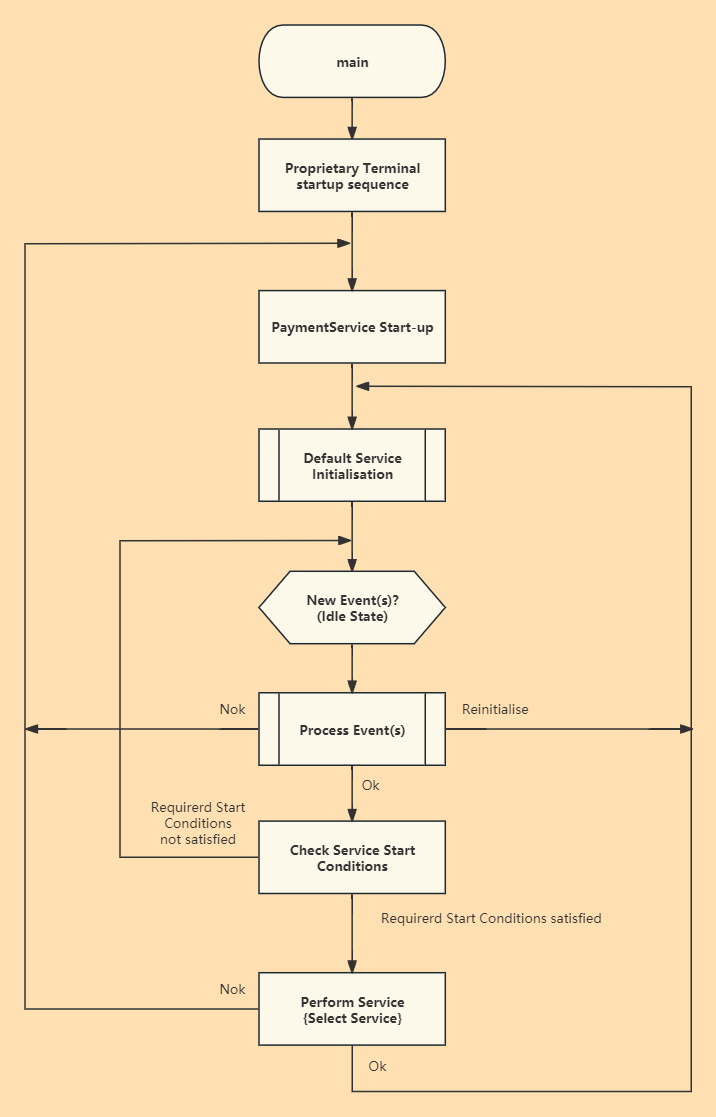
Below is the overview of application developed based on PaymentService.
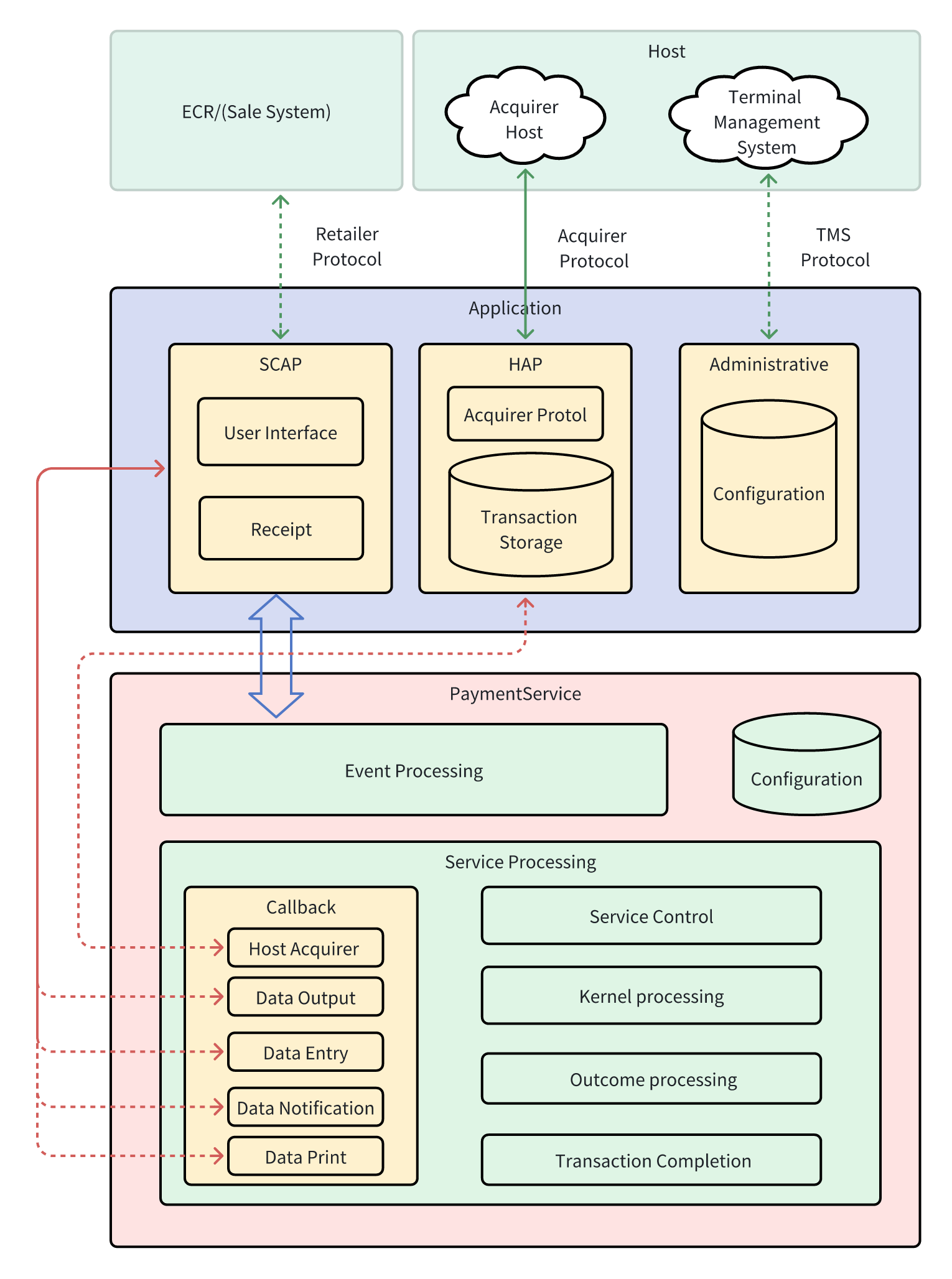
When we use PaymentService to create an application, there are some modules that the application needs to be responsible for completing, including
SCAP (Sale system, Cardholder and Attendant Protocol): This module is responsible for handling the interface to the cardholder and/or attendant and/or the sale system. During a transaction, PaymentService needs to communicate with the cardholder and/or attendant and/or with the sale system, e.g. in order to request or to provide information on status or data of PaymentService or to request the printing of receipts.
We assume that SCAP provides the following functionality:
HAP (Host Acquirer Protocol): HAP is responsible for handling the acquirer protocol and the storing of transaction data. We assume that HAP provides the following functionality:
| AAC | Application Authentication Cryptogram |
|---|---|
| AC | Application Cryptogram |
| ADF | Application Definition File |
| AFL | Application File Locator |
| AID | Application Identifier |
| AIP | Application Interchange Profile |
| APS | Application Profile Settings |
| APSC | Application Profile Settings for Cancellation |
| ARC | Authorisation Response Code |
| ARPC | Authorisation Response Cryptogram |
| ARQC | Authorisation Request Cryptogram |
| ASRPD | Application Selection Registered Proprietary Data |
| ATC | Application Transaction Counter |
| ATOL | Additional Tag Object List |
| AUC | Application Usage Control |
| BIC | Bank Identifier Code |
| BID | BIN based Card Product Identifier |
| BIN | Bank Identification Number |
| CA | Certification Authority |
| CCD | Common Core Definitions |
| CDA | Combined DDA/Application Cryptogram Generation |
| CDCVM | Consumer Device Cardholder Verification Method |
| CDOL1 | Card Risk Management Data Object List 1 |
| CDOL2 | Card Risk Management Data Object List 2 |
| Ch Msg | Cardholder Message |
| CID | Cryptogram Information Data |
| CISR | Configuration for Issuer SCA Request Processing |
| CSG | Cards Stakeholders Group |
| CSU | Card Status Update |
| CVD | Card Verification Digits |
| CVM | Cardholder Verification Method |
| CV Rule | Cardholder Verification Rule |
| DCC | Dynamic Currency Conversion |
| DDA | Conversion DDA |
| DDF | Directory Definition File |
| DDOL | Dynamic Data Authentication Data Object List |
| DOL | Data Object List |
| EEA | European Economic Area |
| EPC | European Payments Council |
| FCI | File Control Information |
| fDDA | Fast Dynamic Data Authentication |
| GPO | GET PROCESSING OPTIONS |
| HAP | Host Acquirer Protocol application |
| HAPI | Interface to the Host Acquirer Protocol application |
| IAC | Issuer Action Code |
| IAD | Issuer Application Data |
| IATD | Issuer Authentication Data |
| IBAN | International Bank Account Number |
| IFR | Interchange Fee Regulation ([IFR]) |
| IIN | Issuer Identification Number |
| IINCV | Issuer Identification Number Comparison Value |
| IINE | Issuer Identification Number Extended |
| IPAR | Instalment Parameter |
| LDD | ICC Dynamic Data Length |
| LDN | ICC Dynamic Number Length |
| LATC | Last Online ATC Register |
| LCOL | Lower Consecutive Offline Limit |
| LRC | Longitudinal Redundancy Check |
| MOTO | Mail Order Telephone Order |
| Msg | Print Message Number |
| MTOL | Mandatory Tag Object List |
| NCA | Length of the Certification Authority (CA) Public Key Modulus |
| NI | Length of the Issuer Public Key Modulus |
| NIC | Length of the ICC Public Key Modulus |
| NPE | Length of the ICC PIN Encipherment Public Key Modulus |
| ODA | Offline Data Authentication |
| PCA | Certification Authority Public Key |
| PI | Issuer Public Key |
| PIC | ICC Public Key |
| PPE | ICC PIN Encipherment Public Key |
| PAD | Proprietary Authentication Data |
| PAN | Application Primary Account Number |
| PAR | Payment Account Reference |
| PDOL | Processing Options Data Object List |
| PED | PIN Entry Device |
| PPSE | Proximity Payment System Directory |
| PSD | Payment System Directory |
| PSE | Payment System Environment |
| PTC | PIN Try Counter |
| RID | Registered Application Provider Identifier |
| ROP | Re-Authorise with Online PIN |
| SCA | Strong Customer Authentication |
| SCAP | Sale System, Cardholder and Attendant Protocol application |
| SCAPI | Interface to the Sale System, Cardholder and Attendant Protocol application |
| SCS | SEPA Cards Standardisation |
| SDA | Static Data Authentication |
| SDAD | Signed Dynamic Application Data |
| SDOL | Selection Data Object List |
| SFI | Short File Identifier |
| SIRCC | Switch Interface or Restart Contactless with CVM Required |
| SLC | Search Log Criteria |
| SPI | Send POI Information |
| SSAD | Signed Static Application Data |
| SW1 SW2 | Status Words 1 and 2 |
| TAA | Terminal Action Analysis |
| TAC | Terminal Action Code |
| TC | Transaction Certificate |
| TDOL | Transaction Certificate Data Object List |
| TLV | Tag Length Value |
| TS | Terminal Settings |
| TRM | Terminal Risk Management |
| TSI | Transaction Status Information |
| TTQ | Terminal Transaction Qualifier |
| TVR | Terminal Verification Results |
| UCOL | Upper Consecutive Offline Limit |
| UI | User Interface |
Import PaymentService package.

Make the project compile with aar files in the `libs` folder by adding the following codes to the 'build.gradle':
implementation fileTree(dir: "libs", include: ["*.aar"])Add AutoService dependency.
annotationProcessor "com.google.auto.service:auto-service:1.0.1
implementation 'com.google.auto.service:auto-service-annotations:1.0.1'There are 5 abstract classes that need to be inherited. They are:
AbstractEntryInteraction
AbstractNotificationInteraction
AbstractOutputInteraction
AbstractPrintInteraction
AbstractHostAcquirerInteraction
Such as :
@AutoService(value = Abstractoutputinteraction.class)
public class Myoutputinteraction extends AbstractoutputInteraction{

	@Override
	public void UIRequest(UIBean ui, InteractionListenerlistener){
		XLog.d(msg: "into UIRequest.....");
		//TODO UI display
		listener.response(ExitCode.DONE, null);
	}
}
There are two points to note:
Need to use @AutoService(value = AbstractOutputInteraction.class)
If InteractionListener is provided, listener.response needs to be called to return the result
When PaymentService starts, some parameters need to be loaded.
There are three ways to load parameters.
Parameter can be loaded from local XML files.
public boolean loadConfigXML(String path) throws PaymentServiceException;Such as (path: sdcard/PaymentService/nptps.xml [ Nexo Configuration Tables])
If your configuration comes from TMS or other channels, PaymentService provides a serial of interface to load these configurations.
public boolean loadConfig(String tableName,byte[] tableData) throws PaymentServiceException;

public byte[] getConfig(String tableName,byte[] config ) throws PaymentServiceException;

public boolean removeConfig(String tableName,byte[] config)  throws PaymentServiceException;

public boolean removeAllConfig();This function handles the events received while the PaymentService is in the Idle State.
Different events may be received by the PaymentService in a time sequence. ThePaymentService shall process events in the sequence they were received. If several events are received at the same time (e.g. in a message from the sale system), then the events shall be processed in the order as described in the following Process Events flows. This is crucial for correctly processing the Service_Selection_Event since the Service_Selection_Event initialises the transaction data base .
The events that can be processed by the PaymentService in Idle State are listed in Table below. A "Yes" in the column "Service Start Event" in Table below identifies the events that may start a Service. The events that will actually start a Service are configured in Allowed Service Start Events and Minimum Service Start Conditions of the respective Service Settings Table .
| Event | Service Start Event |
|---|---|
| Language_Selection_Event | No |
| Choice_of_Application_Event | No |
| Service_Selection_Event | No |
| Acquirer_Preselection_Event | No |
| Cardholder_Detection_Event, only used in unattended environment | Yes |
| Amount_Entry_Event | Yes |
| Card_Inserted_Event | Yes |
| Card_Swiped_Event | Yes |
| Manual_Entry_Event, only used in attended environment | Yes |
| Manual_Entry_for_MOTO_Event, only used in attended environment | Yes |
| Reference_Entry_Event | Yes |
| Accept_Event (e.g. by pressing a key), only used in attended environment | Yes |
| Attendant_Forced_Online_Event | No |
| Additional_Transaction_Data_Event | No |
| Card_Removal_Event | No |
| Cancel_Event | No |
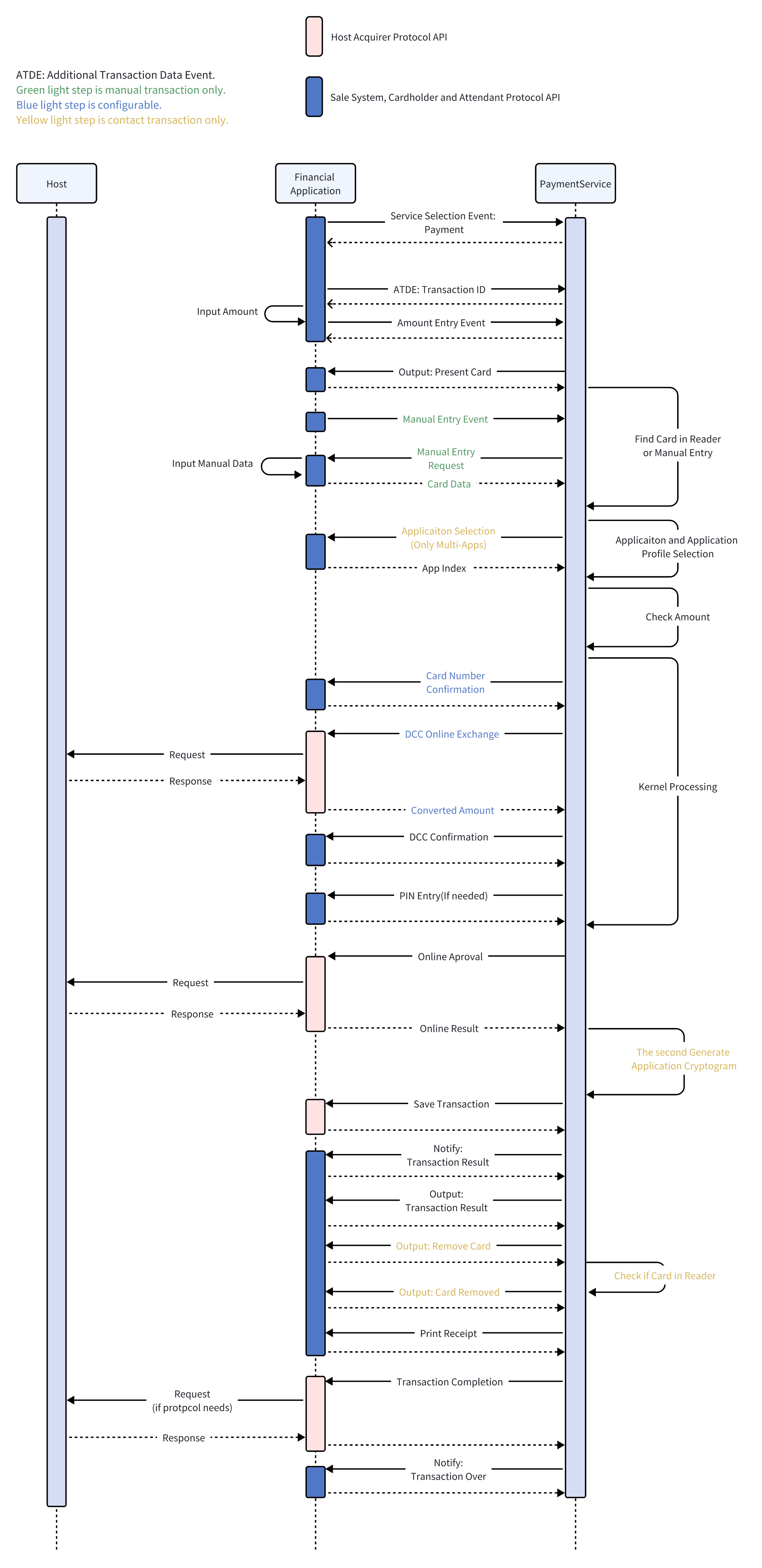
To start a SALE transaction . You need to process three events :
Service_Selection_Event(Optional)
SALE transactions require selecting a 'payment' service. If your default service is this, you can skip this step.
    ServiceSelectionBean mBean =
        new ServiceSelectionBean.Builder()
        .event(FASTEvent.SERVICE_SELECTION)
        .selectedService(ServiceSelection.SELSERV_PAYMENT)
        .build();
    PaymentServiceProvider.getInstance().processEvent(mBean);
Additional_Transaction_Data_Event
You need to send the transaction ID to the PaymentService.
    AdditionalTransactionDataBean.Builder builder =
        AdditionalTransactionDataBean.builder()
        .event(FASTEvent.ADDITIONAL_TRANSACTION_DATA)
        .transactionID(traceNo);
    PaymentServiceProvider.getInstance().processEvent(builder.build());
Amount_Entry_Event
Before you send the Amount_Entry_Event, you need to go to an input amount fragment to get the amount. Then send the Amount_Entry_Event to the PaymentService.
    AmountEntryBean amountEntryBean = new AmountEntryBean.Builder()
        .event(FASTEvent.AMOUNT_ENTRY)
        .transAmount(1L)
        .build();

    PaymentServiceProvider.getInstance().processEvent(mBean);
Then the PaymentService will start the SALE process.Then there will be a series of callbacks.
The order of the callback is as follows:
UIRequest
The messageID of the UIBean is '15'. The application needs to jump to the card reader fragment. The type of card reader needs to be displayed according to the 'supportInterface'.
If you need to display amount and currency. You can get it from 'terminalTransactionCurrencyCodeAlpha3' and 'C2' of ''confirmAmount'.
Here is an example of UIBean:
        UIBean[additionCode]:0
        UIBean[additionMessage]:
        UIBean[confirmAmount]:[AmountContent{amountID='C2', amount=30000}]
        UIBean[currencyCodeAlpha3]:USD
        UIBean[isEnableChooseApplication]:false
        UIBean[messageID]:15
        UIBean[selectedService]:01
        UIBean[selectedLanguage]:EN
        UIBean[supportInterface]:15
UIRequest
The messageID of the UIBean is '16'. It means that it is being processed.The application needs to show some processing tips.
        UIBean[additionCode]:0
        UIBean[additionMessage]:
        UIBean[confirmAmount]:[]
        UIBean[currencyCodeAlpha3]:
        UIBean[isEnableChooseApplication]:false
        UIBean[messageID]:16
        UIBean[selectService]:02
cardNumberConfirm
Display the card number for user confirmation.(This is a configurable item,The callback can be configured not to appear.
PINEntry
This callback is used to enter a password. Based on the returned 'pinType ', it is determined whether the input is an offline password or an online password.
You need to call NSDK to start pin input.
If it is an offline password, return sw1 sw2 to PaymentService.
If it is an online password, return pinBlock to PaymentService.
        PINResponseBean pinResponseBean = new PINResponseBean();
        if (isOfflinePin) {
            pinResponseBean.setSw1Sw2(OfflinePinBlock);
        }else{
            pinResponseBean.setPinBlock(pinBlock);
        }
        interactionListener.response(ExitCode.DONE,pinResponseBean);
onlineAuthorization
Perform online operations and send online results back to PaymentService.
If there is a situation where the online connection cannot be performed. You need to return ExitCode.UNABLE_GO_ONLINE to PaymentService.
interactionListener.response(ExitCode.UNABLE_GO_ONLINE ,null);If you get a definite result while online, you need to return ExitCode.DONE. And build AuthorisationResponseBean to PaymentService.
interactionListener.response(ExitCode.DONE,authorisationResponseBean );If you fail to assemble or parse data, or other data parsing exceptions, you need to return ExitCode.NOK to PaymentService.
interactionListener.response(ExitCode.NOK,null);transactionDataStorage
This callback is used to store records.
Notify
Used to notify the result of the transaction, the transaction result refers to'transactionResult '.
        NotifyBean[referralAttendantMsg]:
        NotifyBean[selectService]:01
        NotifyBean[transactionAmount]:0
        NotifyBean[transactionResult]:00
UIRequest
The messageID of the UIBean is '03'. It means transaction approval.You can display the transaction results.
        UIBean[additionCode]:0
        UIBean[additionMessage]:
        UIBean[confirmAmount]:[AmountContent{amountID='C2', amount=3659}]
        UIBean[currencyCodeAlpha3]:USD
        UIBean[isEnableChooseApplication]:false
        UIBean[messageID]:03
        UIBean[selectService]:01
        UIBean[selectlanguage]:EN
        UIBean[supportInterface]:0
UIRequest
The messageID of the UIBean is '10'. It means to remind the user to move the card.You can use Toast or Dialog to prompt users to remove the card.
        UIBean[additionCode]:0
        UIBean[additionMessage]:
        UIBean[confirmAmount]:[]
        UIBean[currencyCodeAlpha3]:
        UIBean[isEnableChooseApplication]:false
        UIBean[messageID]:10
        UIBean[selectService]:01
        UIBean[selectlanguage]:EN
        UIBean[supportInterface]:0
UIRequest
The messageID of the UIBean is '63'. It means that the card has been removed, and you can prompt the corresponding card removal UI.
        UIBean[additionCode]:0
        UIBean[additionMessage]:
        UIBean[confirmAmount]:[]
        UIBean[currencyCodeAlpha3]:
        UIBean[isEnableChooseApplication]:false
        UIBean[messageID]:63
        UIBean[selectService]:01
        UIBean[selectlanguage]:EN
        UIBean[supportInterface]:0
printReceipt
Perform a printing operation.
printReceipt(optional)
Perform a printing operation.
transactionCompletion
This function is used at Transaction Completion to trigger transaction finalisation in HAP.
You can :
Update the stored transaction data according to the final Transaction Result
If the transaction was authorised online, check whether the final Transaction Amount is lower than the amount that was authorised online and act on the result according to the rules of the protocol.
If the transaction was approved online, partially or fully, check whether the final Transaction Result is DECLINED or ABORTED and act on the result according to the rules of protocol.
Advice handling,
Capture of the data necessary for clearing.
Notify
The transactionResult of NotifyBean is '10'(TRANSACTION_END_FLAG). This is a constant defined in com.newland.paymentservice.constant.TransactionResult.
It is a transaction ending flag. You can return to the main fragment in this callback.
        NotifyBean[referralAttendantMessage] :
        NotifyBean[selectService]  01
        NotifyBean[transactionAmount] : 0
        NotifyBean[transactionResult] :10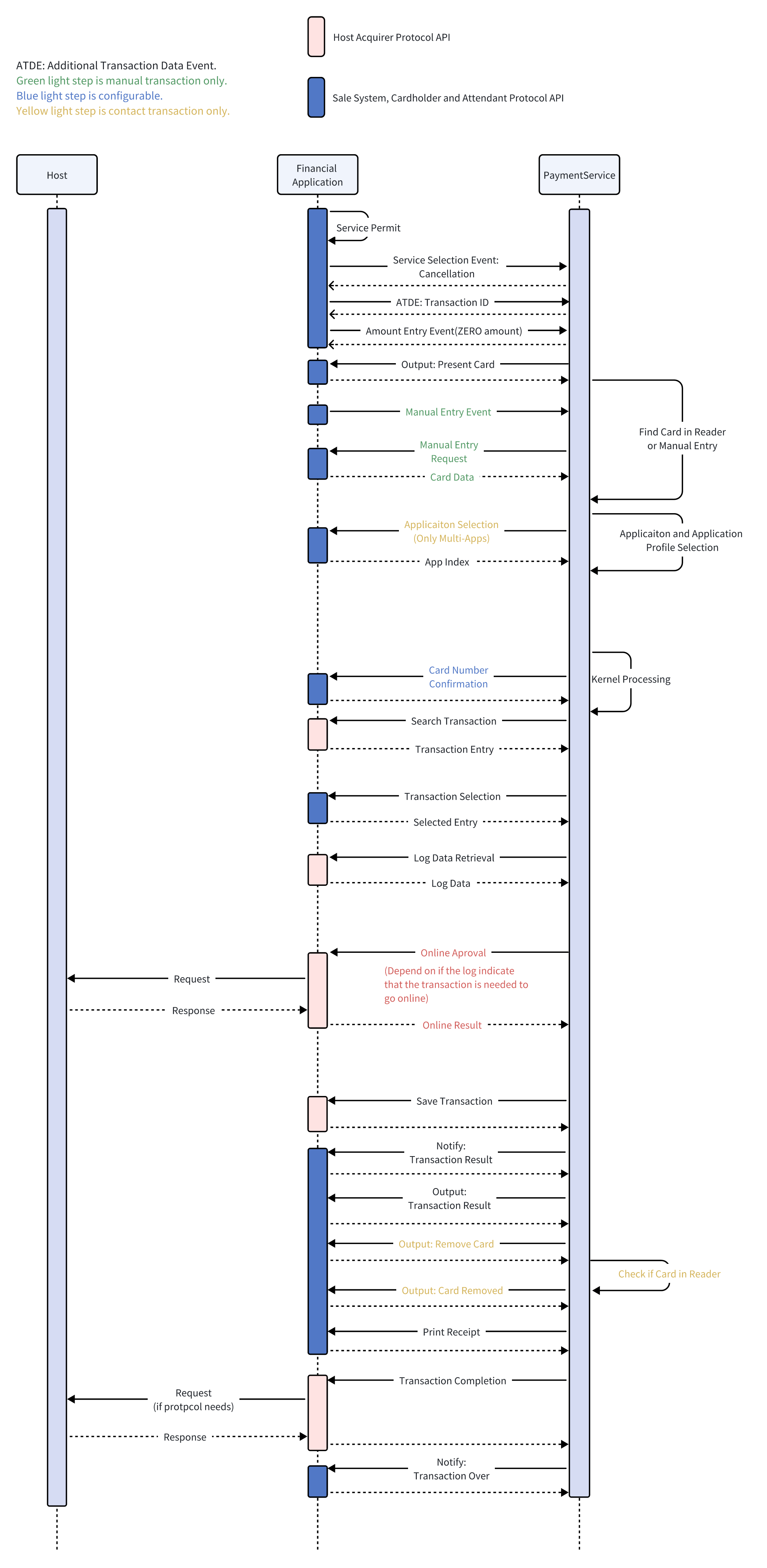
Service_Selection_Event
Refund transactions require selecting a 'Cancellation' service.
    ServiceSelectionBean mBean =
        new ServiceSelectionBean.Builder()
        .event(FASTEvent.SERVICE_SELECTION)
        .selectedService(ServiceSelection.SELSERV_CANCELLATION)
        .build();
    PaymentServiceProvider.getInstance().processEvent(mBean);
Additional_Transaction_Data_Event
You need to send the 'transaction ID' to the PaymentService.
    AdditionalTransactionDataBean.Builder builder =
        AdditionalTransactionDataBean.builder()
        .event(FASTEvent.ADDITIONAL_TRANSACTION_DATA)
        .transactionID(traceNo);
    PaymentServiceProvider.getInstance().processEvent(builder.build());
Amount_Entry_Event
You should send Zero Amount to the PaymentService.
    AmountEntryBean amountEntryBean = new AmountEntryBean.Builder()
        .event(FASTEvent.AMOUNT_ENTRY)
        .transAmount(0L)
        .build();

    PaymentServiceProvider.getInstance().processEvent(mBean);
Then the PaymentService will start the Cancellation process.Then there will be a series of callbacks.
The order of the callback is as follows:
UIRequest
The messageID of the UIBean is '15'. The application needs to jump to the card reader fragment. The type of card reader needs to be displayed according to the 'supportInterface'.
If you need to display amount and currency. You can get it from 'terminalTransactionCurrencyCodeAlpha3' and 'C2' of ''confirmAmount'.
Here is an example of UIBean:
        UIBean[additionCode]:0
        UIBean[additionMessage]:
        UIBean[confirmAmount]:[AmountContent{amountID='C2', amount=30000}]
        UIBean[currencyCodeAlpha3]:USD
        UIBean[isEnableChooseApplication]:false
        UIBean[messageID]:15
        UIBean[selectedService]:01
        UIBean[selectedLanguage]:EN
        UIBean[supportInterface]:15
UIRequest
The messageID of the UIBean is '16'. It means that it is being processed.The application needs to show some processing tips.
        UIBean[additionCode]:0
        UIBean[additionMessage]:
        UIBean[confirmAmount]:[]
        UIBean[currencyCodeAlpha3]:
        UIBean[isEnableChooseApplication]:false
        UIBean[messageID]:16
        UIBean[selectService]:02
cardNumberConfirm
Display the card number for user confirmation.(This is a configurable item,The callback can be configured not to appear.
searchTransaction
Search for a record list that meets the conditions given by SearchLogCriteria and return it to PaymentService.
searchTransactionResultList
A Data Entry Interaction is performed to inform of the Search Transactions Result List and to request selection of the transaction to be cancelled.
        TransactionEntry[entryReference] : 01
        TransactionEntry[selectedService] : 01
        TransactionEntry[transactionAmount] : 1
        TransactionEntry[transactionDate] : 19700101
        TransactionEntry[transactionTime] : 121212
        TransactionEntry[transactionResult] : 00
        TransactionEntry[panMasked] : 123******0123456
        TransactionEntry[panSequenceNumber] : 00
        TransactionEntry[authorisationCode] : 123456
        TransactionEntry[preAuthorisationValidityNumberOfDays] : 0
        TransactionEntry[isCancellationHasToBePerformedOnline] : false
        TransactionEntry[applicationProfileNumber] : 22
        TransactionEntry[isEntryExpired] : false
        TransactionEntry[updatePreAuthorisationTotalAmount] : 0
        TransactionEntry[currencyCodeAlpha3] : USD
You can display the list, let the user choose the transaction he wants to cancel, and then send the transaction entryReference to PaymentService.
        SearchTransactionResponseBean mBean =
            new SearchTransactionResponseBean .Builder()
            .entryReference("01")
            .build()

        interactionListener.response(ExitCode.DONE,mBean );
recordRetrieval
This function accesses the log entry referenced by the Entry Reference supplied by PaymentService and retrieves the data requested by the PaymentService.
onlineAuthorization
Perform online operations and send online results back to PaymentService.
If there is a situation where the online connection cannot be performed. You need to return ExitCode.UNABLE_GO_ONLINE to PaymentService.
interactionListener.response(ExitCode.UNABLE_GO_ONLINE ,null);If you get a definite result while online, you need to return ExitCode.DONE. And build AuthorisationResponseBean to PaymentService.
interactionListener.response(ExitCode.DONE,authorisationResponseBean );If you fail to assemble or parse data, or other data parsing exceptions, you need to return ExitCode.NOK to PaymentService.
interactionListener.response(ExitCode.NOK,null);transactionDataStorage
This callback is used to store records.
Notify
Used to notify the result of the transaction, the transaction result refers to'transactionResult '.
        NotifyBean[referralAttendantMsg]:
        NotifyBean[selectService]:01
        NotifyBean[transactionAmount]:0
        NotifyBean[transactionResult]:00
UIRequest
The messageID of the UIBean is '03'. It means transaction approval.You can display the transaction results.
        UIBean[additionCode]:0
        UIBean[additionMessage]:
        UIBean[confirmAmount]:[AmountContent{amountID='C2', amount=3659}]
        UIBean[currencyCodeAlpha3]:USD
        UIBean[isEnableChooseApplication]:false
        UIBean[messageID]:03
        UIBean[selectService]:01
        UIBean[selectlanguage]:EN
        UIBean[supportInterface]:0
UIRequest
The messageID of the UIBean is '10'. It means to remind the user to move the card.You can use Toast or Dialog to prompt users to remove the card.
        UIBean[additionCode]:0
        UIBean[additionMessage]:
        UIBean[confirmAmount]:[]
        UIBean[currencyCodeAlpha3]:
        UIBean[isEnableChooseApplication]:false
        UIBean[messageID]:10
        UIBean[selectService]:01
        UIBean[selectlanguage]:EN
        UIBean[supportInterface]:0
UIRequest
The messageID of the UIBean is '63'. It means that the card has been removed, and you can prompt the corresponding card removal UI.
        UIBean[additionCode]:0
        UIBean[additionMessage]:
        UIBean[confirmAmount]:[]
        UIBean[currencyCodeAlpha3]:
        UIBean[isEnableChooseApplication]:false
        UIBean[messageID]:63
        UIBean[selectService]:01
        UIBean[selectlanguage]:EN
        UIBean[supportInterface]:0
printReceipt
Perform a printing operation.
printReceipt(optional)
Perform a printing operation.
transactionCompletion
This function is used at Transaction Completion to trigger transaction finalisation in HAP.
You can :
Notify
The transactionResult of NotifyBean is '10'(TRANSACTION_END_FLAG). This is a constant defined in com.newland.paymentservice.constant.TransactionResult.
It is a transaction ending flag. You can return to the main fragment in this callback.
        NotifyBean[referralAttendantMessage] :
        NotifyBean[selectService]  01
        NotifyBean[transactionAmount] : 0
        NotifyBean[transactionResult] :10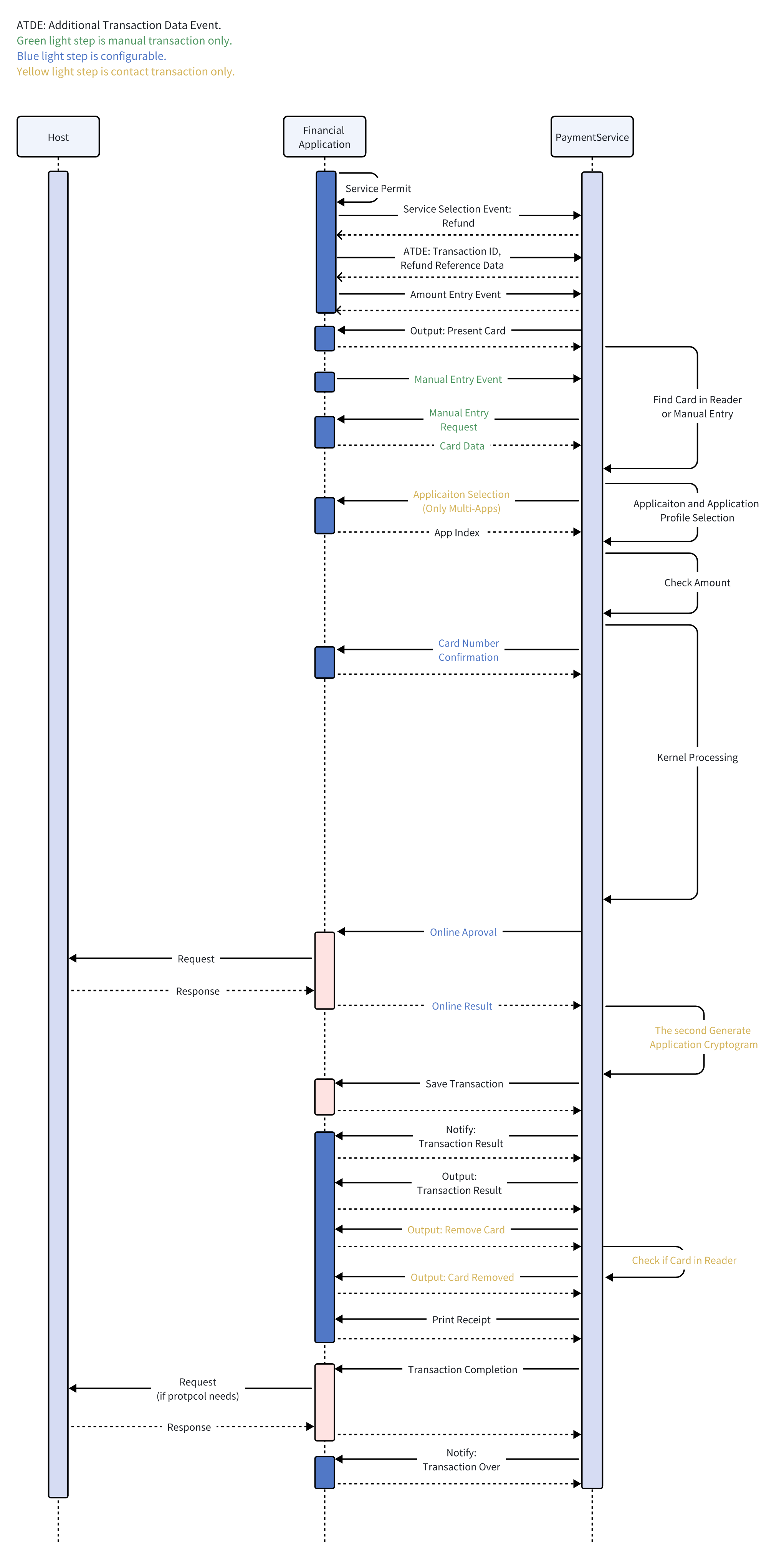
To start a refund transaction . You need to process three events :
Service_Selection_Event
Refund transactions require selecting a 'refund' service.
    ServiceSelectionBean mBean =
        new ServiceSelectionBean.Builder()
        .event(FASTEvent.SERVICE_SELECTION)
        .selectedService(ServiceSelection.SELSERV_REFUND)
        .build();
    PaymentServiceProvider.getInstance().processEvent(mBean);
Additional_Transaction_Data_Event
You need to send the 'transaction ID' ,'original reference number' and 'original transaction date' to the PaymentService.
    AdditionalTransactionDataBean.Builder builder =
        AdditionalTransactionDataBean.builder()
        .event(FASTEvent.ADDITIONAL_TRANSACTION_DATA)
        .refundReferenceData(origReferNo)
        .originalTransactionDate(origDate)
        .transactionID(traceNo);
    PaymentServiceProvider.getInstance().processEvent(builder.build());
Amount_Entry_Event
Before you send the Amount_Entry_Event, you need to go to an input amount fragment to get the amount. Then send the Amount_Entry_Event to the PaymentService.
    AmountEntryBean amountEntryBean = new AmountEntryBean.Builder()
        .event(FASTEvent.AMOUNT_ENTRY)
        .transAmount(1L)
        .build();

    PaymentServiceProvider.getInstance().processEvent(mBean);
Then the PaymentService will start the Refund process.Then there will be a series of callbacks.
The order of the callback is as follows:
UIRequest
The messageID of the UIBean is '15'. The application needs to jump to the card reader fragment. The type of card reader needs to be displayed according to the 'supportInterface'.
If you need to display amount and currency. You can get it from 'terminalTransactionCurrencyCodeAlpha3' and 'C2' of ''confirmAmount'.
Here is an example of UIBean:
        UIBean[additionCode]:0
        UIBean[additionMessage]:
        UIBean[confirmAmount]:[AmountContent{amountID='C2', amount=30000}]
        UIBean[currencyCodeAlpha3]:USD
        UIBean[isEnableChooseApplication]:false
        UIBean[messageID]:15
        UIBean[selectedService]:01
        UIBean[selectedLanguage]:EN
        UIBean[supportInterface]:15
UIRequest
The messageID of the UIBean is '16'. It means that it is being processed.The application needs to show some processing tips.
        UIBean[additionCode]:0
        UIBean[additionMessage]:
        UIBean[confirmAmount]:[]
        UIBean[currencyCodeAlpha3]:
        UIBean[isEnableChooseApplication]:false
        UIBean[messageID]:16
        UIBean[selectService]:02
cardNumberConfirm
Display the card number for user confirmation.(This is a configurable item,The callback can be configured not to appear.
pinEntry
This callback is used to enter a password. Based on the returned 'pinType ', it is determined whether the input is an offline password or an online password.
You need to call NSDK to start pin input.
If it is an offline password, return sw1 sw2 to PaymentService.
If it is an online password, return pinBlock to PaymentService.
        PINResponseBean pinResponseBean = new PINResponseBean();
        if (isOfflinePin) {
            pinResponseBean.setSw1Sw2(OfflinePinBlock);
        }else{
            pinResponseBean.setPinBlock(pinBlock);
        }
        interactionListener.response(ExitCode.DONE,pinResponseBean);
onlineAuthorization
Perform online operations and send online results back to PaymentService.
If there is a situation where the online connection cannot be performed. You need to return ExitCode.UNABLE_GO_ONLINE to PaymentService.
interactionListener.response(ExitCode.UNABLE_GO_ONLINE ,null);If you get a definite result while online, you need to return ExitCode.DONE. And build AuthorisationResponseBean to PaymentService.
interactionListener.response(ExitCode.DONE,authorisationResponseBean );If you fail to assemble or parse data, or other data parsing exceptions, you need to return ExitCode.NOK to PaymentService.
interactionListener.response(ExitCode.NOK,null);transactionDataStorage
This callback is used to store records.
Notify
Used to notify the result of the transaction, the transaction result refers to'transactionResult '.
        NotifyBean[referralAttendantMsg]:
        NotifyBean[selectService]:01
        NotifyBean[transactionAmount]:0
        NotifyBean[transactionResult]:00
UIRequest
The messageID of the UIBean is '03'. It means transaction approval.You can display the transaction results.
        UIBean[additionCode]:0
        UIBean[additionMessage]:
        UIBean[confirmAmount]:[AmountContent{amountID='C2', amount=3659}]
        UIBean[currencyCodeAlpha3]:USD
        UIBean[isEnableChooseApplication]:false
        UIBean[messageID]:03
        UIBean[selectService]:01
        UIBean[selectlanguage]:EN
        UIBean[supportInterface]:0
UIRequest
The messageID of the UIBean is '10'. It means to remind the user to move the card.You can use Toast or Dialog to prompt users to remove the card.
        UIBean[additionCode]:0
        UIBean[additionMessage]:
        UIBean[confirmAmount]:[]
        UIBean[currencyCodeAlpha3]:
        UIBean[isEnableChooseApplication]:false
        UIBean[messageID]:10
        UIBean[selectService]:01
        UIBean[selectlanguage]:EN
        UIBean[supportInterface]:0
UIRequest
The messageID of the UIBean is '63'. It means that the card has been removed, and you can prompt the corresponding card removal UI.
        UIBean[additionCode]:0
        UIBean[additionMessage]:
        UIBean[confirmAmount]:[]
        UIBean[currencyCodeAlpha3]:
        UIBean[isEnableChooseApplication]:false
        UIBean[messageID]:63
        UIBean[selectService]:01
        UIBean[selectlanguage]:EN
        UIBean[supportInterface]:0
printReceipt
Perform a printing operation.
printReceipt(optional)
Perform a printing operation.
transactionCompletion
This function is used at Transaction Completion to trigger transaction finalisation in HAP.
You can :
Notify
The transactionResult of NotifyBean is '10'(TRANSACTION_END_FLAG). This is a constant defined in com.newland.paymentservice.constant.TransactionResult.
It is a transaction ending flag. You can return to the main fragment in this callback.
        NotifyBean[referralAttendantMessage] :
        NotifyBean[selectService]  01
        NotifyBean[transactionAmount] : 0
        NotifyBean[transactionResult] :10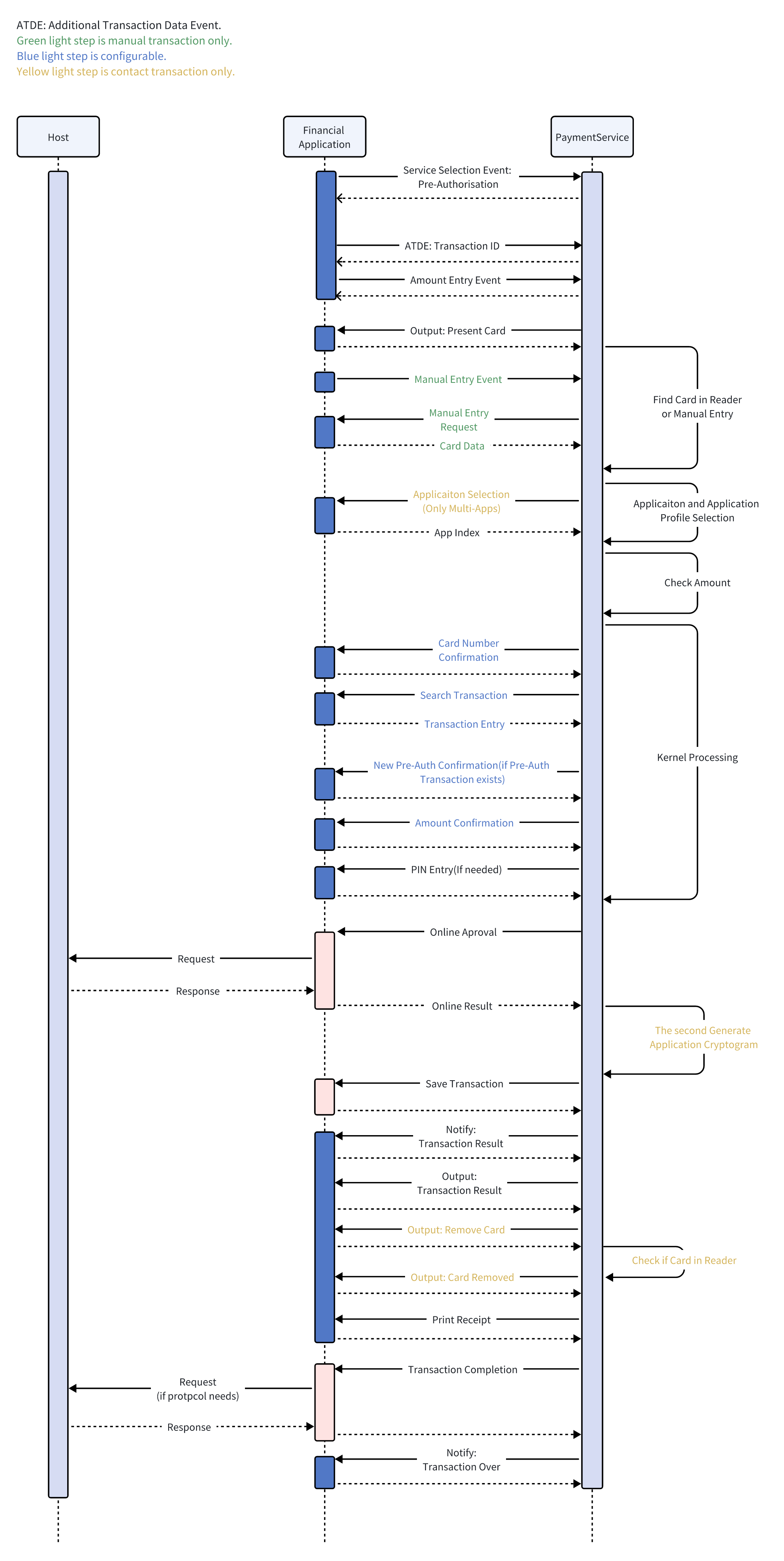
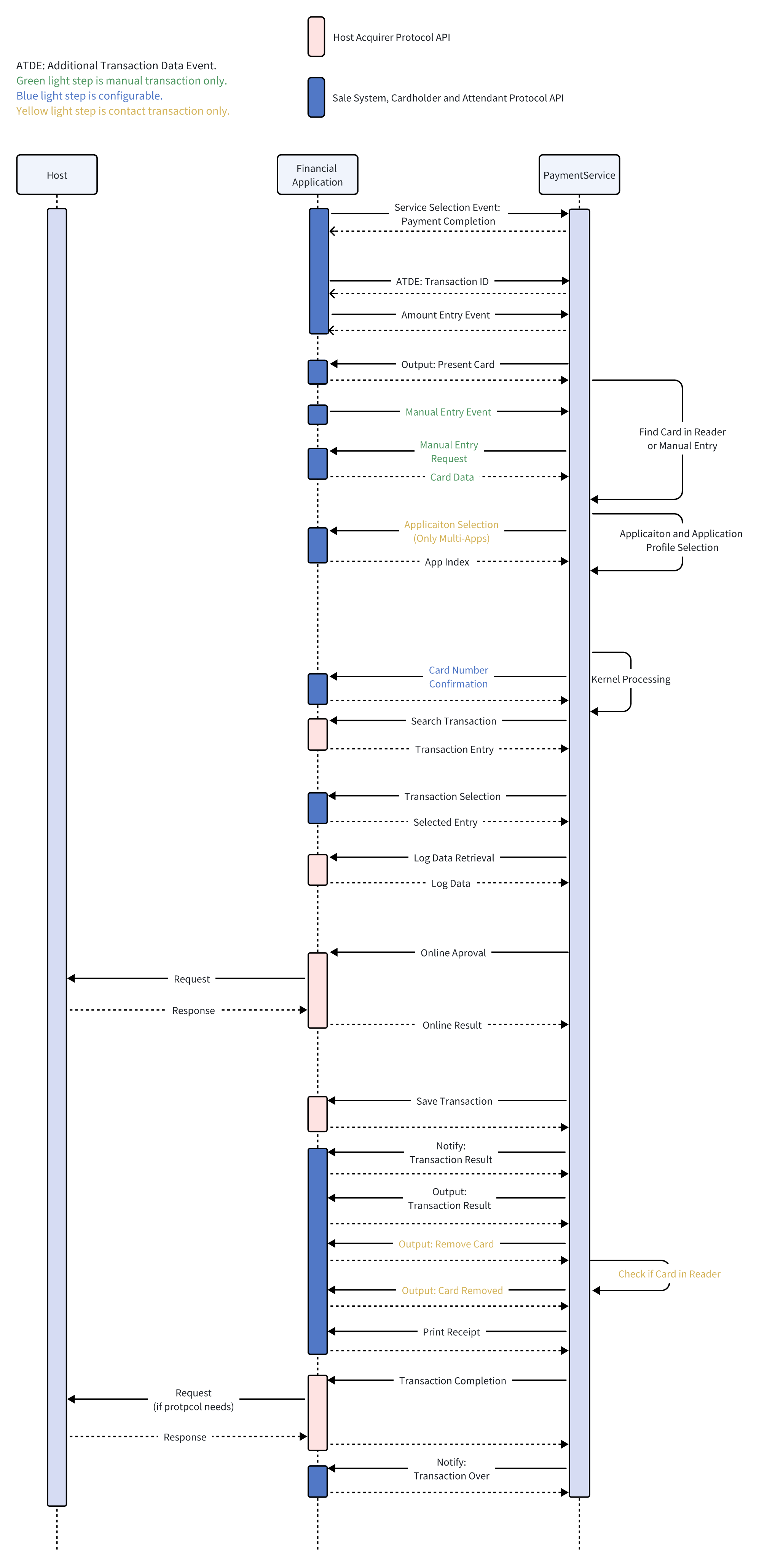
To start a Pre-Authorisation transaction . You need to process three events :
Service_Selection_Event
SALE transactions require selecting a 'SELSERV_PRE_AUTH' service.
    ServiceSelectionBean mBean =
        new ServiceSelectionBean.Builder()
        .event(FASTEvent.SERVICE_SELECTION)
        .selectedService(ServiceSelection.SELSERV_PRE_AUTH)
        .build();
    PaymentServiceProvider.getInstance().processEvent(mBean);
Additional_Transaction_Data_Event
You need to send the transaction ID to the PaymentService.
    AdditionalTransactionDataBean.Builder builder =
        AdditionalTransactionDataBean.builder()
        .event(FASTEvent.ADDITIONAL_TRANSACTION_DATA)
        .transactionID(traceNo);
    PaymentServiceProvider.getInstance().processEvent(builder.build());
Amount_Entry_Event
Before you send the Amount_Entry_Event, you need to go to an input amount fragment to get the amount. Then send the Amount_Entry_Event to the PaymentService.
    AmountEntryBean amountEntryBean = new AmountEntryBean.Builder()
        .event(FASTEvent.AMOUNT_ENTRY)
        .transAmount(1L)
        .build();

    PaymentServiceProvider.getInstance().processEvent(mBean);
Then the PaymentService will start the Pre-Authorisation process.Then there will be a series of callbacks.
The order of the callback is as follows:
UIRequest
The messageID of the UIBean is '15'. The application needs to jump to the card reader fragment. The type of card reader needs to be displayed according to the 'supportInterface'.
If you need to display amount and currency. You can get it from 'terminalTransactionCurrencyCodeAlpha3' and 'C2' of ''confirmAmount'.
Here is an example of UIBean:
       UIBean[additionCode]:0
       UIBean[additionMessage]:
       UIBean[confirmAmount]:[AmountContent{amountID='C2', amount=30000}]
       UIBean[currencyCodeAlpha3]:USD
       UIBean[isEnableChooseApplication]:false
       UIBean[messageID]:15
       UIBean[selectedService]:01
       UIBean[selectedLanguage]:EN
UIBean[supportInterface]:15The messageID of the UIBean is '16'. It means that it is being processed.The application needs to show some processing tips.
       UIBean[additionCode]:0
       UIBean[additionMessage]:
       UIBean[confirmAmount]:[]
       UIBean[currencyCodeAlpha3]:
       UIBean[isEnableChooseApplication]:false
       UIBean[messageID]:16
UIBean[selectService]:02This is a function that enables the cardholder to confirm the selected application.
       ApplicationSelectionBean[SelectionCount]:0
       ApplicationSelectionBean[candidateList]:[Candidate{, label=VISA Credit}, Candidate{, label=VISA Debit}]
       ApplicationSelectionBean[selectLanguage]:EN
       ApplicationSelectionBean[selectService]:01
After you complete the Action, you need to call **InteractionListener.response **to tell PaymentService the result.
       AppSelectionResponseBean  appSelectionResponseBean
           = new AppSelectionResponseBean.Builder()
           .selectIndex(1)
           .build();
interactionListener.response(ExitCode.DONE,appSelectionResponseBean );Display the card number for user confirmation.(This is a configurable item,The callback can be configured not to appear.)
Search for a record list that meets the conditions given by SearchLogCriteria and return it to PaymentService.
A Data Entry Interaction is performed to inform of the Search Transactions Result List and to request selection of the transaction to be cancelled.
       TransactionEntry[entryReference] : 01
       TransactionEntry[selectedService] : 01
       TransactionEntry[transactionAmount] : 1
       TransactionEntry[transactionDate] : 19700101
       TransactionEntry[transactionTime] : 121212
       TransactionEntry[transactionResult] : 00
       TransactionEntry[panMasked] : 123******0123456
       TransactionEntry[panSequenceNumber] : 00
       TransactionEntry[authorisationCode] : 123456
       TransactionEntry[preAuthorisationValidityNumberOfDays] : 0
       TransactionEntry[isCancellationHasToBePerformedOnline] : false
       TransactionEntry[applicationProfileNumber] : 22
       TransactionEntry[isEntryExpired] : false
       TransactionEntry[updatePreAuthorisationTotalAmount] : 0
       TransactionEntry[currencyCodeAlpha3] : USD
You can display the list, let the user choose the transaction he wants to cancel, and then send the transaction entryReference to PaymentService.
       SearchTransactionResponseBean mBean =
           new SearchTransactionResponseBean .Builder()
           .entryReference("01")
           .build()

interactionListener.response(ExitCode.DONE,mBean );This callback is used to enter a password. Based on the returned 'pinType ', it is determined whether the input is an offline password or an online password.
You need to call NSDK to start pin input.
If it is an offline password, return sw1 sw2 to PaymentService.
If it is an online password, return pinBlock to PaymentService.
   PINResponseBean pinResponseBean = new PINResponseBean();
   if (isOfflinePin) {
	   pinResponseBean.setSw1Sw2(OfflinePinBlock);
   }else{
	   pinResponseBean.setPinBlock(pinBlock);
   }
interactionListener.response(ExitCode.DONE,pinResponseBean);Perform online operations and send online results back to PaymentService.
If there is a situation where the online connection cannot be performed. You need to return ExitCode.UNABLE_GO_ONLINE to PaymentService.
interactionListener.response(ExitCode.UNABLE_GO_ONLINE ,null);If you get a definite result while online, you need to return ExitCode.DONE. And build AuthorisationResponseBean to PaymentService.
interactionListener.response(ExitCode.DONE,authorisationResponseBean );If you fail to assemble or parse data, or other data parsing exceptions, you need to return ExitCode.NOK to PaymentService.
interactionListener.response(ExitCode.NOK,null);This callback is used to store records.
Used to notify the result of the transaction, the transaction result refers to'transactionResult '.
       NotifyBean[referralAttendantMsg]:
       NotifyBean[selectService]:01
       NotifyBean[transactionAmount]:0
NotifyBean[transactionResult]:00The messageID of the UIBean is '03'. It means transaction approval.You can display the transaction results.
       UIBean[additionCode]:0
       UIBean[additionMessage]:
       UIBean[confirmAmount]:[AmountContent{amountID='C2', amount=3659}]
       UIBean[currencyCodeAlpha3]:USD
       UIBean[isEnableChooseApplication]:false
       UIBean[messageID]:03
       UIBean[selectService]:01
       UIBean[selectlanguage]:EN
UIBean[supportInterface]:0The messageID of the UIBean is '10'. It means to remind the user to move the card.You can use Toast or Dialog to prompt users to remove the card.
       UIBean[additionCode]:0
       UIBean[additionMessage]:
       UIBean[confirmAmount]:[]
       UIBean[currencyCodeAlpha3]:
       UIBean[isEnableChooseApplication]:false
       UIBean[messageID]:10
       UIBean[selectService]:01
       UIBean[selectlanguage]:EN
UIBean[supportInterface]:0The messageID of the UIBean is '63'. It means that the card has been removed, and you can prompt the corresponding card removal UI.
       UIBean[additionCode]:0
       UIBean[additionMessage]:
       UIBean[confirmAmount]:[]
       UIBean[currencyCodeAlpha3]:
       UIBean[isEnableChooseApplication]:false
       UIBean[messageID]:63
       UIBean[selectService]:01
       UIBean[selectlanguage]:EN
UIBean[supportInterface]:0Perform a printing operation.
Perform a printing operation.
This function is used at Transaction Completion to trigger transaction finalisation in HAP.
You can :
The transactionResult of NotifyBean is '10'(TRANSACTION_END_FLAG). This is a constant defined in com.newland.paymentservice.constant.TransactionResult.
It is a transaction ending flag. You can return to the main fragment in this callback.
       NotifyBean[referralAttendantMessage] :
       NotifyBean[selectService]  01
       NotifyBean[transactionAmount] : 0
NotifyBean[transactionResult] :10Same process as transaction Cancellation.
To start a Pre-Authorisation Completion transaction . You need to process three events :
SALE transactions require selecting a 'SELSERV_PAYMENT_COMPLETION' service.
    ServiceSelectionBean mBean =
        new ServiceSelectionBean.Builder()
        .event(FASTEvent.SERVICE_SELECTION)
        .selectedService(ServiceSelection.SELSERV_PAYMENT_COMPLETION)
        .build();
PaymentServiceProvider.getInstance().processEvent(mBean);You need to send the transaction ID to the PaymentService.
    AdditionalTransactionDataBean.Builder builder =
        AdditionalTransactionDataBean.builder()
        .event(FASTEvent.ADDITIONAL_TRANSACTION_DATA)
        .transactionID(traceNo);
PaymentServiceProvider.getInstance().processEvent(builder.build()); Before you send the Amount_Entry_Event, you need to go to an input amount fragment to get the amount. Then send the Amount_Entry_Event to the PaymentService.
    AmountEntryBean amountEntryBean = new AmountEntryBean.Builder()
        .event(FASTEvent.AMOUNT_ENTRY)
        .transAmount(1L)
        .build();

    PaymentServiceProvider.getInstance().processEvent(mBean);
Then the PaymentService will start the Pre-Authorisation Completion process.Then there will be a series of callbacks.
The order of the callback is as follows:
UIRequest
The messageID of the UIBean is '15'. The application needs to jump to the card reader fragment. The type of card reader needs to be displayed according to the 'supportInterface'.
If you need to display amount and currency. You can get it from 'terminalTransactionCurrencyCodeAlpha3' and 'C2' of ''confirmAmount'.
Here is an example of UIBean:
        UIBean[additionCode]:0
        UIBean[additionMessage]:
        UIBean[confirmAmount]:[AmountContent{amountID='C2', amount=30000}]
        UIBean[currencyCodeAlpha3]:USD
        UIBean[isEnableChooseApplication]:false
        UIBean[messageID]:15
        UIBean[selectedService]:01
        UIBean[selectedLanguage]:EN
UIBean[supportInterface]:15The messageID of the UIBean is '16'. It means that it is being processed.The application needs to show some processing tips.
        UIBean[additionCode]:0
        UIBean[additionMessage]:
        UIBean[confirmAmount]:[]
        UIBean[currencyCodeAlpha3]:
        UIBean[isEnableChooseApplication]:false
        UIBean[messageID]:16
UIBean[selectService]:02This is a function that enables the cardholder to confirm the selected application.
        ApplicationSelectionBean[SelectionCount]:0
        ApplicationSelectionBean[candidateList]:[Candidate{, label=VISA Credit}, Candidate{, label=VISA Debit}]
        ApplicationSelectionBean[selectLanguage]:EN
        ApplicationSelectionBean[selectService]:01
After you complete the Action, you need to call InteractionListener.response to tell PaymentService the result.
        AppSelectionResponseBean  appSelectionResponseBean
            = new AppSelectionResponseBean.Builder()
            .selectIndex(1)
            .build();
interactionListener.response(ExitCode.DONE,appSelectionResponseBean );Display the card number for user confirmation.(This is a configurable item,The callback can be configured not to appear.
Search for a record list that meets the conditions given by SearchLogCriteria and return it to PaymentService.
A Data Entry Interaction is performed to inform of the Search Transactions Result List and to request selection of the transaction to be cancelled.
        TransactionEntry[entryReference] : 01
        TransactionEntry[selectedService] : 01
        TransactionEntry[transactionAmount] : 1
        TransactionEntry[transactionDate] : 19700101
        TransactionEntry[transactionTime] : 121212
        TransactionEntry[transactionResult] : 00
        TransactionEntry[panMasked] : 123******0123456
        TransactionEntry[panSequenceNumber] : 00
        TransactionEntry[authorisationCode] : 123456
        TransactionEntry[preAuthorisationValidityNumberOfDays] : 0
        TransactionEntry[isCancellationHasToBePerformedOnline] : false
        TransactionEntry[applicationProfileNumber] : 22
        TransactionEntry[isEntryExpired] : false
        TransactionEntry[updatePreAuthorisationTotalAmount] : 0
        TransactionEntry[currencyCodeAlpha3] : USD
You can display the list, let the user choose the transaction he wants to cancel, and then send the transaction entryReference to PaymentService.
        SearchTransactionResponseBean mBean =
            new SearchTransactionResponseBean .Builder()
            .entryReference("01")
            .build()

interactionListener.response(ExitCode.DONE,mBean );This function accesses the log entry referenced by the Entry Reference supplied by PaymentService and retrieves the data requested by the PaymentService.
A Data Entry Interaction is performed to request confirmation of the Transaction Amount from attendant or sale system.
Example :
        AmountConfirmBean[selectedService] : 01
        AmountConfirmBean[selectedLanguage] : EN
        AmountConfirmBean[currencyCodeAlpha3] : USD
        AmountConfirmBean[isAllowedChangeApplication] : false
AmountConfirmBean[currencyCodeAlpha3] : VISAPerform online operations and send online results back to PaymentService.
If there is a situation where the online connection cannot be performed. You need to return ExitCode.UNABLE_GO_ONLINE to PaymentService.
interactionListener.response(ExitCode.UNABLE_GO_ONLINE ,null);If you get a definite result while online, you need to return ExitCode.DONE. And build AuthorisationResponseBean to PaymentService.
interactionListener.response(ExitCode.DONE,authorisationResponseBean );If you fail to assemble or parse data, or other data parsing exceptions, you need to return ExitCode.NOK to PaymentService.
interactionListener.response(ExitCode.NOK,null);This callback is used to store records.
Used to notify the result of the transaction, the transaction result refers to'transactionResult '.
        NotifyBean[referralAttendantMsg]:
        NotifyBean[selectService]:01
        NotifyBean[transactionAmount]:0
NotifyBean[transactionResult]:00The messageID of the UIBean is '03'. It means transaction approval.You can display the transaction results.
        UIBean[additionCode]:0
        UIBean[additionMessage]:
        UIBean[confirmAmount]:[AmountContent{amountID='C2', amount=3659}]
        UIBean[currencyCodeAlpha3]:USD
        UIBean[isEnableChooseApplication]:false
        UIBean[messageID]:03
        UIBean[selectService]:01
        UIBean[selectlanguage]:EN
UIBean[supportInterface]:0The messageID of the UIBean is '10'. It means to remind the user to move the card.You can use Toast or Dialog to prompt users to remove the card.
        UIBean[additionCode]:0
        UIBean[additionMessage]:
        UIBean[confirmAmount]:[]
        UIBean[currencyCodeAlpha3]:
        UIBean[isEnableChooseApplication]:false
        UIBean[messageID]:10
        UIBean[selectService]:01
        UIBean[selectlanguage]:EN
UIBean[supportInterface]:0The messageID of the UIBean is '63'. It means that the card has been removed, and you can prompt the corresponding card removal UI.
        UIBean[additionCode]:0
        UIBean[additionMessage]:
        UIBean[confirmAmount]:[]
        UIBean[currencyCodeAlpha3]:
        UIBean[isEnableChooseApplication]:false
        UIBean[messageID]:63
        UIBean[selectService]:01
        UIBean[selectlanguage]:EN
UIBean[supportInterface]:0Perform a printing operation.
Perform a printing operation.
This function is used at Transaction Completion to trigger transaction finalisation in HAP.
You can :
The transactionResult of NotifyBean is '10'(TRANSACTION_END_FLAG). This is a constant defined in com.newland.paymentservice.constant.TransactionResult.
It is a transaction ending flag. You can return to the main fragment in this callback.
        NotifyBean[referralAttendantMessage] :
        NotifyBean[selectService]  01
        NotifyBean[transactionAmount] : 0
NotifyBean[transactionResult] :10Same process as transaction Cancellation.
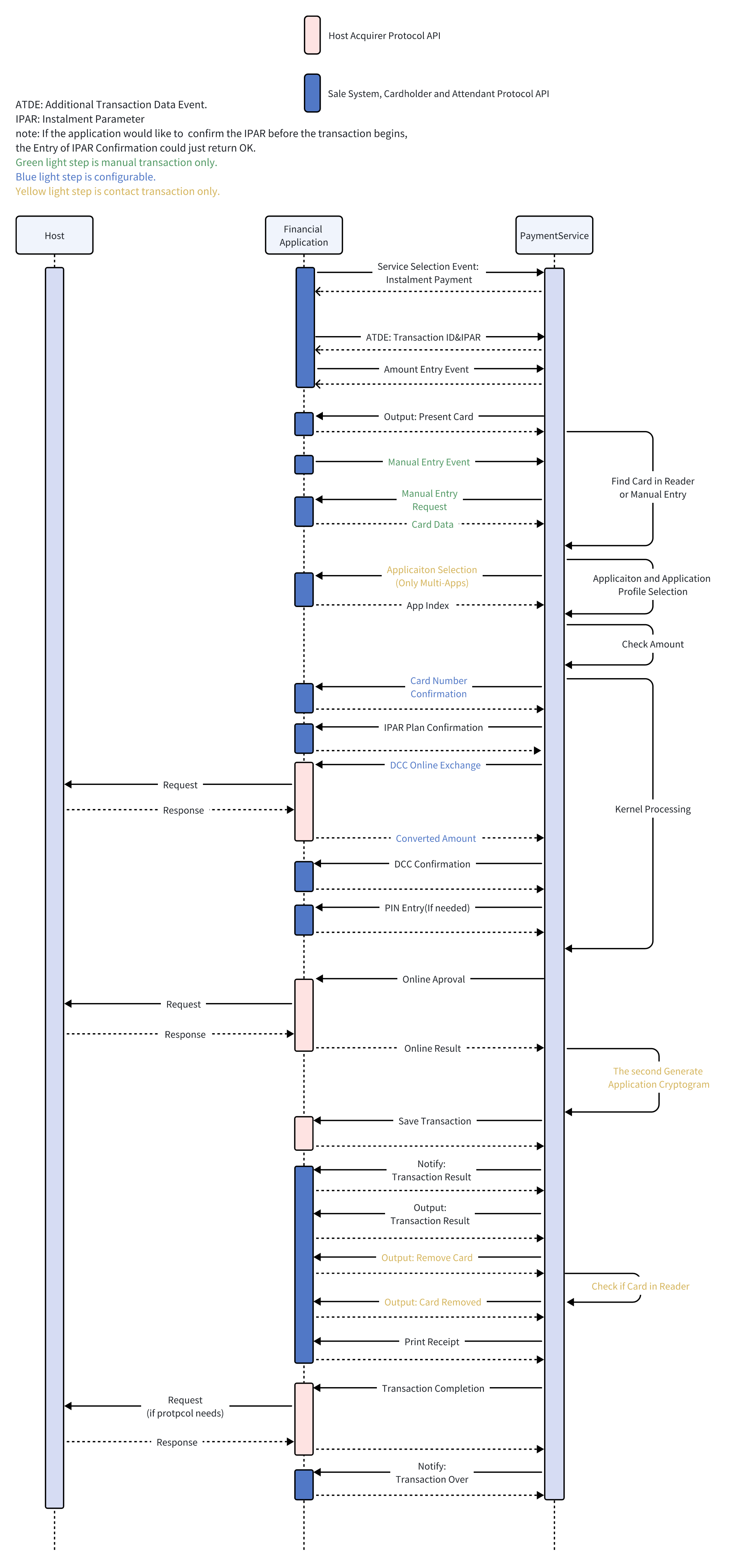
To start a Instalment transaction . You need to process three events :
Service_Selection_Event
SALE transactions require selecting a 'SELSERV_INSTALMENT_PAYMENT' service.
    ServiceSelectionBean mBean =
        new ServiceSelectionBean.Builder()
        .event(FASTEvent.SERVICE_SELECTION)
        .selectedService(ServiceSelection.SELSERV_INSTALMENT_PAYMENT)
        .build();
    PaymentServiceProvider.getInstance().processEvent(mBean);
Additional_Transaction_Data_Event
You need to send the transaction ID to the PaymentService.
    AdditionalTransactionDataBean.Builder builder =
        AdditionalTransactionDataBean.builder()
        .event(FASTEvent.ADDITIONAL_TRANSACTION_DATA)
        .instalmentParameter(getInstalmentParameter());
        .transactionID(traceNo);
    PaymentServiceProvider.getInstance().processEvent(builder.build());
Amount_Entry_Event
Before you send the Amount_Entry_Event, you need to go to an input amount fragment to get the amount. Then send the Amount_Entry_Event to the PaymentService.
    AmountEntryBean amountEntryBean = new AmountEntryBean.Builder()
        .event(FASTEvent.AMOUNT_ENTRY)
        .transAmount(1L)
        .build();

    PaymentServiceProvider.getInstance().processEvent(mBean);
Then the PaymentService will start the Instalment process.Then there will be a series of callbacks.
The order of the callback is as follows:
UIRequest
The messageID of the UIBean is '15'. The application needs to jump to the card reader fragment. The type of card reader needs to be displayed according to the 'supportInterface'.
If you need to display amount and currency. You can get it from 'terminalTransactionCurrencyCodeAlpha3' and 'C2' of ''confirmAmount'.
Here is an example of UIBean:
        UIBean[additionCode]:0
        UIBean[additionMessage]:
        UIBean[confirmAmount]:[AmountContent{amountID='C2', amount=30000}]
        UIBean[currencyCodeAlpha3]:USD
        UIBean[isEnableChooseApplication]:false
        UIBean[messageID]:15
        UIBean[selectedService]:01
        UIBean[selectedLanguage]:EN
        UIBean[supportInterface]:15
UIRequest
The messageID of the UIBean is '16'. It means that it is being processed.The application needs to show some processing tips.
        UIBean[additionCode]:0
        UIBean[additionMessage]:
        UIBean[confirmAmount]:[]
        UIBean[currencyCodeAlpha3]:
        UIBean[isEnableChooseApplication]:false
        UIBean[messageID]:16
        UIBean[selectService]:02
cardNumberConfirm
Display the card number for user confirmation. This is a configurable item,The callback can be configured not to appear.
installmentPlanConfirm
A Data Entry Interaction is performed to request display to the cardholder the details of the instalment plan provided by the sale system in the Selected Language. The same display shall also request confirmation or rejection from the cardholder.
PINEntry
This callback is used to enter a password. Based on the returned 'pinType ', it is determined whether the input is an offline password or an online password.
You need to call NSDK to start pin input.
If it is an offline password, return sw1 sw2 to PaymentService.
If it is an online password, return pinBlock to PaymentService.
        PINResponseBean pinResponseBean = new PINResponseBean();
        if (isOfflinePin) {
            pinResponseBean.setSw1Sw2(OfflinePinBlock);
        }else{
            pinResponseBean.setPinBlock(pinBlock);
        }
        interactionListener.response(ExitCode.DONE,pinResponseBean);
onlineAuthorization
Perform online operations and send online results back to PaymentService.
If there is a situation where the online connection cannot be performed. You need to return ExitCode.UNABLE_GO_ONLINE to PaymentService.
interactionListener.response(ExitCode.UNABLE_GO_ONLINE ,null);If you get a definite result while online, you need to return ExitCode.DONE. And build AuthorisationResponseBean to PaymentService.
interactionListener.response(ExitCode.DONE,authorisationResponseBean );If you fail to assemble or parse data, or other data parsing exceptions, you need to return ExitCode.NOK to PaymentService.
interactionListener.response(ExitCode.NOK,null);transactionDataStorage
This callback is used to store records.
Notify
Used to notify the result of the transaction, the transaction result refers to'transactionResult '.
        NotifyBean[referralAttendantMsg]:
        NotifyBean[selectService]:01
        NotifyBean[transactionAmount]:0
        NotifyBean[transactionResult]:00
UIRequest
The messageID of the UIBean is '03'. It means transaction approval.You can display the transaction results.
        UIBean[additionCode]:0
        UIBean[additionMessage]:
        UIBean[confirmAmount]:[AmountContent{amountID='C2', amount=3659}]
        UIBean[currencyCodeAlpha3]:USD
        UIBean[isEnableChooseApplication]:false
        UIBean[messageID]:03
        UIBean[selectService]:01
        UIBean[selectlanguage]:EN
UIBean[supportInterface]:0The messageID of the UIBean is '10'. It means to remind the user to move the card.You can use Toast or Dialog to prompt users to remove the card.
        UIBean[additionCode]:0
        UIBean[additionMessage]:
        UIBean[confirmAmount]:[]
        UIBean[currencyCodeAlpha3]:
        UIBean[isEnableChooseApplication]:false
        UIBean[messageID]:10
        UIBean[selectService]:01
        UIBean[selectlanguage]:EN
UIBean[supportInterface]:0The messageID of the UIBean is '63'. It means that the card has been removed, and you can prompt the corresponding card removal UI.
        UIBean[additionCode]:0
        UIBean[additionMessage]:
        UIBean[confirmAmount]:[]
        UIBean[currencyCodeAlpha3]:
        UIBean[isEnableChooseApplication]:false
        UIBean[messageID]:63
        UIBean[selectService]:01
        UIBean[selectlanguage]:EN
UIBean[supportInterface]:0Perform a printing operation.
Perform a printing operation.
This function is used at Transaction Completion to trigger transaction finalisation in HAP.
You can :
The transactionResult of NotifyBean is '10'(TRANSACTION_END_FLAG). This is a constant defined in com.newland.paymentservice.constant.TransactionResult.
It is a transaction ending flag. You can return to the main fragment in this callback.
        NotifyBean[referralAttendantMessage] :
        NotifyBean[selectService]  01
        NotifyBean[transactionAmount] : 0
NotifyBean[transactionResult] :10If there are any exceptions in the callback, you can use the error constant in ExitCode to inform PaymentService.
public class ExitCode {
    public final static String DONE = "Done";
    public final static String NOK = "Nok";
    public final static String DONE_BUT_NOT_ACCEPT = "Done_But_Not_Accept";
    public final static String CANCELLED = "Cancelled";
    public final static String ABORTED = "Aborted";
    public final static String TIMEOUT = "Timeout"
    public final static String CARD_REMOVED = "Card_Removed";
    public final static String CHANGE_APPLICATION = "Change_Application";
    public final static String PIN_BYPASS = "PIN_Bypass";
    public final static String UNABLE_GO_ONLINE = "Unable_Go_Online";

    public final static String PINPAD_NOT_WORK = "Pinpad_Not_Work";
    public final static String SEEK_CARD = "Seek_Card";

}When returning is unsuccessful
when the transaction is cancelled by the sale system, by the cardholder, or by the attendant.
when there is a technical error or a synchronisation problem is detected by SCAP.
when no response is returned to PaymentService。
Refuse but continue to execute the transaction, such as DCCconfirm callback.
In the PIN callback, check that the card has been removed.
When using an EEA card, if the application is automatically selected, the application can be re-selected when entering the pin.
bypasses entering PIN.
Enter the manual input information switch to finding the card.
Unable to perform online operation when online callback
When the password keyboard is not available.
**Done **and **Nok **can be returned.
Special circumstances :onlineAuthorization:
If you want to set specific error messages and get them in the notify callback, you can use them like this:
AuthorisationResponseBean responseBean = new AuthorisationResponseBean.Builder()
        .transactionResult(TransactionResult.DECLINED)
                .declineDisplayMessage("your message").build();

listener.response(ExitCode.DONE,responseBean);**Done and Aborted **and **Nok **can be returned.
Difference between Aborted and Nok:
**Nok **is the default error, and returns **Aborted **when an exception occurs.
PINEntry:
You can return **PIN_BYPASS,PINPAD_NOT_WORK,CARD_REMOVED,CHANGE_APPLICATION **in the situation mentioned above.
appendedDataEntry:
If you want to switch to finding the card, you can return SEEK_CARD.
DCCConfirm :
Refuse but continue to execute the transaction , you can return DONE_BUT_NOT_ACCEPT.
If an exception occurs, return Nok.
If an exception occurs, return Nok.
If an exception occurs, return Nok.
SDK Manager Path : C:\NPT_SDK\Android\demos\PaymentService_Demo\API Demo
