Newland EMV Level 3 provides an application layer for EMV Contact/Contactless processing on top of the EMV Level 2 kernels.
EMVL3 integrates the APIs of various EMVL2 Kernels, encapsulates the interface process of EMVL2, and provides a unified API, allowing applications to easily and quickly process EMV transactions.
__ORDER_Ⅰ__For API usage questions : please refer to NPT_SDK\Android\doc\EMV\L3_SDK\EMVL3 FAQ.pdfENDORDER
__ORDER_Ⅱ__For API details, please refer to NPT_SDK\Android\doc\EMV\L3_SDK\emv_l3_api\index.htmlENDORDER
__ORDER_Ⅲ__For API calling demo, please refer to NPT_SDK\Android\demos\EMV_L3_DemoENDORDER
For now, EMV Level 3 can be used on the following devices:
| Device Model | OS Firmware | Platform |
|---|---|---|
| N910 A7 or higher | V1.0.19 or higher | Android |
| N910 Pro | V1.1.02 or higher | Android |
| N850 A7 or higher | V1.0.05 or higher | Android |
| N700 A7 or higher | V1.0.06 or higher | Android |
| CPOS X5 | V1.0.60 or higher | Android |
And EMV Level 3 supports to communicate with external PIN pad devices as below:
| Device Model | OS Firmware |
|---|---|
| ME30SU | V2.6.8 or higherV3.0.3 or higher |
Packages that contain both internal and external modules:
Newland-EMVL3-x.x.x.aar | Including internal modules. |
|---|---|
Newland-EMVL3-Plugin-Ext-x.x.x.jar | Including external modules to interact with external pinpad devices. |
Newland-EMVL3-Ext-x.x.x.aar | used in Mobile. Usually is used when developing applications on common android devices (e.g., android mobile phones) |
| Newland-EMVL3-x.x.x.aar : | Newland-EMVL3-x.x.x.aar : Newland-EMVL3-Plugin-Ext-x.x.x.jar : | Newland-EMVL3-Ext-x.x.x.aar : | |
|---|---|---|---|
| N950 | √ | ||
| N910 Pro | √ | ||
| N910 | √ | ||
| N850 | √ | ||
| N750 | √ | ||
| N700 | √ | ||
| N550 | √ | ||
| N510 | √ | ||
| X800 | √ | ||
| CPOS X5 | √ | ||
| N850+SP100/SP130/ME51P/ME30SU | √ | ||
| CPOS+SP100/ME51P/ME30SU | √ | ||
| Mobile+ME30SU | √ |
Initialize Level 3 API environment, setup callback function initialization and configuration need only be performed once at module startup.
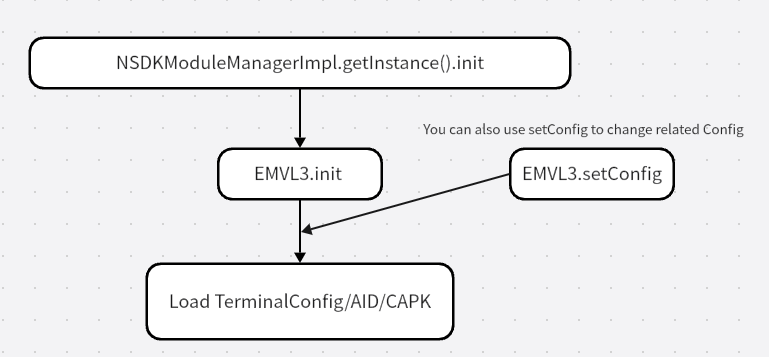
Initialize kernel status and set kernel configuration.
Initialization and configuration need only be performed once at module startup and whilst configuration remains the same during processing. And you can also use com.newland.sdk.emvl3.api.internal.EmvL3.setConfig to set configuration alone.
| EmvL3Const.CONFIG | Value | Description |
|---|---|---|
| L3_CFG_SUPPORT_EC | 0x0001 | Support pboc election currency transaction |
| L3_CFG_SUPPORT_SM | 0x0002 | Support SM algorithm |
| L3_CFG_SUPPORT_GET_RFAPDU | 0x0010 | Support get contactless APDU |
| L3_CFG_SUPPORT_RF_AFTERFINALSELECT | 0x0020 | Support callbcak after_final_select for contactless. |
| L3_CFG_DISABLE_TRACK2_LEN_CHECK | 0x0101 | Support disable check Track2 length |
In order to use L3 functions normally, EMVL3 init function must be used first.
Set "support/not support" the specified configuration.
Used to determine the config support functions. Use this function and Configuration Item to set the config parameters required for EmvL3Impl.init function.
Get the specified configuration.
Get the result of whether the specified configuration is supported.Confirm that the current configuration supports this parameter.
Lack of AID or CAPK configuration can lead to transaction failure.
Terminal Configuration :
- The Newland Reader maintains two separate Terminal configurations, one each for contact and contactless interfaces. A terminal configuration for a card >interface applies to all card applications (AIDs) supported by the Reader for that card interface. The terminal configurations are retained over power cycles.
- When the Reader powers up for the first time, it will have no terminal configurations.
AidImpl.loadTerminalConfig(byte[] config);
Load Terminal Configuration.
make sure TAG 9F06 in the parameter config(TLVs) with 16 bytes of “\x00”.
Terminal Configuration management:
ORDER_ⅠgetTerminalConfig();ENDORDER Get terminal configuration.
ORDER_ⅡflushTerminalConfig();ENDORDER Flush Terminal configuration ( will delete Terminal configuration. )
AID Configuration :
- Every AID can share Terminal Configuration parameters
- Each AID has its own configuration Tags, which can be unique to itself or duplicated with Terminal Configuration parameters. When the Tags duplicated with Terminal >Configuration, the Tags of AID configuration will be used for transactions.
AidImpl.loadAID(byte[] config);
Load/Update one AID configuration.
AID Configuration management:
ORDER_ⅠgetAID(AIDEntry aidentry);ENDORDER Get AID configuration.
/**
 * Value of TAG 9F06.
 */
private byte[] aid = new byte[16];
/**
 * Length of AID.
 */
private int aidlen;
/**
 * Value of TAG DF37.
 */
private byte[] kernelid= new byte[8];
/**
 * Extend usage
 * <p>
 * 0x00 - default, will no check<br>
 * |0x01 - should be matching transactionType<br>
 * |0x02 - should be matching externString</p>
 */
private int externCheckFlag;
/**
 * Value of TAG 9C.
 */
private byte transactionType;
private byte[]externString = new byte[50];
private int externStrlen;ORDER_Ⅱremove(AIDEntry aidentry);ENDORDER Remove the specified AID
ORDER_Ⅲflush();ENDORDER Flush EMV configuration ( will delete all of the configuration (Terminal and AIDs) )
ORDER_ⅣflushAID();ENDORDER Flush EMV configuration ( will delete all of the configuration (Terminal and AIDs) )
ORDER_ⅤgetAidCount();ENDORDER Get aid count.
ORDER_ⅥgetAIDList();ENDORDER numerate all of the aid configuration, include terminal configuration.
CAPK :Certification Authority Public Key.
CapkImpl.load(CAPKEntry capk);
Load one CAPK.
private byte[] modulus = new byte[248];
private int pkModuluslen;
private byte[] exponent = new byte[3];
private byte[] hash = new byte[20];
private byte[] expiredDate = new byte[4];
private byte[] rid = new byte[5];
private int index;
private byte algorithmIndicator;
private byte hashAlgorithm;
private byte[] rfu = new byte[4];
CAPK Configuration management:
ORDER_ⅠCapkImpl.get(byte[] rid, int index); ENDORDER Get one Certification Authority Public Key.
ORDER_ⅡCapkImpl.remove(byte[] rid, int index);ENDORDER Remove one Certification Authority Public Key.
ORDER_ⅢCapkImpl.flush();ENDORDER Remove ALL Certification Authority Public Key.
ORDER_ⅣCapkImpl.getCapkCount();ENDORDER Get CAPK Count.
ORDER_ⅤCapkImpl.getCAPKList();ENDORDER Get the whole capk configuration(rid + index)
CertRevocationImpl.load(CRLEntry crl);
Load one Certification Revocation List
/**
 * Registered Application Provider Identifier
 */
private byte[] rid = new byte[5];
/**
 * Certification Authority Public Key Index
 */
private int index;
/**
 * Certificate Serial Number
 */
private byte[] əcsn = new byte[3];
/**
 * Reserved for Futrue Use
 */
private byte[] rfu = new byte[3];
Certification Revocation list management:
ORDER_ⅠisExist(byte[] rid, int index, byte[] csn); ENDORDER Get one Certification Revocation List
ORDER_Ⅱremove(byte[] rid, int index, byte[] csn);ENDORDER Remove one Certification Revocation List
ORDER_Ⅲflush();ENDORDER Remove ALL Certification Revocation List
load(ExceptionFileEntry exceptionFile);
Load one exception file
/**
 * The Pan 19byte ascii
 */
private byte[] pan = new byte[19];
/**
 * Lenth of PAN
 */
private int panlen;
/**
 * PAN Serial Number. OxFF: ignore
 */
private int panSN;
/**
 * Reserved for Futrue Use
 */
private byte[] rfu = new byte[4];
Exception list Management:
ORDER_ⅠisExist(String pan, byte panSN); ENDORDER Get one exception file from list.
ORDER_ⅡisExist(byte[] pan, int panSN);ENDORDER Get one exception file from list.
ORDER_Ⅲremove(String pan, byte panSN);ENDORDER Remove one exception file from List.
ORDER_Ⅳflush();ENDORDER Remove All exception file from list.
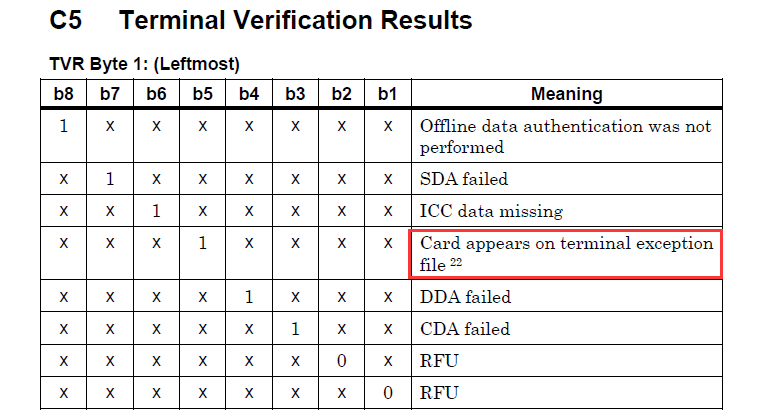
(Is the card number on the blacklist affecting transaction results related to the configuration of ICS and TAC/IAC.
Byte 4 Terminal Risk Management
bit 8 Floor Limit Checking
bit 7 Random Transaction Selections
bit 6 Velocity checking
bit 5 Transaction Log
bit 4 Exception File
bit 3 Terminal Risk Management irrespective of AIP setting
bit 2 Transaction Log mode (1-EMV, 0-PBOC)
bit 1 Rfu
)
MSR/Contact/Contactless transactions are performed during normal processing.
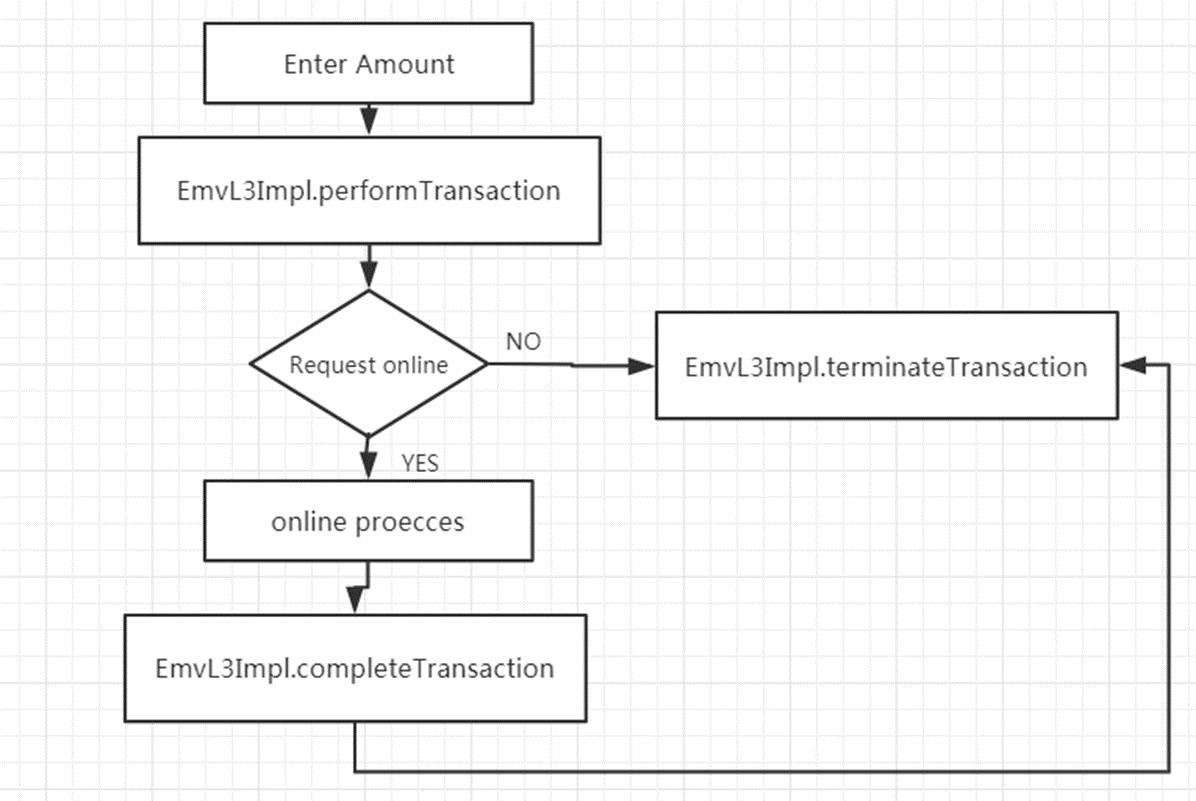
Perform transactions on the MSR, contact and contactless card interfaces.
Returns transaction result ( Declined, Approved, Online, Terminated, OK, Try_Another )
cardInputType :
| EmvL3Const.CardInterface | Value |
|---|---|
| MAGSTRIPE | 0x01 |
| CONTACT | 0x02 |
| CONTACTLESS | 0x04 |
| MANUAL | 0x08 |
timeout : Time in seconds for which the Reader will look for a card on the specified interfaces before returning a timeout error.
data : transaction data (TLVs).
listener : The detailed use of PerformTransactionListener can be found in Listener 4.1
PerformTransactionListener extends UIEventListener, APDUListener, TransResultListenerContinue to perform transactions after online processing (for MSR /contact/ contactless transaction).
After going online to the backend/acquirer host for online authorization, this API can be used by the terminal to convey the result of the online authorization to the Reader and to complete the transaction.
onlineResult : Possible Values: true: Online Processing with back-end host was completed false: Online Processing not completed. Could not connect to host or no response from host.
data : transaction data (TLVs).
completeListener : The detailed use of CompleteTransactionListener can be found in Listener 4.2
CompleteTransactionListener extends UIEventListener, APDUListener, TransResultListenerThis Functionality is used to handle transaction cleanup and release resource.
Terminate transaction and release resource.
Must be called after every transaction ( Mandatory )
Get the EMVL3 data according L3_DATA type (The type L3 data) or EMVL2 specified tag.
| EmvL3Const.L3_DATA | Value | Description |
|---|---|---|
| PAN | 0 | Application Primary Account Number (PAN) |
| TRACK1 | 1 | Track 1 Data |
| TRACK2 | 2 | Track 2 Data |
| TRACK3 | 3 | Track 3 Data |
| DD_CARD_TRACK1 | 4 | DD Card Track1 |
| DD_CARD_TRACK2 | 5 | DD Card Track2 |
| EXPIRE_DATE | 6 | Expired Date |
| SERVICE_CODE | 7 | Service Code |
| CARDHOLDER_NAME | 8 | Cardholder Name |
| POS_ENTRY_MODE | 9 | POS Entry Mode. Indicates the method by which the PAN was entered |
| CARD_SCHEME_ID | 10 | Card Scheme ID |
| SIGNAtrue | 11 | Signatrue Flag |
| ADVISE | 12 | Advise Flag, used for Contact EMV |
| ISSUER_SCRIPT_RESULT | 13 | Issuer Script Results |
| CVM_OUTCOME | 14 | CVM outcome. this data type only used for clss transction |
Update kernel data.
Get the TLV format data from current kernel.
Set Debug Mode/Level
LV_CLOSE : 0x00 Close debug.
LV_DEBUG : 0x01 Debug mode. log with normal debug.
LV_ALL : 0x03 Debug mode. log with all of the debug information.
When debugLv is LV_DEBUG or LV_ALL, the transaction log information will output in the Command line tool — Logcat
Get the version of EMVL3 module and L2 kernel.
| EmvL3Const.MODULE | Value | Description |
|---|---|---|
| L3_MODULE_API | 0 | EMVL3 SDK |
| L3_MODULE_EMV | 1 | EMV |
| L3_MODULE_EP | 2 | Entrypoint |
| L3_MODULE_QPBOC | 3 | QPBOC |
| L3_MODULE_PAYPASS | 4 | Paypass |
| L3_MODULE_PAYWAVE | 5 | Paywave |
| L3_MODULE_EXPRESSPAY | 6 | Express |
| L3_MODULE_DPAS | 7 | D-pass (Discover) |
| L3_MODULE_JCB | 8 | JCB |
| L3_MODULE_PURE | 9 | Pure |
| L3_MODULE_RUPAY | 10 | Rupay |
| L3_MODULE_INTERAC | 11 | Interac |
| L3_MODULE_MIR | 12 | MIR |
| L3_MDDULE_MULTIBANCO | 13 | Multibanco |
| L3_MDDULE_CPACE | 14 | CAPCE |
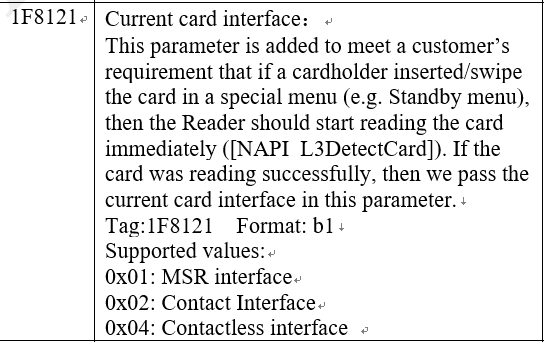
Detect card(Optional)
input : Card input mode, indicate card interfaces on which to look for a card.
timeout : Time in seconds for which the Reader will look for a card on the specified interfaces before returning a timeout error.
currentInterface : Current card interface if the card reading successfully.
Input / currentInterface :
0x01: MSR interface
0x02: Contact Interface
0x04: Contactless interface
0x08: Manul interface
(This function can be used to separate the detect card operation from the EmvL3Impl.performTransaction function and perform it in advance.By placing the detect card result of this function in the data of the EmvL3Impl.performTransactio parameter Tag-1F8121, the built-in detect card operation of the EmvL3Impl.performTransaction function can be skipped.
)
Response listener result and exchange L2/L3 data or Send Card Detect Message.
eventResult : listener result or response Card Detect event
listener result:
ErrorCode.L3_ERR_SUCC : Sucess
ErrorCode.L3_ERR_CANCEL : Cancel
ErrorCode.L3_ERR_TIMEOUT : Timeout
ErrorCode.L3_ERR_FAIL : Other failure
ErrorCode.L3_ERR_BYPASS : Bypass PIN
response Card Detect event:
EMVL3Const.ResponseEvent.CANCEL : 0x01
EMVL3Const.ResponseEvent.SUCC_MANUAL : 0x02
additional data of listener result or other special L2/L3 data you want to exchange, you can realize by the parameter data.
Callback function interface.
The following will introduce the functions of Listener interface based on the content of the callback functions set in EMVL3APIDemo.
Online/Offline PIN entry.(Online Enciphered Pin, Offline Plaintext Pin, Offline Enciphered Pin)
| EmvL3Const.PINType | Value | Description |
|---|---|---|
| PIN_ONLINE | 0 | Online PIN. |
| PIN_OFFLINE | 1 | Offline PIN. |
| PIN_OFFLINE_ENCIPHERED | 2 | Offline enciphered PIN. |
pinTryCnt : The rest PIN try counter of offline PIN
pinPK : NULL or PIN public key( used for enciphered offline PIN)
@Override
public void getPIN(int pinType, int pinTryCnt, publickey pinPK) {
    Log.d(getClass().getName(), String.format("PerfromTransactionListener::getPIN():  %d, %d", pinType, pinTryCnt));
    byte[] pan = mEmvL3Module.getData(EmvL3Const.L3_DATA.PAN);

    if(pinType == EmvL3Const.PINType.PIN_OFFLINE_ENCIPHERED && pinPK == null){
        showMessage("OfflinePin Without publickey");
        mEmvL3Module.responseEvent(ErrorCode.L3_ERR_CANCEL, null);
    }

    ((MainActivity) context).startEnterPin(pinType, new String(pan), pinPK);
}

public void startEnterPin(int Pintype, String pan, publickey pinPK) {
   appendText("Into Enter Pin");
   if(getPinKCV(2) == null){
      appendText("Withput Pin Key,Skip Enter Pin");
      mEmvL3Flow.ResponseEvent(ErrorCode.L3_ERR_SUCC, new byte[]{(byte)0x90,0x00});
      return;
   }
   try {
      NSDKModuleManager moduleManager = NSDKModuleManagerImpl.getInstance();
      DeviceManager deviceManager = (DeviceManager) moduleManager.getModule(ModuleType.DEVICE_MANAGER);
      DeviceInfo deviceInfo = deviceManager.getDeviceInfo();
      String model = deviceInfo.getDeviceModel();
      Log.d(getClass().getName(), "device model : "+model);
      if("X800".equalsIgnoreCase(model)) {
         Intent intent = new Intent(MainActivity.activity, SecondDisplayActivity.class);
         Bundle bundle = new Bundle();
         bundle.putBoolean("isRandomLayout", false);
         bundle.putInt("keyType", KEY_TYPE_DES);
         bundle.putBoolean("isX800", true);
         bundle.putString("moduleItem", "Online PIN");
         bundle.putString("PAN",  new String(pan));
         intent.putExtras(bundle);
         MainActivity.activity.startActivityForResult(intent,MainActivity.REQUEST_DISPLAY_ACTIVITY);
         return;
      }
   } catch (NSDKException e) {
      e.printStackTrace();
   }

   isNeedStart = false;
   Intent intent = new Intent(MainActivity.this, KeyBoardNumberActivity.class);
   intent.putExtra("pinType", Pintype);
   intent.putExtra("pan", pan);
   if(Pintype == EmvL3Const.PINType.PIN_OFFLINE_ENCIPHERED){
      byte[] pk_mod = new byte[pinPK.pk_mod_len];
      System. arraycopy(pinPK.pk_modulus,0,pk_mod,0,pinPK.pk_mod_len);
      intent.putExtra("module", ISOUtils.hexString(pinPK.pk_modulus));
      intent.putExtra("exponent", ISOUtils.hexString(pinPK.pk_exponent));
   }
   startActivityForResult(intent, 1);

}
After completing this listener,you need to call responseEvent to notify EMVL3 to process.
Candidate selection.
Application selection process, control the behavior of devices when making card application selections.
@Override
public void selectCandidateList(ArrayList<Candidate> arrayList) {
    Log.d(getClass().getName(), "PerfromTransactionListener::selectCandidateList");
    selectCandidate(arrayList);
    // m_EmvL3Module.responseEvent(ErrorCode.L3_ERR_SUCC, nSelect);
}

/**
 * Show the candidate list for customer to choose
 *
 * @param candidates The candidate list
 * @return Result of UI,ErrorCode.L3_ERR_SUCC for success, ErrorCode.L3_ERR_CANCEL for cancelled
 */
private void selectCandidate(final ArrayList<Candidate> candidates) {
    Log.d(getClass().getName(), " selectCandidate:" + candidates.size());
    String[] items = new String[candidates.size()];
    int index = 0;
    for (Candidate candidate : candidates) {
        String name = null;
        int n = 1;
        if (candidate.getIssuerCodeTableIndex() > 8) {
            n -= 1;
            candidate.setIssuerCodeTableIndex((byte)(candidate.getIssuerCodeTableIndex()-8));
        }

        //boolean supportIsscode = ((candidate.getTerminalCodeTable()[n] & (1L << (candidate.getIssuerCodeTableIndex() - 1))) != 0x00);
        if ( candidate.getPreferName()[0] != 0x00) {
            name = new String(candidate.getPreferName());
        } else {
            if (candidate.getLabel()[0] != 0x00) {
                name = new String(candidate.getLabel());
            } else {
                name = BytesUtils.bytesToHex(candidate.getAID());
            }
        }

        items[index] = name;
        index++;
    }

    selectItems("Select Candidates", items);
}

protected void selectItems(String title, String[] items) {

    ((MainActivity) context).runOnUiThread(new Runnable() {
        @Override
        public void run() {
            selectMenu(title, items);
        }
    });
}

private void selectMenu(String title, String[] items) {

    final byte[] choice = {0};

    AlertDialog.Builder builderDiaLog = new AlertDialog.Builder(context).setIcon(R.mipmap.ic_launcher).setTitle(title)
            .setSingleChoiceItems(items, 0, new DialogInterface.OnClickListener() {
                @Override
                public void onClick(DialogInterface dialogInterface, int i) {
                    choice[0] = (byte) i;
                }
            }).setPositiveButton("sure", new DialogInterface.OnClickListener() {
                @Override
                public void onClick(DialogInterface dialogInterface, int i) {
                    mEmvL3Module.responseEvent(ErrorCode.L3_ERR_SUCC, choice);
                }
            }).setNegativeButton("Cancel", new DialogInterface.OnClickListener() {
                @Override
                public void onClick(DialogInterface dialogInterface, int i) {
                    mEmvL3Module.responseEvent(ErrorCode.L3_ERR_CANCEL, choice);
                }
            });
    builderDiaLog.create().show();
}
After completing this listener,you need to call responseEvent to notify EMVL3 to process.
Success:EmvL3Impl.responseEvent(ErrorCode.L3_ERR_SUCC, data);
Cancel:EmvL3Impl.responseEvent(ErrorCode.L3_ERR_CANCEL, data);
Account type selection
control the behavior of the application when selecting card accounts.
@Override
public void selectAccount() {
	Log.d(getClass().getName(), "PerfromTransactionListener::selectAccount()");
	String[] items = new String[4];
	items[0] = "Default";
	items[1] = "Savings";
	items[2] = "Cheque/debit";
	items[3] = "Credit";

	selectItems("Select Account", items);
//  m_EmvL3Module.responseEvent(ErrorCode.L3_ERR_SUCC, null);
}
protected void selectItems(String title, String[] items) {

    ((MainActivity) context).runOnUiThread(new Runnable() {
        @Override
        public void run() {
            selectMenu(title, items);
        }
    });
}

private void selectMenu(String title, String[] items) {

    final byte[] choice = {0};

    AlertDialog.Builder builderDiaLog = new AlertDialog.Builder(context).setIcon(R.mipmap.ic_launcher).setTitle(title)
            .setSingleChoiceItems(items, 0, new DialogInterface.OnClickListener() {
                @Override
                public void onClick(DialogInterface dialogInterface, int i) {
                    choice[0] = (byte) i;
                }
            }).setPositiveButton("sure", new DialogInterface.OnClickListener() {
                @Override
                public void onClick(DialogInterface dialogInterface, int i) {
                    mEmvL3Module.responseEvent(ErrorCode.L3_ERR_SUCC, choice);
                }
            }).setNegativeButton("Cancel", new DialogInterface.OnClickListener() {
                @Override
                public void onClick(DialogInterface dialogInterface, int i) {
                    mEmvL3Module.responseEvent(ErrorCode.L3_ERR_CANCEL, choice);
                }
            });
    builderDiaLog.create().show();
}
After completing this listener,you need to call responseEvent to notify EMVL3 to process.
Success:EmvL3Impl.responseEvent(ErrorCode.L3_ERR_SUCC, data);
Cancel:EmvL3Impl.responseEvent(ErrorCode.L3_ERR_CANCEL, data);
Multi-language selection
The application should match the language Preference and complete the language selection. The selectLanguage Listener can control the behavior of devices when selecting language.
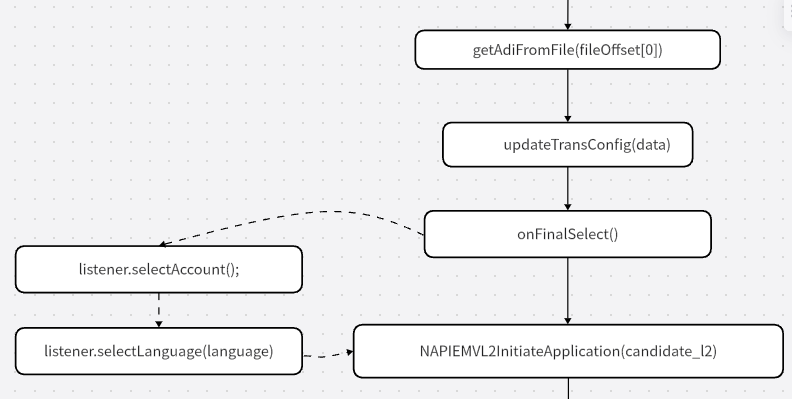
selectAccount and selectLanguage Listener can be optionally executed at the end of application initialization stage.
@Override
public void selectLanguage(byte[] languageNo) {
    Log.d(getClass().getName(), "PerfromTransactionListener::selectLanguage()");
    if (languageNo == null) {
        mEmvL3Module.responseEvent(ErrorCode.L3_ERR_SUCC, null);
        return;
    }

    String[] items = new String[2];
    items[0] = "Chinese";
    items[1] = "English";

    selectItems("Select Language", items);

}

protected void selectItems(String title, String[] items) {

    ((MainActivity) context).runOnUiThread(new Runnable() {
        @Override
        public void run() {
            selectMenu(title, items);
        }
    });
}

private void selectMenu(String title, String[] items) {

    final byte[] choice = {0};

    AlertDialog.Builder builderDiaLog = new AlertDialog.Builder(context).setIcon(R.mipmap.ic_launcher).setTitle(title)
            .setSingleChoiceItems(items, 0, new DialogInterface.OnClickListener() {
                @Override
                public void onClick(DialogInterface dialogInterface, int i) {
                    choice[0] = (byte) i;
                }
            }).setPositiveButton("sure", new DialogInterface.OnClickListener() {
                @Override
                public void onClick(DialogInterface dialogInterface, int i) {
                    mEmvL3Module.responseEvent(ErrorCode.L3_ERR_SUCC, choice);
                }
            }).setNegativeButton("Cancel", new DialogInterface.OnClickListener() {
                @Override
                public void onClick(DialogInterface dialogInterface, int i) {
                    mEmvL3Module.responseEvent(ErrorCode.L3_ERR_CANCEL, choice);
                }
            });
    builderDiaLog.create().show();
}
After completing this listener,you need to call responseEvent to notify EMVL3 to process.
Success:EmvL3Impl.responseEvent(ErrorCode.L3_ERR_SUCC, data);
Cancel:EmvL3Impl.responseEvent(ErrorCode.L3_ERR_CANCEL, data);
Credentials checking
only used for Unionpay PBOC
type : Credential type
number : The Credential number you need to check
@Override
public void checkCredentials(byte type, byte[] number) {
    com.nlutils.util.LoggerUtils.e(" checkCredentials:");
    String credentTials;
    switch (type) {
        case 0:
            credentTials = "ID CARD:" + BytesUtils.bytesToBinaryString(number);
            break;
        case 1:
            credentTials = "OFFICER:" + BytesUtils.bytesToBinaryString(number);
            break;
        case 2:
            credentTials = "PASSPORT:" + BytesUtils.bytesToBinaryString(number);
            break;
        case 3:
            credentTials = "ENTRY CARD:" + BytesUtils.bytesToBinaryString(number);
            break;
        case 4:
            credentTials = "TEMP IDCARD:" + BytesUtils.bytesToBinaryString(number);
            break;
        default:
            credentTials = "OTHER:" + BytesUtils.bytesToBinaryString(number);
            break;
    }
    userConfirm("CheckCredenTials", credentTials);
}

protected void userConfirm(String title, String cardNum) {

    ((MainActivity) context).runOnUiThread(new Runnable() {
        @Override
        public void run() {
            confirm(title, cardNum);
        }
    });
}

private void confirm(String title, String cardNum) {

    AlertDialog.Builder builderDiaLog = new AlertDialog.Builder(context).setIcon(R.mipmap.ic_launcher).setTitle(title)
            .setMessage(cardNum).setPositiveButton("sure", new DialogInterface.OnClickListener() {
                @Override
                public void onClick(DialogInterface dialogInterface, int i) {
                    mEmvL3Module.responseEvent(ErrorCode.L3_ERR_SUCC, null);
                }
            }).setNegativeButton("Cancel", new DialogInterface.OnClickListener() {
                @Override
                public void onClick(DialogInterface dialogInterface, int i) {
                    mEmvL3Module.responseEvent(ErrorCode.L3_ERR_CANCEL, null);
                }
            });
    builderDiaLog.create().show();
}
After completing this listener,you need to call responseEvent to notify EMVL3 to process.
Success:EmvL3Impl.responseEvent(ErrorCode.L3_ERR_SUCC, null);
Cancel:EmvL3Impl.responseEvent(ErrorCode.L3_ERR_CANCEL, null);
Data Exchange
Only used for mastercard contactless [PAYPASS]
type : 0x01-DEK, 0x02-DET
data : DEK sent command or DET response command
After completing this listener,you need to call responseEvent to notify EMVL3 to process.
EmvL3Impl.responseEvent(ErrorCode.L3_ERR_SUCC, null);
Listener after Final Selection
This function used after Final Selection but before GPO We can update the Terminal/AID Configurations according to the different AID in current Contact transaction by using EmvL3Impl.setData(int, byte[]), For contactless trasaction you need use EmvL3Impl.responseEvent(int eventResult, byte[] data).
cardInterface :
EmvL3Const.CardInterface.CONTACT
or
EmvL3Const.CardInterface.CONTACTLESS
After completing this listener,you need to call responseEvent to notify EMVL3 to process.
EmvL3Impl.responseEvent(ErrorCode.L3_ERR_SUCC, null);
Get Manual Data (Expiry date and CVV2, or other data you need)
Used for manual transaction.
After completing this listener,you need to call responseEvent to notify EMVL3 to process.
EmvL3Impl.responseEvent(ErrorCode.L3_ERR_SUCC, null);
Display the card number to double check.
Used for contact, MSR and manual transaction.
After completing this listener,you need to call responseEvent to notify EMVL3 to process.
EmvL3Impl.responseEvent(ErrorCode.L3_ERR_SUCC, null);
Issuer Voice Referrals
An attended terminal shall either display the ‘CALL YOUR BANK’ message to the attendant, or shall alert the attendant in some other way that the Issuer has requested a voice referral. Appropriate application data, such as the Application PAN, should be displayed or printed to the attendant in order to perform the referral. Appropriate messages should be displayed requesting the attendant to enter data indicating that the transaction has been approved or declined as a result of the referral process.
After completing this listener,you need to call responseEvent to notify EMVL3 to process.
EmvL3Impl.responseEvent(ErrorCode.L3_ERR_SUCC, null);
allowing applications to access APDU exchange data for use during APDU interaction between terminals and cards.
Used for Contact/contactless transaction
After completing this listener,you need to call responseEvent to notify EMVL3 to process.
EmvL3Impl.responseEvent(ErrorCode.L3_ERR_SUCC, null);
Listener for get transresult and errorcode.
This function used after for get transaction result and errorcode.
| EmvL3Const.TransResult | Value | Description |
|---|---|---|
| L3_TXN_OK | 0 | Transaction is performing well. |
| L3_TXN_TERMINATE | 1 | Transaction is terminated because of unexpected errors, |
| L3_TXN_TRY_ANOTHER | 2 | Try another interface (Contactless transaction). |
| L3_TXN_DECLINE | 3 | Transaction decline (Offline /Online) |
| L3_TXN_APPROVED | 4 | Transaction approved(Offline /Online) |
| L3_TXN_ONLINE | 5 | Transaction request online, you must send the transaction online for authorization. |
PerfromTransactionListener :
@Override
public void transResult(int result, int errcode) {
    Log.d(getClass().getName(), String.format("PerfromTransactionListener::transResult():  %d, %d ", result, errcode));
    Log.d(getClass().getName(), mEmvL3Module.errorMessage(errcode));
    /**
     * Handle transaction result
     */
    switch (result) {
        case EmvL3Const.TransResult.L3_TXN_APPROVED:
            getKernelData(false);
            showToast("approve offline");
            endTransaction();
            break;
        case EmvL3Const.TransResult.L3_TXN_DECLINE:
            showToast("declined offline");
            getKernelData(false);
            endTransaction();
            break;
        case EmvL3Const.TransResult.L3_TXN_ONLINE:
            getKernelData(false);
            goOnline();
            break;
        default:
            if (result == EmvL3Const.TransResult.L3_TXN_TRY_ANOTHER) {
                showMessage("Try Another Interface");
            } else if (errcode == ErrorCode.L3_ERR_TIMEOUT) {
                showMessage("User Timeout");
            } else if (errcode == ErrorCode.L3_ERR_CANCEL || errcode == ErrorCode.EMV_ERR_CANCEL) {
                showMessage("Transaction Cancelled");
            } else {
                showMessage("Transaction Aborted");
            }
            getKernelData(true);
            showToast("transaction terminate");
            endTransaction();
            break;
    }
}
CompleteTransactionListener :
@Override
public void transResult(int result, int errcode) {
    Log.d(getClass().getName(), String.format("CompleteTransactionListener::transResult():  %d, %d ", result, errcode));
    Log.d(getClass().getName(), mEmvL3Module.errorMessage(errcode));
    /**
     * Handle transaction result
     */
    switch (result) {
        case EmvL3Const.TransResult.L3_TXN_APPROVED:
            getKernelData(false);
            showToast("approve online");
            endTransaction();
            break;
        case EmvL3Const.TransResult.L3_TXN_DECLINE:
            getKernelData(false);
            showToast("decline online");
            endTransaction();
            break;
        default:
            getKernelData(true);
            if (result == EmvL3Const.TransResult.L3_TXN_TRY_ANOTHER) {
                showMessage("Try Another Interface");
            } else if (errcode == ErrorCode.L3_ERR_TIMEOUT) {
                showMessage("User Timeout");
            } else if (errcode == ErrorCode.L3_ERR_CANCEL || errcode == ErrorCode.EMV_ERR_CANCEL) {
                showMessage("Transaction Cancelled");
            } else {
                showMessage("Transaction Aborted");
            }
            showToast("Transaction terminate");
            endTransaction();
            break;

    }
}
This listener does not need to call responseEvent.
Display the message according uiEventID.(control the display effect of the device screen during various UI events.)
| EmvL3Const.UIEvent | Value | Description |
|---|---|---|
| UI_PRESENT_CARD | 0 | Reader is ready to read a cardthe **first byte **in 'UI Event Data' indicates the specified event [L3_UI_CARD] (see EmvL3Const.UICard) |
| UI_PROCESSING | 1 | The Reader is processing the transaction |
| UI_CAPK_LOAD_FAIL | 2 | Load CAPK fails, checksum error. |
| UI_SEE_PHONE | 3 | The cardholder must interact with their mobile device to complete the transaction. |
| UI_CHIP_ERR_RETRY | 5 | Reading Chip error, Retry 3 times before Fallback |
| UI_PIN_STATUS | 6 | Used for external trasaction. You can get pinblock and ksn after entering pin. |
@Override
public void transResult(int result, int errcode) {
    Log.d(getClass().getName(), String.format("PerfromTransactionListener::transResult():  %d, %d ", result, errcode));
    Log.d(getClass().getName(), mEmvL3Module.errorMessage(errcode));
    /**
     * Handle transaction result
     */
    switch (result) {
        case EmvL3Const.TransResult.L3_TXN_APPROVED:
            getKernelData(false);
            showToast("approve offline");
            endTransaction();
            break;
        case EmvL3Const.TransResult.L3_TXN_DECLINE:
            showToast("declined offline");
            getKernelData(false);
            endTransaction();
            break;
        case EmvL3Const.TransResult.L3_TXN_ONLINE:
            getKernelData(false);
            goOnline();
            break;
        default:
            if (result == EmvL3Const.TransResult.L3_TXN_TRY_ANOTHER) {
                showMessage("Try Another Interface");
            } else if (errcode == ErrorCode.L3_ERR_TIMEOUT) {
                showMessage("User Timeout");
            } else if (errcode == ErrorCode.L3_ERR_CANCEL || errcode == ErrorCode.EMV_ERR_CANCEL) {
                showMessage("Transaction Cancelled");
            } else {
                showMessage("Transaction Aborted");
            }
            getKernelData(true);
            showToast("transaction terminate");
            endTransaction();
            break;
    }
}
CompleteTransactionListener :
@Override
public void uiEvent(int i, byte[] bytes) {
    processUIEvent(i, bytes);
    mEmvL3Module.responseEvent(ErrorCode.L3_ERR_SUCC, null);
}

private void processUIEvent(int uiEvent, byte[] uiEventData) {
    Log.d(getClass().getName(), "ProcessUIEvent() called");

    switch (uiEvent) {
        /**
         * Prompt the customer to tap or insert or swipe the card.
         * The ui event data will be used to distinguish the type .
         */
        case EmvL3Const.UIEvent.UI_PRESENT_CARD:
            //Present card again.
            if (uiEventData[0] == EmvL3Const.UICard.UI_PRESENTCARD_AGAIN) {
                showMessage("PRESENT CARD AGAIN");
                break;
            }

            //Contact card fallback,prompting customer to swipe card
            if (uiEventData[0] == EmvL3Const.UICard.UI_FALLBACK_CT) {
                showMessage("CONTACT FALLBACK");
                break;
            }

            //Contactless card fallback,prompting customer to insert or swipe card
            if (uiEventData[0] == EmvL3Const.UICard.UI_FALLBACK_CLSS) {
                showMessage("CONTACTLESS FALLBACK");
                break;
            }

            //Swiped card which has chip,need to insert the card
            if (uiEventData[0] == EmvL3Const.UICard.UI_USE_CHIP) {
                showMessage("PLS USE CHIP");
                break;
            }

            //To show the current card interface type, like EmvL3Const.UICard.UI_STRIPE{@}
            if (uiEventData[0] != EmvL3Const.UICard.UI_KEYIN) {
                showMessage("TAP/INSERT/SWIP");
                break;
            }
            break;
        case EmvL3Const.UIEvent.UI_SEE_PHONE:
            // You can show that See Phone for Instructions
            showMessage("PLS SEE PHONE FOR STRUCTION");
            break;
        case EmvL3Const.UIEvent.UI_CHIP_ERR_RETRY:
            //The chip is error or card is reverse inserted
            showMessage("CHIP ERR ,PLS RETRY");
            break;
        case EmvL3Const.UIEvent.UI_PROCESSING:
            showMessage("Processing...");
            break;
        case EmvL3Const.UIEvent.UI_PIN_STATUS:
            showMessage("PIN STATUS");
            break;
    }
}
After completing this listener,you need to call responseEvent to notify EMVL3 to process.
EmvL3Impl.responseEvent(ErrorCode.L3_ERR_SUCC, null);
