API reference AbortParam Object
Applicable Scenarios
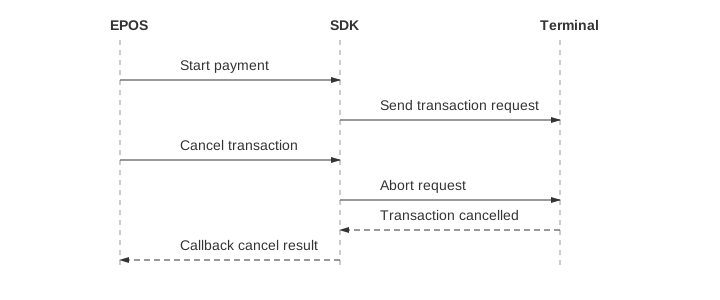
The transaction abort mechanism allows the EPOS application to actively terminate an ongoing transaction in certain situations, such as:
The customer does not complete the payment operation for an extended period.
The EPOS application needs to cancel the current transaction.
An abnormal condition is detected during the transaction process.
A previous Display is still shown and the next operation presents its own terminal UI, such as a financial operation or NFC Tag (see Device Display & Interaction).
In these cases, the EPOS can send an Abort request.
AbortParam abortParam = AbortParam.newBuilder()
        .orgExchangeIdentification(lastExchangeId)
        .build();

// Send abort request to cancel the specified exchange
RetailerManager.provideSystemService()
        .newAbortExchange(abortParam)
        .startAsyncExchange(new Exchange.RetailerSDKCallback<AbortResult>() {

    @Override
    public void onError(int errCode, String errMsg) {
        // Called when the abort request fails
    }

    @Override
    public void onResult(AbortResult abortResult) {
        // Handle abort result.
    }
});
using System;
using PayExplorerConnect;
public void HandleAbortError(int code, string message)
{
// Called when the abort request fails
}
public void HandleAbortResult(AbortResult result)
{
// Handle abort result.
}
public string StartAbort()
{
// Replace the sample ID with the exchange ID returned by the original request.
AbortParam param = new AbortParam.Builder()
.OrgExchangeIdentification("000000001")
.Build();
// Send abort request to cancel the specified exchange
string exchangeId = RetailerManager
.ProvideSystemService()
.NewAbortExchange(param)
.StartAsyncExchange(HandleAbortResult, HandleAbortError);
return exchangeId;
}#import <PayExplorerConnect/RetailerManager.h>
#import <PayExplorerConnect/AbortParam+Builder.h>
// Use the exchange ID saved when the original request started.
AbortParam *params = [AbortParam makeWithBuilder:^(AbortParamBuilder *builder) {
builder.orgExchangeIdentification(@"000000001");
builder.abortReason(@"abort payment");
}];
[[RetailerManager sharedManager] abort:params block:^(NSString *exchangeId) {
// Save the exchange ID to track this request.
} result:^(NSInteger errcode, NSString *msg) {
if (errcode != 0) {
// Handle abort error.
return;
}
// Handle abort result.
}];API reference AbortResult Object
After the abort request is sent, the terminal will return a response indicating whether the abort was successful.
Successful Abort
The terminal receives the abort instruction and successfully stops the current transaction process. A clear abort success response is returned to the EPOS.
Invalid Abort
If the transaction has already entered a non-interruptible financial processing stage, the terminal may return an “Abort Invalid” error code.
Abort requests may fail in the following situations:
The transaction request has already been sent to the acquirer channel, and the acquiring application is waiting for the channel response.
The payment terminal is currently executing a critical transaction operation, and the transaction cannot be interrupted at that stage.
