Learn More
New to the PayExplorer Connect SDK? Here are some helpful resources:
PayExplorer Connect SDK API
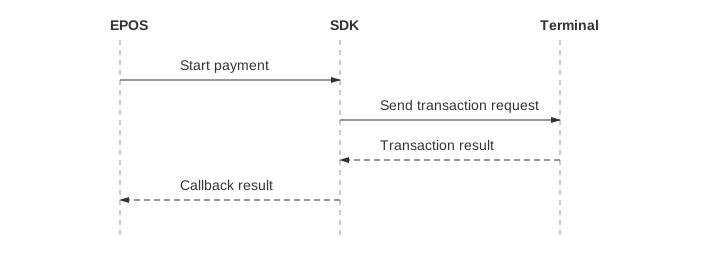
The SDK supports sale, refund, reversal, and other operations. This guide uses a standard payment (sale) to demonstrate the common Exchange flow: prepare parameters, start a request, and handle its result. Financial, device, and system operations can follow the same calling pattern, using the entry points, parameters, and business results in their API references.
Use Event Notification Services for progress feedback. Use Abort Transaction when interruption is needed and Transaction Query when the original request's status or result needs checking. Validate the implemented paths with the Go-Live Checklist.
API reference PaymentParam Object
A PaymentParam object should be created before initiating a transaction, with the key parameters properly configured:
// Build a payment parameter object
PaymentParam paymentParam = PaymentParam.newBuilder()
    .transactionReference("12345678")
    .totalAmount("99.99")
    .build();
using System;
using PayExplorerConnect;
// Replace the sample values with your transaction data.
public PaymentParam CreatePaymentParam()
{
return new PaymentParam.Builder()
.TransactionReference("12345678")
.TotalAmount("99.99")
.Build();
}#import <PayExplorerConnect/RetailerManager.h>
#import <PayExplorerConnect/PaymentParam+Builder.h>
// Build payment parameters
PaymentParam *params = [PaymentParam makeWithBuilder:^(PaymentParamBuilder *builder) {
builder.transactionReference(@"12345678");
builder.totalAmount(@"99.99");
}];Register callbacks and start the request with the prepared parameters. The SDK returns results asynchronously; save the Exchange ID to track the request.
// Start the payment exchange with callback
RetailerManager.provideFinancialService()
        .newPaymentExchange(paymentParam)
        .startAsyncExchange(new Exchange.RetailerSDKCallback<PaymentResult>() {

            @Override
            public void onError(int code, String msg) {
                // Application logic: handle request/communication errors
            }

            @Override
            public void onResult(PaymentResult result) {
                handlePaymentResult(result);
            }
        });
public void HandlePaymentError(int code, string message)
{
// Application logic: handle request/communication errors
}
public string StartPayment()
{
PaymentParam paymentParam = CreatePaymentParam();
// Start the payment exchange with callback
string exchangeId = RetailerManager
.ProvideFinancialService()
.NewPaymentExchange(paymentParam)
.StartAsyncExchange(HandlePaymentResult, HandlePaymentError);
return exchangeId;
}// Start the payment exchange with callback
[[RetailerManager sharedManager] payment:params block:^(NSString *exchangeId) {
// exchangeId is used for tracking the transaction
} result:^(id result, NSInteger errcode, NSString *msg) {
if (errcode != 0 && result == nil) {
[self handlePaymentError:errcode message:msg];
return;
}
PaymentResult *paymentResult = (PaymentResult *)result;
[self handlePaymentResult:paymentResult];
}];The onError callback indicates that the request failed to be sent or processed by the SDK.
A completed transaction result is always returned through the result callback.
For detailed error definitions, see: Error Codes
API reference PaymentResult Object
For every Exchange, first confirm completion, then determine the business outcome. If the result type exposes an end flag such as endFlag or EndFlag, false identifies an intermediate response and true identifies the final response. If no end flag is exposed, receiving a valid result callback completes that Exchange. Use the flag provided by the result type in the SDK version you use.
The SDK returns a PaymentResult object through the result callback. After confirming the final response, read the following fields to determine the payment outcome and retrieve transaction details:
// Handle payment result returned from the SDK
private void handlePaymentResult(PaymentResult result) {
    // Skip null or intermediate responses.
    if (result == null || !result.isEndFlag()) {
        return;
    }
    // Check transaction status
    if (Response5Code.SUCC == result.getResponse()) {
        // Transaction succeeded
        String authorisationCode = result.getAuthorisationCode();
        // Application logic: update UI or record transaction
    } else {
        // Transaction failed, cancelled, or pending
        RetailerResultDetail1Code reason = result.getResponseReason();
        String responseInfo = result.getAdditionalResponseInformation();
        // Application logic: handle failure reason
    }
}
// Handle payment result returned from the SDK
public void HandlePaymentResult(PaymentResult result)
{
// Skip null or intermediate responses.
if (result?.EndFlag != true) return;
// Check transaction status
if (result.Response == ResponseCode.SUCC)
{
// Transaction succeeded
// Application logic: update UI or record transaction
}
else
{
// Transaction failed, cancelled, or pending
// Application logic: handle failure reason
}
}// Handle payment result
- (void)handlePaymentResult:(PaymentResult *)result {
// Skip null or intermediate responses.
if (!result || !result.endFlag) {
return;
}
if (result.response == ResponseCodeSUCC) {
// Transaction succeeded
NSString *authCode = result.authorisationCode;
// Application logic: update UI or record transaction
} else {
// Transaction failed, cancelled, or pending
RetailerResultDetailCode reason = result.responseReason;
NSString *info = result.additionalResponseInformation;
// Application logic: handle failure reason
}
}
// Handle payment error
- (void)handlePaymentError:(NSInteger)code message:(NSString *)msg {
// Application logic: handle SDK errors
}Important: After confirming the final response, the transaction is considered successful only when response == SUCC.
