This document provides practical guidance for developers building Android applications that interact with the NHAL (Newland Hardware Abstraction Layer). It covers integration steps, usage instructions, and example code to help developers understand and effectively utilize the HAL APIs.
For detailed API specifications, please refer to the official HAL API Reference.
Make sure the HAL service is installed before using the APIs. For Newland Android POS devices, please install newland-pos-hal-service-x.x.x.apk.

libs folder by adding the following codes to the build.gradle:implementation fileTree(include: ['*.jar','*.aar'], dir: 'libs')HalService is the main entry point for the HAL interfaces.
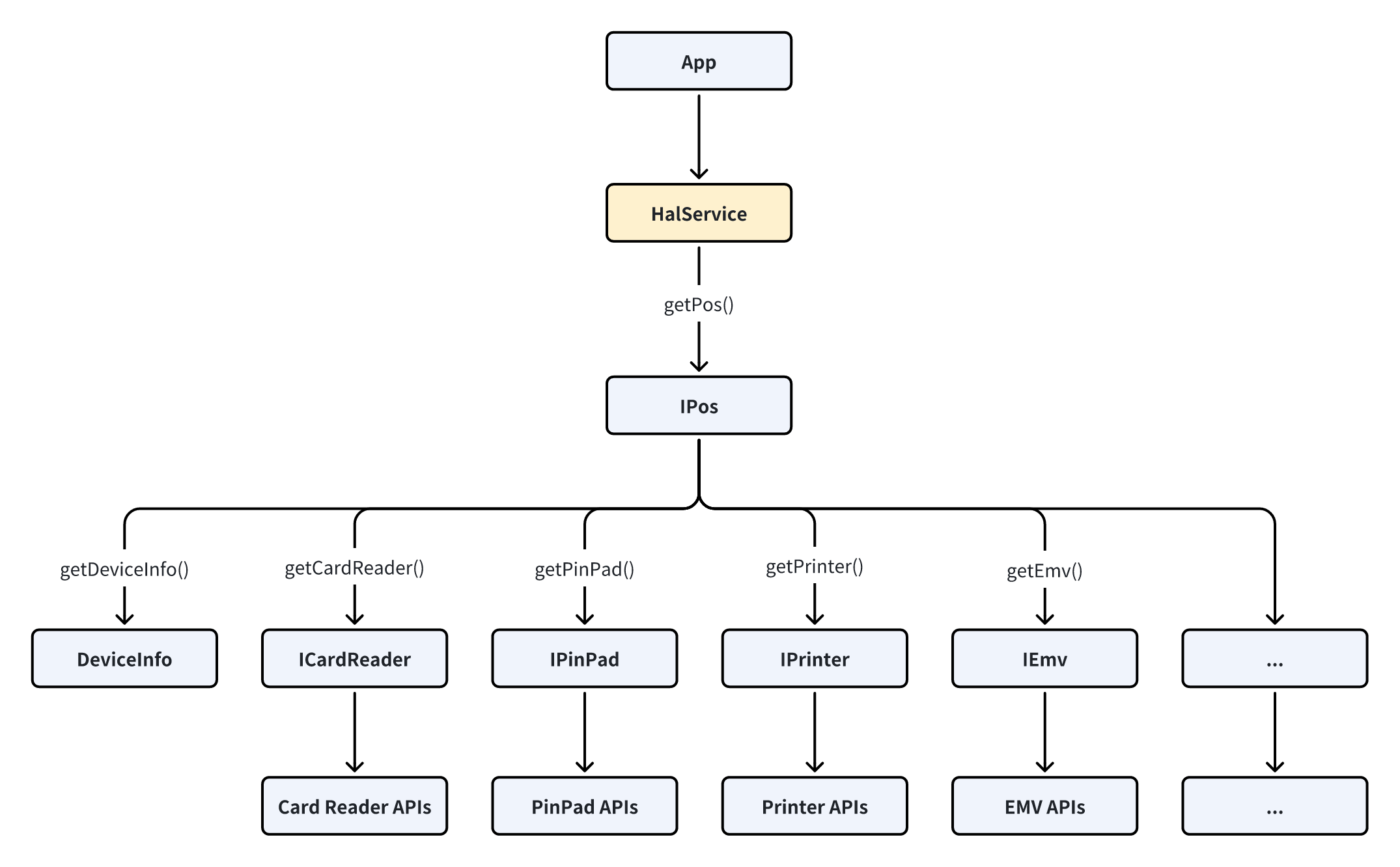
If you want to use the functions of related modules, you can obtain the modules first and then call their APIs.
// Get the local(INTERNAL) POS device.
IPos pos = HalService.getInstance().getPos(null);

//For example, get the IScanner Module.
IScanner scanner =pos.getScanner();

//For example, get the IEmv Module.
IEmv emv = pos.getEmv();

// Call the API of the module
try {
    String version = emv.getKernelVersion(KernelType.EMV);
} catch (Exception e) {
    // Handle the exception
}
Error Reporting Strategy:
For synchronous interfaces, errors are reported via exceptions.
For asynchronous interfaces, errors are primarily reported via callbacks.
In both cases, exceptions may still occur and must be properly caught and handled to ensure stability.
To simplify application development, NHAL offers the HalException class, which converts an exception message into a HalException object. Using the HalException object, developers can conveniently retrieve both the error code and the error message resulting from interface operations.
try {
    // Call HAL interface
} catch (Exception e) {
    HalException halException = HalException.fromMessage(e.getMessage());
    Log.d(TAG, "Error code: " + halException.getErrorCode());
    Log.d(TAG, "Detail code: " + halException.getDetailErrorCode());
    Log.d(TAG, "Error message: " + halException.getErrorMessage());
}This section mainly introduces how to use the interfaces of the core POS modules as shown in the following table:
| Module | Description |
|---|---|
| DeviceInfo | Get POS device informations. |
| IPinPad | Provides key management, encryption and decryption, and PIN entry functions. |
| ICardReader | Used for card searching and creating instances of various card types. |
| IPrinter | Used to print receipt. |
| IScanner | Scan and Decode. |
| IBeeper | Activates the beeper. |
| ILight | Controls the state of indicator lights. |
| IEmv | Provides EMV L3 functions. |
| ISerialPort | Provides serial port communication (read/write) capabilities. |
| ISystem | Set/Get system configuration. |
| ILogger | HAL log switch. |
| IRouteManager | Manages specific IPs to use designated network types. |
| IApnManager | Manages APN. |
| ICashBox | Open the cash box. |
Get Module:
DeviceInfo deviceInfo;
try {
    IPos pos = HalService.getInstance().getPos(null);
    deviceInfo = pos.getDeviceInfo();
} catch (Exception e) {
    // Handle the exception
}//Get POS device Model
String model = deviceInfo.getModel();
//Get POS device Manufacturer
String Manufacturer = deviceInfo.getManufacturer();
//Get POS device Serial Number
String sn = deviceInfo.getSerialNumber();
//Get whether the POS device supports CashBox
boolean isSupportCashBox = deviceInfo.isSupportCashBox();
//Get Led Config, refer to Class : com.pos.hal.device.LedConfig
int ledConfig = deviceInfo.getLedConfig();
//... ...This module mainly consists of three functionalities: key management, encryption/decryption, and PIN entry.
Get module:
IPinPad pinPad;
try {
    IPos pos = HalService.getInstance().getPos(null);
    pinPad = pos.getPinPad();
} catch (Exception e) {
    // Handle the exception
}Key sourceKey = new Key.Builder()
.setIndex(250)
.setType(KeyType.SYM_DES)
.setUsage(KeyUsage.SYM_KEK)
.build();
Key dstKey = new Key.Builder()
.setIndex(1)
.setType(KeyType.SYM_DES)
.setUsage(KeyUsage.SYM_DUKPT)
.setLength(16)
.setData(BytesUtils.hexStringToBytes("4DE2C2838D2990C94DE2C2838D2990C9"))
.setKcvMode(KcvMode.NONE)
.setKsn(BytesUtils.hexStringToBytes("00000000000000000000"))
.build();
SymAlgorithmParameters symAlgorithmParameters = new SymAlgorithmParameters();
symAlgorithmParameters .setCipherMode(CipherMode.ECB);
KeyLoadParameters keyLoadParameters = new KeyLoadParameters.Builder()
.setSymAlgParams(symAlgorithmParameters)
.build();
try {
pinPad.loadKey(KeyLoadMethod.CIPHER, keyLoadParameters, sourceKey, dstKey);
} catch (Exception e) {
// Handle the exception
}private byte[] encryptAndDecrypt(byte[] plainData) {
try {
Key dataKey = new Key.Builder()
.setIndex(1)
.setType(KeyType.SYM_DES)
.setUsage(KeyUsage.SYM_DATA)
.build();
SymAlgorithmParameters params = new SymAlgorithmParameters.Builder()
.setCipherMode(CipherMode.ECB)
.setPaddingMode(PaddingMode.NONE)
.build();
CipherOutput encryptedOutput = pinPad.encrypt(dataKey , params, plainData);
byte[] cipherData = encryptedOutput.getData();
CipherOutput decryptedOutput = pinPad.decrypt(dataKey , params, cipherData );
byte[] decryptedPlainData = decryptedOutput.getData();
if (Arrays.equals(plainData, decryptedPlainData)) {
// Data successfully decrypted.
}
} catch (Exception e) {
// Handle the exception
}
}Workflow:
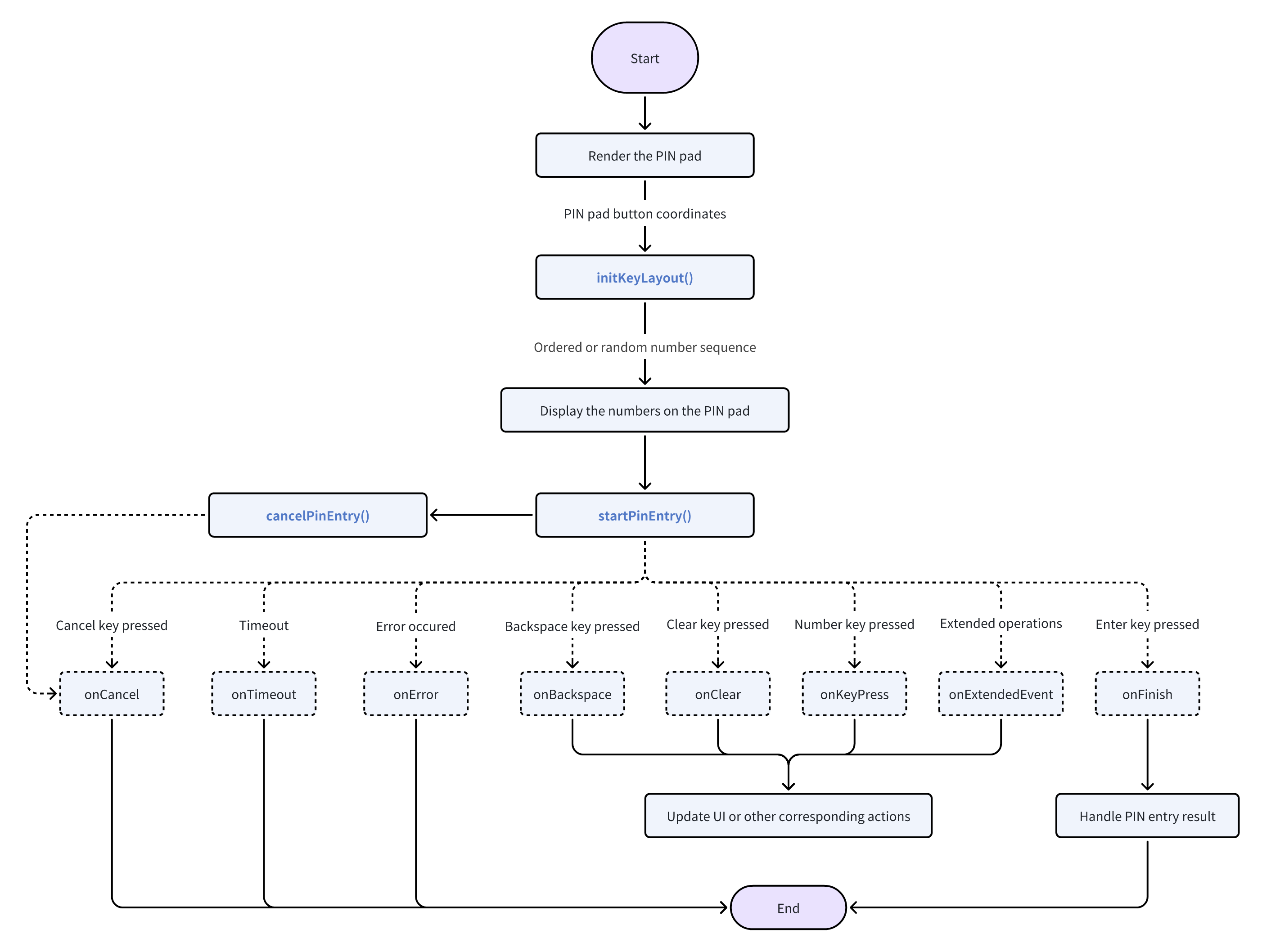
Example code:
Given the task of displaying a password keypad interface as shown below, with the coordinates of each key already available:
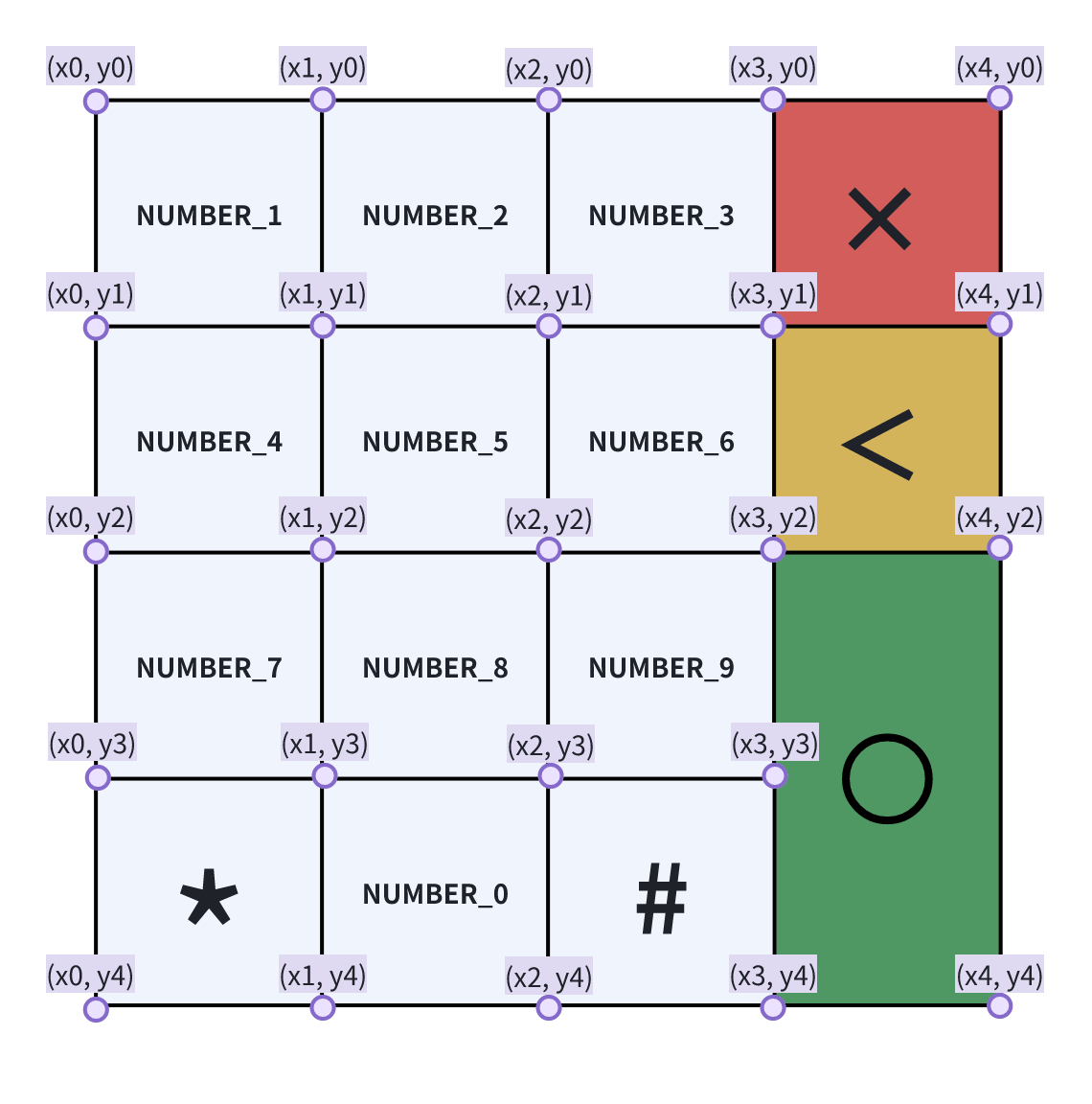
Get the digit sequence to be displayed on the PIN pad via initKeyLayout method:
public PinPadButton[] getPinPadButtons() {
    PinPadButton number0 = new PinPadButton.Builder()
            .setId(PinPadButtonId.NUMBER_0)
            .setTopLeftX(x1)
            .setTopLeftY(y3)
            .setRightBottomX(x2)
            .setRightBottomY(y4)
            .build();
    PinPadButton number1 = new PinPadButton.Builder()
            .setId(PinPadButtonId.NUMBER_1)
            .setTopLeftX(x0)
            .setTopLeftY(y0)
            .setRightBottomX(x1)
            .setRightBottomY(y1)
            .build();
    PinPadButton number2 = new PinPadButton.Builder()
            .setId(PinPadButtonId.NUMBER_2)
            .setTopLeftX(x1)
            .setTopLeftY(y0)
            .setRightBottomX(x2)
            .setRightBottomY(y1)
            .build();
    PinPadButton number3 = new PinPadButton.Builder()
            .setId(PinPadButtonId.NUMBER_3)
            .setTopLeftX(x2)
            .setTopLeftY(y0)
            .setRightBottomX(x3)
            .setRightBottomY(y1)
            .build();
    PinPadButton number4 = new PinPadButton.Builder()
            .setId(PinPadButtonId.NUMBER_4)
            .setTopLeftX(x0)
            .setTopLeftY(y1)
            .setRightBottomX(x1)
            .setRightBottomY(y2)
            .build();
    PinPadButton number5 = new PinPadButton.Builder()
            .setId(PinPadButtonId.NUMBER_5)
            .setTopLeftX(x1)
            .setTopLeftY(y1)
            .setRightBottomX(x2)
            .setRightBottomY(y2)
            .build();
    PinPadButton number6 = new PinPadButton.Builder()
            .setId(PinPadButtonId.NUMBER_6)
            .setTopLeftX(x2)
            .setTopLeftY(y1)
            .setRightBottomX(x3)
            .setRightBottomY(y2)
            .build();
    PinPadButton number7 = new PinPadButton.Builder()
            .setId(PinPadButtonId.NUMBER_7)
            .setTopLeftX(x0)
            .setTopLeftY(y2)
            .setRightBottomX(x1)
            .setRightBottomY(y3)
            .build();
    PinPadButton number8 = new PinPadButton.Builder()
            .setId(PinPadButtonId.NUMBER_8)
            .setTopLeftX(x1)
            .setTopLeftY(y2)
            .setRightBottomX(x2)
            .setRightBottomY(y3)
            .build();
    PinPadButton number9 = new PinPadButton.Builder()
            .setId(PinPadButtonId.NUMBER_9)
            .setTopLeftX(x2)
            .setTopLeftY(y2)
            .setRightBottomX(x3)
            .setRightBottomY(y3)
            .build();
    PinPadButton cancel = new PinPadButton.Builder()
            .setId(PinPadButtonId.CANCEL)
            .setTopLeftX(x3)
            .setTopLeftY(y0)
            .setRightBottomX(x4)
            .setRightBottomY(y1)
            .build();
    PinPadButton backspace = new PinPadButton.Builder()
            .setId(PinPadButtonId.BACKSPACE)
            .setTopLeftX(x3)
            .setTopLeftY(y1)
            .setRightBottomX(x4)
            .setRightBottomY(y2)
            .build();
    PinPadButton enter = new PinPadButton.Builder()
            .setId(PinPadButtonId.ENTER)
            .setTopLeftX(x3)
            .setTopLeftY(y2)
            .setRightBottomX(x4)
            .setRightBottomY(y4)
            .build();
    return new PinPadButton[]{ number0, number1, number2, number3, number4, number5, number6, number7, number8, number9, cancel, backspace, enter };
}

try {
    PinPadButton[] pinPadButtons = getPinPadButtons();
    KeyLayoutParameters keyLayoutParameters = new KeyLayoutParameters()
    // Request randomized keypad
    keyLayoutParameters.setRandomKeyboard(true);
    byte[] outSeq = pinPad.initKeyLayout(pinPadButtons, keyLayoutParameters);
    // This numeric sequence is used to display on the corresponding keys of the PIN keypad.
} catch (Exception e) {
    // Handle the exception
}
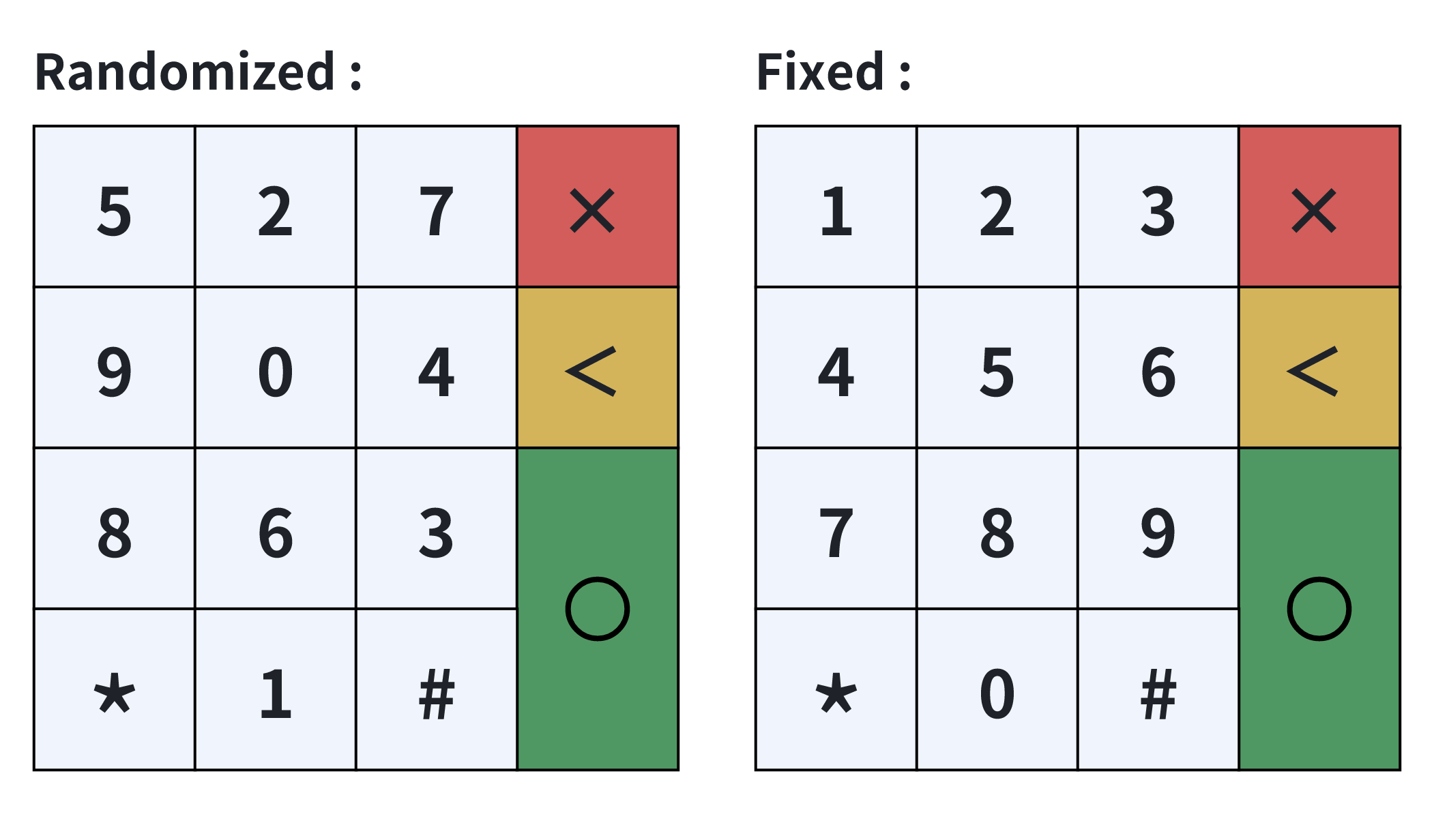
If keyLayoutParameters.setRandomKeyboard(true): Return value is different every time, for example [0x31, 0x35, 0x32, 0x37, 0x39, 0x30, 0x34, 0x38, 0x36, 0x33]
If keyLayoutParameters.setRandomKeyboard(false): Always return [0x30, 0x31, 0x32, 0x33, 0x34, 0x35, 0x36, 0x37, 0x38, 0x39]
Each value corresponds in order to positions on the keypad represented by PinPadButtonId.NUMBER_0, PinPadButtonId.NUMBER_1 ... PinPadButtonId.NUMBER_9, resulting in a password keypad as below:
Then PIN input can be started:
Key pinKey = new Key.Builder()
        .setIndex(2)
        .setType(KeyType.SYM_DES)
        .setUsage(KeyUsage.SYM_PIN)
        .build();

PanInfo panInfo = new PanInfo();
panInfo .setPlainPan("xxxxxxxxxxxxxxxx");

PinEntryParameters parameters = new PinEntryParameters.Builder()
        .setPinKey(pinKey)
        .setPanInfo(panInfo)
        .setTimeout(60)
        .setPinType(PinType.ONLINE)
        .setPinBlockMode(PinBlockMode.ISO9564_0)
        .build();

IPinEntryListener pinEntryListener = new PinEntryListener {
    @Override
    public void onFinish(PinEntryResult pinEntryResult) throws RemoteException {
        // Handle PIN entry result
    }

    @Override
    public void onTimeout() throws RemoteException {
        // Handle timeout
    }

    @Override
    public void onKeyPress() throws RemoteException {
        // Handle key press
    }

    @Override
    public void onCancel() throws RemoteException {
        // Handle cancel
    }

    @Override
    public void onClear() throws RemoteException {
        // Handle cledr
    }

    @Override
    public void onBackspace() throws RemoteException {
        // Handle backspace
    }

    @Override
    public void onError(int code, String message) throws RemoteException {
        // Handle error
    }

    @Override
    public void onExtendedEvent(PinExtendedEvent pinExtendedEvent) throws RemoteException {
        // Handle extended event
    }
}

try {
    pinPad.startPinEntry(pinEntryParameters, pinEntryListener);
} catch (Exception e) {
    // Handle the exception
}Workflow:
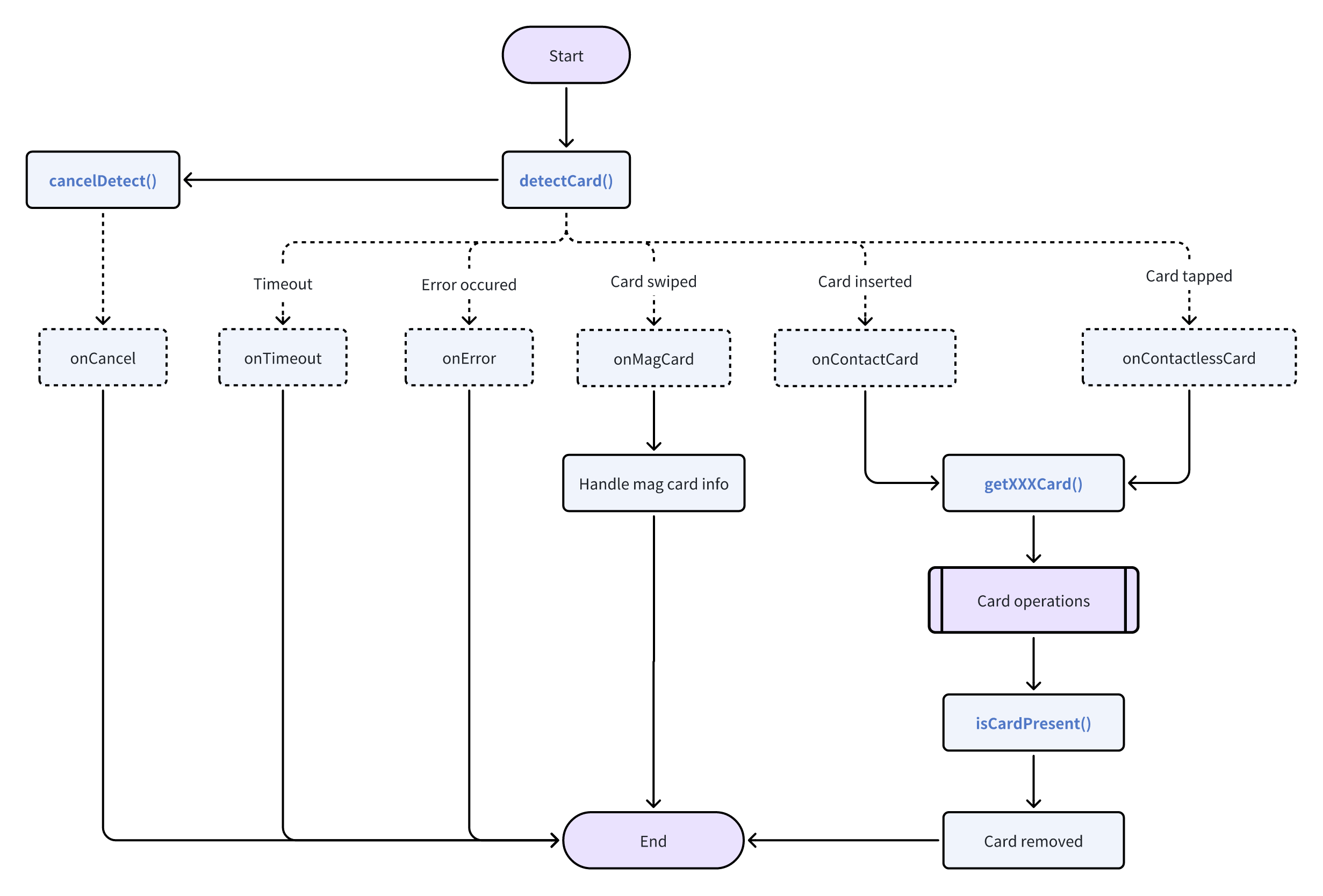
Example code:
Get card reader:
ICardReader cardReader;
try {
    IPos pos = HalService.getInstance().getPos(null);
    cardReader = pos.getCardReader();
} catch (Exception e) {
    // Handle the exception
}
Detect Card:
CardReaderParameters params = new CardReaderParameters.Builder()
                .setMagCardRequired(true)
                .setContactCardRequired(true)
                .setContactlessCardRequired(true)
                .setVerifyTrack(true)
                .setTimeout(60)
                .build();
try {
    cardReader.detectCard(params, new CardReaderListener() {
        @Override
        public void onMagCard(MagCardInfo magCardInfo) throws RemoteException {
            // Handle mag card info
        }

        @Override
        public void onContactCard(ContactCardInfo contactCardInfo) throws RemoteException {
            CpuCardParameters parameters = new CpuCardParameters()
            parameters.setCardInterface(CardInterface.CONTACT);

            ICpuCard contactCpuCard = cardReader.getCpuCard(parameters);
        }

        @Override
        public void onContactlessCard(ContactlessCardInfo contactlessCardInfo) throws RemoteException {
            CpuCardParameters parameters = new CpuCardParameters()
            parameters.setCardInterface(CardInterface.CONTACTLESS);

            ICpuCard contactlessCpuCard = cardReader.getCpuCard(parameters);
        }

        @Override
        public void onError(int code, String message) throws RemoteException {
            // Handle error
        }

        @Override
        public void onTimeout() throws RemoteException {
            // Handle timeout
        }

        @Override
        public void onCancel() throws RemoteException {
            // Handle cancel
        }
    });
} catch (Exception e) {
    // Handle the exception
}
CPU Card operations:
// 1. Power up
try {
    PowerUpResult result = contactCpuCard.powerUp();
    if(result != null && result.getAtr() != null && result.getAtr().length>0) {
        // Power up successfully
    }else{
        // Failed to power up
    }
} catch (Exception e) {
    // Handle the exception
}

// 2. Perform APDU command
byte[] command = BytesUtils.hexStringToBytes("0084000004")
try {
    byte[] result = contactCpuCard.performApdu(command);
    // Handle the result
} catch (Exception e) {
    // Handle the exception
}

// 3. Power down
try {
    contactCpuCard.powerDown();
} catch (Exception e) {
    // Handle the exception
}Get printer:
IPrinter printer;
try {
    IPos pos = HalService.getInstance().getPos(null);
    printer = pos.getPrinter();
} catch (Exception e) {
    // Handle the exception
}
Build receipt according to your needs. You can add image, text, barcode and QR code. For example:
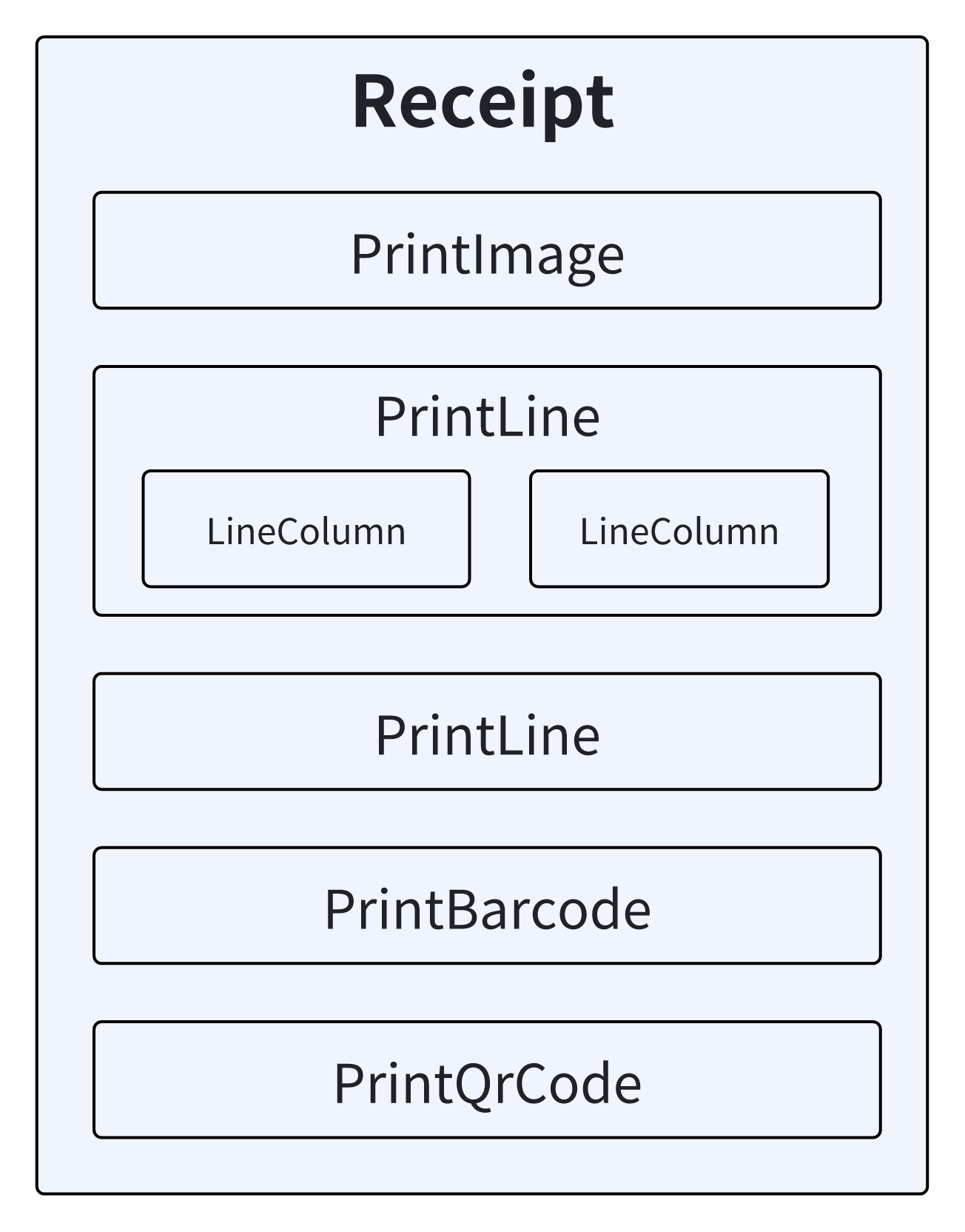
Receipt receipt = new Receipt.Builder()
        .add(new PrintImage.Builder()
                .setImage(BitmapFactory.decodeResource(context.getResources(), R.drawable.newland_npt))
                .setExpectedImageWidth(370)
                .setExpectedImageHeight(77)
                .setAlignment(PrintItemStyle.ALIGN_CENTER)
                .build())
        .add(new PrintLine.Builder()
                .setFontSize(24)
                .setBold(true)
                .addColumn(new LineColumn.Builder()
                        .setContent("1.1")
                        .setFontSize(32)
                        .setWidthPercent(30)
                        .setReverse(true)
                        .build())
                 .addColumn(new LineColumn.Builder()
                         .setContent("line1-column2")
                         .setAlignment(PrintItemStyle.ALIGN_CENTER)
                         .setWidthPercent(70)
                         .build())
                 .build())
         .add(new PrintLine.Builder()
                 .setFontSize(32)
                 .setAlignment(PrintItemStyle.ALIGN_CENTER)
                 .setContent("line2")
                 .build())
         .add(new PrintBarcode.Builder()
                 .setContent("barcode content")
                 .setCodeType(BarcodeType.CODE_128)
                 .setHeight(80)
                 .setWidth(200)
                 .setAlignment(PrintItemStyle.ALIGN_CENTER)
                 .build())
         .add(new PrintQrCode.Builder()
                 .setContent("qrcode test")
                 .setAlignment(PrintItemStyle.ALIGN_RIGHT)
                 .setLevel(QrCodeLevel.LEVEL_H)
                 .setSize(200)
                 .build())
         .build();
Start to print the receipt:
try {
    printer.startPrint(receipt, new PrintListener {
        @Override
        public void onResult(int status) throws RemoteException {
            // Check printing result
            switch(status) {
                case PrinterStatus.OK:
                    // Printing success
                    break;
                case PrinterStatus.NO_PAPER:
                    // Out of paper
                    break;
                ...
            }
        }
    });
} catch (Exception e) {
    // Handle the exception
}If there are no specific requirements for the scanning UI, the startScan method can be called to begin scanning. It will use the default scanning UI and control the specific camera for scanning.
IScanner scanner;
try {
    IPos pos = HalService.getInstance().getPos(null);
    scanner = pos.getScanner();
} catch (Exception e) {
    // Handle the exception
}try {
ScannParameters params = new ScanParameters.Builder()
.setEnableSound(true)
.setScannerType(ScannerType.CAMERA_BACK)
.setTimeout(10000)
.build();
scanner.startScan(params, new ScannerListener() {
@Override
public void onResult(ScannerResult scannerResult) throws RemoteException {
// Handle result
}
@Override
public void onTimeout() throws RemoteException {
// Handle timeout
}
@Override
public void onCancel() throws RemoteException {
// Handle cancel
}
@Override
public void onError(int i, String s) throws RemoteException {
// Handle the error
}
});
} catch (Exception e) {
// Handle the exception
}If a custom scanning UI is required, the application is responsible for managing the scanning UI and capturing images from the camera, then passing the captured image to the startDecode method for decoding.
Get Scanner:
IScanner scanner;
try {
    IPos pos = HalService.getInstance().getPos(null);
    scanner = pos.getScanner();
} catch (Exception e) {
    // Handle the exception
}
Start to decode:
DecodeParameters decodeParameters = new DecodeParameters();
decodeParameters.setImage(capturedBitmap);
try {
    scanner.startDecode(decodeParameters, new ScannerListener() {
        @Override
        public void onResult(ScannerResult scannerResult) throws RemoteException {
            // Handle result
        }

        @Override
        public void onTimeout() throws RemoteException {
            // Handle timeout
        }

        @Override
        public void onCancel() throws RemoteException {
            // Handle cancel
        }

        @Override
        public void onError(int code, String message) throws RemoteException {
            // Handle error
        }
    });
} catch (Exception e) {
    // Handle the exception
}Get beeper:
IBeeper beeper;
try {
    IPos pos = HalService.getInstance().getPos(null);
    beeper = pos.getBeeper();
} catch (Exception e) {
    // Handle the exception
}
Beep:
int beeperFrequency = 1500;
int beeperDuration = 500;
try {
    beeper.beep(beeperFrequency, beeperDuration);
} catch (Exception e) {
    // Handle the exception
}Get light:
ILight light;
try {
    IPos pos = HalService.getInstance().getPos(null);
    light = pos.getLight();
} catch (Exception e) {
    // Handle the exception
}
Set light state:
int ledConfig = pos.getDeviceInfo().getLedConfig();

LightParameters[] lightParameters = new LightParameters[4];
//LED Config is LedConfig.FOUR_GREEN_REAL or LedConfig.FOUR_GREEN_VIRTUAL indicate the LEDs are all green,no color distinction
if (ledConfig == LedConfig.FOUR_GREEN_REAL || ledConfig == LedConfig.FOUR_GREEN_VIRTUAL) {
    lightParameters[0] = new LightParameters.Builder().setNumber(1).setState(LightState.ON).build();
    lightParameters[1] = new LightParameters.Builder().setNumber(2).setState(LightState.ON).build();
    lightParameters[2] = new LightParameters.Builder().setNumber(3).setState(LightState.ON).build();
    lightParameters[3] = new LightParameters.Builder().setNumber(4).setState(LightState.ON).build();
} else {
    lightParameters[0] = new LightParameters.Builder().setColor(LightColor.BLUE).setState(LightState.ON).build();
    lightParameters[1] = new LightParameters.Builder().setColor(LightColor.YELLOW).setState(LightState.ON).build();
    lightParameters[2] = new LightParameters.Builder().setColor(LightColor.GREEN).setState(LightState.ON).build();
    lightParameters[3] = new LightParameters.Builder().setColor(LightColor.RED).setState(LightState.ON).build();
}

try {
    light.set(lightParameters);
} catch (Exception e) {
    throw new RuntimeException(e);
}workflow:
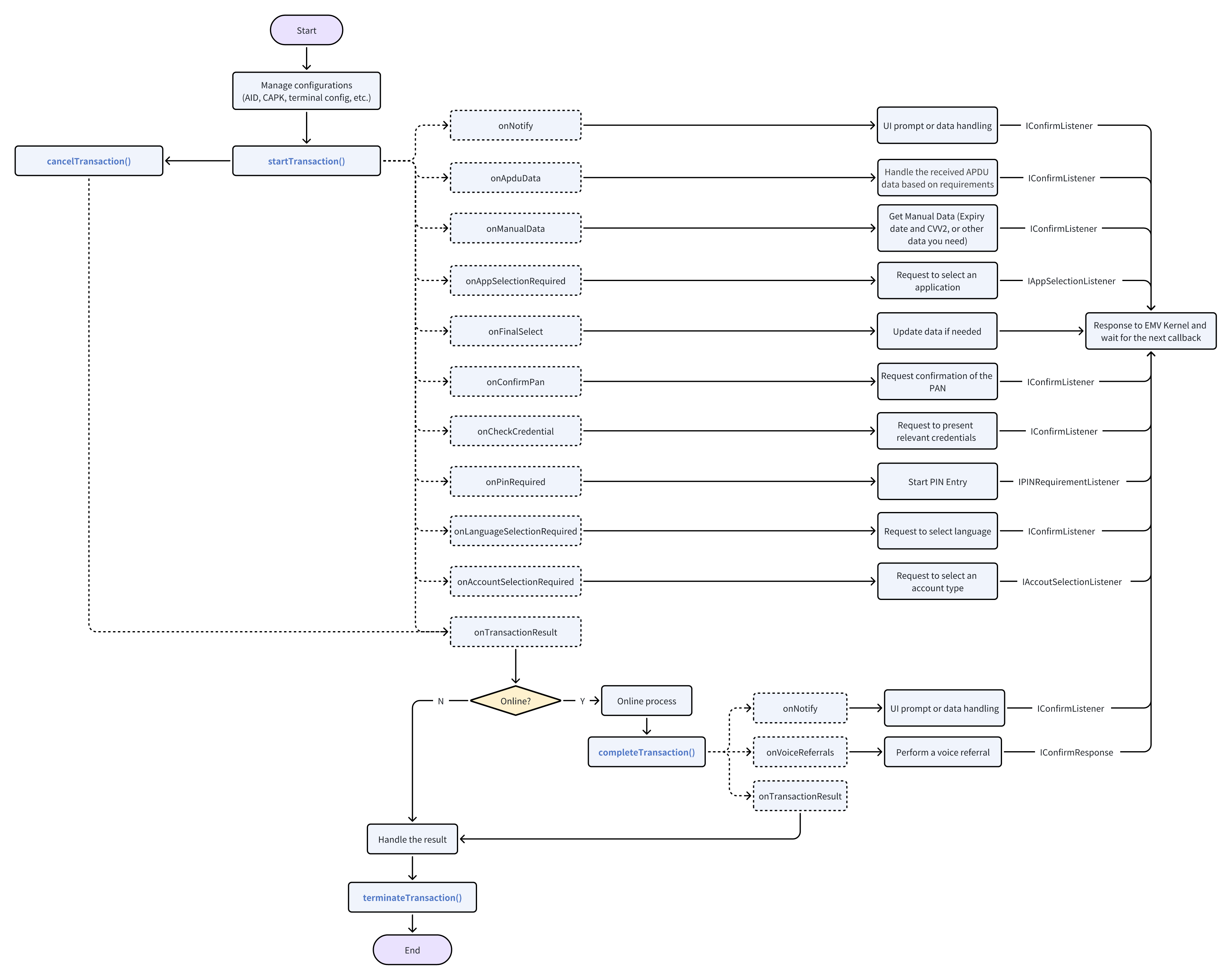
Example code:
Get EMV module:
IEmv emv;
try {
    IPos pos = HalService.getInstance().getPos(null);
    emv = pos.getEmv();
} catch (Exception e) {
    // Handle the exception
}
Load EMV configurations according to your needs.
//Way 1: Through the loadXmlFile to load AID and CAPK Configuration
try {
    emv.loadXmlFile(EMV_CONFIG_PATH);
} catch(Exception e) {
    // Handle the exception
}

//Way 2: Get the AID/CAPK Manager, then through the relevant interface to load Configuration
IAidManager ctAid = emv.getAidManager(CardInterface.CONTACT);
IAidManager clssAid = emv.getAidManager(CardInterface.CONTACTLESS);
ICapkManager capkManager = emv.getCapkManager();

byte[] ctTerminalConfig = ...;
byte[] ctAidConfig = ...;
byte[] clssTerminalConfig = ...;
byte[] clssAidConfig = ...;
CapkEntry capkEntry = new CapkEntry.Builder()
        .setRid(BytesUtils.hexToBytes("A000000003"))
        .setIndex(90)
        .setExpiredDate(BytesUtils.hexToBytes("00000000"))
        .setHash(BytesUtils.hexToBytes("B4BC56CC4E88324932CBC643D6898F6FE593B172"))
        .setExponent(BytesUtils.hexToBytes("000003"))
        .setModulus(BytesUtils.hexToBytes("C26B3CB3833E42D8270DC10C8999B2DA18106838650DA0DBF154EFD51100AD144741B2A87D6881F8630E3348DEA3F78038E9B21A697EB2A6716D32CBF26086F1"))
        .setHashAlgorithm((byte) 0x01)
        .setAlgorithmIndicator((byte) 0x01)
        .build();

try {
    ctAid.setTerminalConfig(ctTerminalConfig );
    ctAid.setAidConfig(ctAidConfig);
    clssAid.setTerminalConfig(clssTerminalConfig);
    clssAid.setAidConfig(clssAidConfig);
    capkManager.set(capkEntry);
} catch(Exception e) {
    // Handle the exception
}
Start a transaction and handle the callbacks:
TransactionParameters params = new TransactionParameters.Builder()
            .setAmountAuthorized(100L)
            .setTransactionType(0x00)
            .setContactCardRequired(true)
            .setContactlessCardRequired(true)
            .setMagCardRequired(true)
            .setManualRequired(true)
            .setTimeout(60)
            .build();
try {
    emv.startTransaction(params, new TransactionListener() {
        @Override
        public void onNotify(NotifyData notifyData, IConfirmListener iConfirmListener) throws RemoteException {
            // 1. UI prompt or data handling
            // 2. Respond to EMV kernal using iConfirmListener
            iConfirmListener.response(EmvResponseCode.SUCC, null);
            // 3. If it is manual input process, set card number to continue process
            String cardNumber = "1234567890123456";
            ConfirmResponse response = new ConfirmResponse.Builder()
                 .setManualCardEntry(true)
                 .setData(cardNumber.getBytes(StandardCharsets.US_ASCII))
                 .build();
            iConfirmListener.response(ResponseCode.SUCC, response);
        }

        @Override
        public void onApduData(int cardInterface, byte[] reqData, byte[] resData, IConfirmListener iConfirmListener) throws RemoteException {
            // 1. Handle the received APDU data based on requirements
            // 2. Respond to EMV kernal using iConfirmListener
            iConfirmListener.response(EmvResponseCode.SUCC, null);
        }

        @Override
        public void onManualData(IConfirmListener iConfirmListener) throws RemoteException {
            // 1. Request manual entry of transaction information
            // 2. Respond to EMV kernal using iConfirmListener
            iConfirmListener.response(EmvResponseCode.SUCC, null);
        }

        @Override
        public void onAppSelectionRequired(ApplicationItem[] applicationItems, IAppSelectionListener iAppSelectionListener) throws RemoteException {
            // 1. Request to select an application
            // 2. Respond to EMV kernal using iAppSelectionListener
            iAppSelectionListener.response(EmvResponseCode.SUCC, new AppSelectionResponse.Builder()
                    .setSelectedIndex(0)
                    .build());
        }

        @Override
        public void onFinalSelect(int cardInterface, byte[] aid, IConfirmListener iConfirmListener) throws RemoteException {
            // 1. Update data if needed by calling `setData` interface
            // 2. Respond to EMV kernal using iConfirmListener
            iConfirmListener.response(EmvResponseCode.SUCC, null);
        }

        @Override
        public void onConfirmPan(String pan, IConfirmListener iConfirmListener) throws RemoteException {
            // 1. Request confirmation of the PAN
            // 2. Respond to EMV kernal using iConfirmListener
            iConfirmListener.response(EmvResponseCode.SUCC, null);
        }

        ... ...
    });
} catch (Exception e) {
    // Handle the exception
}
Complete transaction
If the result of the onTransactionResult callback requires going online, you need to call completeTransaction interface after the online process to complete the transaction flow.
CompleteTransactionData data = new CompleteTransactionData.Builder()
            .setAuthResponseCode("00")
            .setIssuerAuthData(BytesUtils.hexStringToBytes("1A1B1C1D1E1F11113030"))
            .build();
try {
    emv.completeTransaction(true, data, new CompleteListener() {
        @Override
        public void onNotify(NotifyData notifyData, IConfirmListener iConfirmListener) throws RemoteException {
            // 1. UI prompt or data handling
            // 2. Respond to EMV kernal using iConfirmListener
            iConfirmListener.response(EmvResponseCode.SUCC, null);
        }

        @Override
        public void onVoiceReferrals(IConfirmListener iConfirmListener) throws RemoteException {
            // 1. Perform a voice referral
            // 2. Respond to EMV kernal using iConfirmListener
            iConfirmListener.response(EmvResponseCode.SUCC, null);
        }

        @Override
        public void onTransactionResult(int result, int errorCode, String message) throws RemoteException {
            // Handle the result
        }
    });
} catch (Exception e) {
    recordResult(false, e.getMessage());
}
Terminate the transaction and release resources.
try {
    emv.terminateTransaction();
} catch (Exception e) {
    // Handle the exception
}Get the specified serial port instance:
ISerialPort serialPort;
try {
    IPos pos = HalService.getInstance().getPos(null);
    SerialPortConfig serialPortConfig = new SerialPortConfig.Builder()
        .setPortType(SerialPortType.RS232)
        .setBaudRate(BaudRate.BPS115200)
        .setDataBits(DataBits.DATA_BIT_8)
        .setParityBit(ParityBit.NO_CHECK)
        .setStopBits(StopBits.STOP_BIT_ONE)
        .setBlocked(true)
        .setFlowCtr(false)
        .build()
    serialPort = pos.getSerialPort(serialPortConfig);
} catch (Exception e) {
    // Handle the exception
}
Open the serial port:
try {
    serialPort.open();
} catch (Exception e) {
    // Handle the exception
}
Write data:
try {
    byte[] dataToWrite = "Hello".getBytes(StandardCharsets.UTF_8);
    int timeout = 100;
    serialPort.write(dataToWrite, timeout);
} catch (Exception e) {
    // Handle the exception
}
Read data:
try {
    int lengthToRead = 10;
    int timeout = 200;
    byte[] readData = serialPort.read(lengthToRead, timeout);
} catch (Exception e) {
    // Handle the exception
}
Close the serial port:
try {
    serialPort.close();
} catch (Exception e) {
    // Handle the exception
}Get system module:
ISystem system;
try {
    IPos pos = HalService.getInstance().getPos(null);
    system = pos.getSystem();
} catch (Exception e) {
    // Handle the exception
}
Set/Get system config:
//Sets the device's real-time clock.Format:yyyyMMddHHmmss
system.setRtc("20250616113359");
//Gets the current date and time from the real-time clock.
 String rtc = system.getRtc();

//Set timeout-20s of screen off
system.setSetting(Settings.SCREEN_OFF_TIMEOUT, "20000");
//Get brightness of screen
String brightness = system.getSetting(Settings.SCREEN_BRIGHTNESS);

/* Setting key can refer to com.pos.hal.system.Settings */
Enable or disable log:
ILogger logger;
try {
    IPos pos = HalService.getInstance().getPos(null);
    logger = pos.getLogger();

    //Enable the HAL log
    logger.setDebugMode(true);

    //Disable the HAL log
    logger.setDebugMode(false);
} catch (Exception e) {
    // Handle the exception
}Get APN manager:
IApnManager apnManager;
try {
    IPos pos = HalService.getInstance().getPos(null);
    apnManager = pos.getApnManager();
} catch (Exception e) {
    // Handle the exception
}
Call the corresponding interface as needed. For example, add an APN:
try {
    ApnEntity testApn = new ApnEntity.Builder()
            .setName("Test_All_Fields")
            .setApn("test.all.fields")
            .setProxy("10.0.0.172")
            .setPort("80")
            .setUser("testuser")
            .setPassword("testpass")
            .setServer("server.com")
            .setMmsc("http://mmsc.monternet.com")
            .setMmsProxy("10.0.0.172")
            .setMmsPort("80")
            .setMcc("460")
            .setMnc("00")
            .setAuthType(ApnAuthType.PAP) // See: com.pos.hal.apnmanager.ApnAuthType
            .setType(ApnType.DEFAULT) // See: com.pos.hal.apnmanager.ApnType
            .setProtocol("IPV4V6")
            .setRoamingProtocol("IP")
            .setCarrierEnabled(true)
            .setBearer(Bearer.LTE) // See: com.pos.hal.apnmanager.Bearer
            .setMvnoType(MvnoType.SPN) // See: com.pos.hal.apnmanager.MvnoType
            .setMvnoMatchData("TestSPN")
            .build();
   int id = apnManager.add(testApn);
} catch (Exception e) {
    // Handle the exception
}Get route manager:
IRouteManager routeManager;
try {
    IPos pos = HalService.getInstance().getPos(null);
    routeManager = pos.getRouteManager();
} catch (Exception e) {
    // Handle the exception
}
Call the corresponding interface as needed. For example, add a route:
String ip = "192.168.1.1";
// See: com.pos.hal.routemanager.NetworkType
int type = NetworkType.WIFI;
try {
    routeManager.addRoute(ip, type);
    routeManager.enableMultiPath();
} catch (Exception e) {
    // Handle the exception
}Get the cash box module:
ICashBox cashBox;
try {
    IPos pos = HalService.getInstance().getPos(null);
    cashBox = pos.getCashBox();
} catch (Exception e) {
    // Handle the exception
}
Open the cash box:
try {
    cashBox.open();
} catch (Exception e) {
    // Handle the exception
}