If you are facing the following challenges:
| Scenario | NHAL | NSDK | Notes | |
|---|---|---|---|---|
| Existing project, no need for hardware decoupling | √ | |||
| Existing project requiring hardware decoupling | Already using another HAL solution | √ | As device decoupling has already been achieved through another HAL solution, the only requirement is to adapt it to this HAL framework. | |
| Already using another SDK | √ | Typically, the application is already integrated with a specific SDK. To decouple from the underlying hardware, adaptation is performed by bridging this SDK interface to other vendor-specific SDKs. | ||
| A brand-new project, no need for hardware decoupling | √ | |||
| A brand-new project requiring hardware decoupling | Have already decided to adopt another HAL solution | √ | As device decoupling has already been achieved through another HAL solution, the only requirement is to adapt it to this HAL framework. | |
| Already using another SDK | √ | Typically, the application is already integrated with a specific SDK. To decouple from the underlying hardware, adaptation is performed by bridging this SDK interface to other vendor-specific SDKs. | ||
| A brand-new project, no need for hardware decoupling | √ | |||
| A brand-new project requiring hardware decoupling | Have already decided to adopt another HAL solution | √ | As device decoupling has already been achieved through another HAL solution, the only requirement is to adapt it to this HAL framework. | |
| No HAL solution has been chosen yet | √ | |||
NHAL (Newland Hardware Abstraction Layer) is a standardized hardware abstraction interface designed for Android POS devices. Its purpose is to provide a unified access specification for POS device functions, enabling complete decoupling between applications and underlying hardware, thereby enhancing application portability and cross-device compatibility.
For Application Developer: Device functions are accessed solely through the standard HAL interface without relying on any vendor-specific SDKs. Applications can run seamlessly on any device that supports the HAL service without requiring code modifications.
For POS Service Provider: Implement this interface and provide device functionalities as a HAL service.
Here is Overview of the HAL Structure:
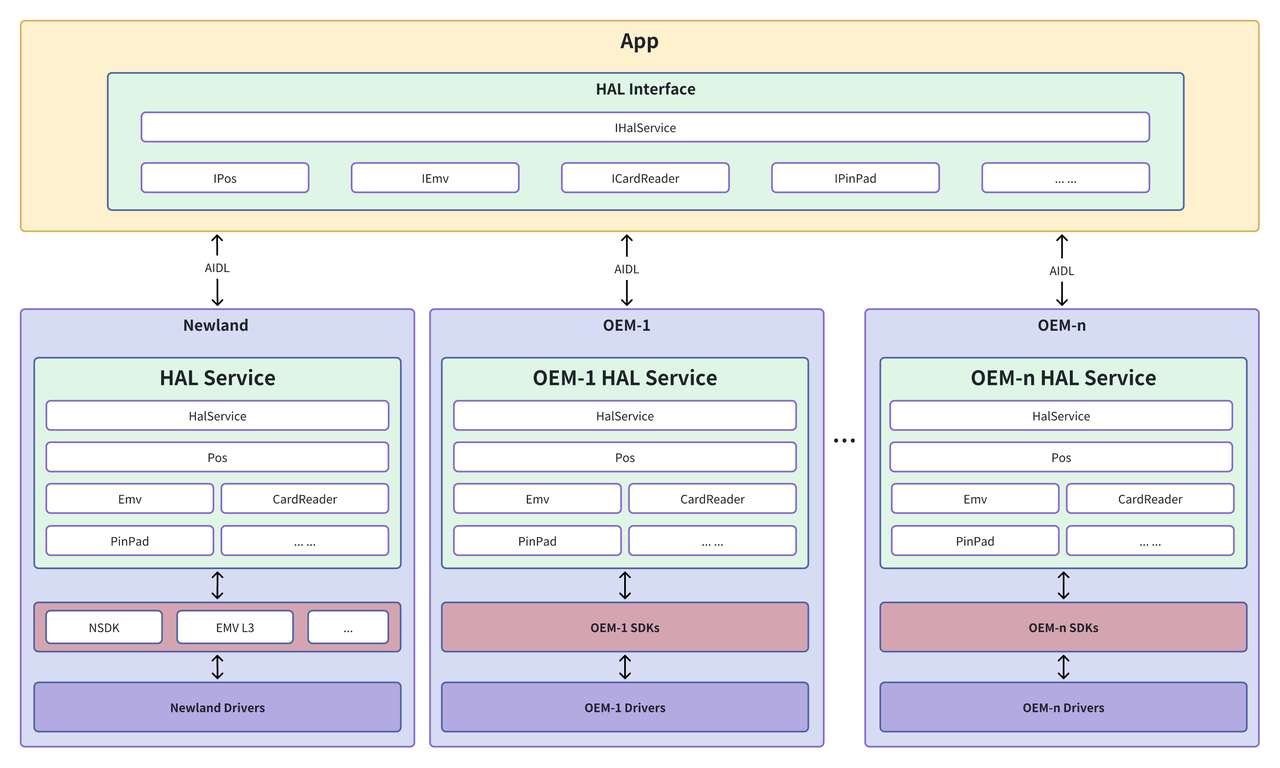
| App | Accesses hardware capabilities by calling standardized HAL interfaces. |
|---|---|
| HAL Interface | Communicates with the HAL service across processes using Android's AIDL (Android Interface Definition Language) mechanism. |
| HAL Service | Implemented by device manufacturers, responsible for translating standardized HAL interfaces into specific hardware operations. |
| Low-Level SDK/Driver | The SDK and drivers within the device that actually perform the hardware operations. |
| Write Once, Run Anywhere | Applications built on the NHAL interface can run on POS devices from different manufacturers without code changes. This greatly improves portability and cross-device compatibility, reducing both development and maintenance costs. |
|---|---|
| Reduced Application Footprint | Only a single HAL AAR package is required, eliminating the need to include multiple vendor-specific SDKs and significantly minimizing the application size. |
| Decoupled Maintenance & Seamless Updates | Applications built on the NHAL interface remain stable even as the underlying services evolve. Updates to the service layer can be deployed without changes to the application, enabling zero-downtime maintenance and faster iteration. |
| Facilitated Simulation and Automated Testing | With a clear hardware abstraction layer, developers can more easily mock or simulate hardware behavior, enabling better automated testing and faster debugging cycles. |
| Standardized interface implementation | Provide a unified interface definition, facilitate device manufacturers to understand and implement, and ensure that devices of different manufacturers can interact with applications in a consistent manner. |
|---|---|
| Simplified Updates and Deployment | Support customized development and function expansion according to the characteristics of the device and business requirements to meet the diverse needs of the market. |
| Promote device interoperability | It helps to improve the interoperability between devices of different manufacturers, promotes the ecological development of the POS machine market, and creates more market opportunities for device manufacturers. |
Newland HAL contains multiple modules, which can be selectively used during application development, including:
| Module | Function | Use case |
|---|---|---|
| DeviceInfo | Obtain POS device information, such as device model, serial number, HAL Service version, etc. | Get the basic device information when the application starts for logging or Facility Management. |
| IPinPad | Load and delete keys, perform encryption and decryption operations, handle PIN input, etc. | Securely handle the PIN entered by the user in the payment application to ensure the security of the transaction. |
| ICardReader | Detect card presentation and removal, and read card information. | In the payment or membership card management application, detect the card status and read the card data. |
| IPrinter | Control the printer to print receipts. | Call this interface to print the transaction voucher after the transaction is completed. |
| IScanner | Scan and decode barcodes or QR codes. | In retail applications, scan the bar code of the goods to obtain the goods information. |
| IBeep | Activates the buzzer to give a prompt tone. | When it is necessary to remind the user of an operation or device status, a prompt tone is issued to provide auditory feedback. |
| ILight | Control the status of the indicator light, such as lighting, extinguishing, flashing, etc. | When it is necessary to prompt the user for operation or device status, the control indicator light provides visual feedback. |
| IEmv | Initiate the transaction process and process EMV card transactions. | In the payment application, call the module interface to start the credit or debit card transaction process. |
| ISerialPort | Set serial port parameters, such as baud rate, data bits, stop bits, etc. | In applications that need to communicate with external devices through serial ports, configure serial port parameters to ensure the correctness of data transmission. |
| ISystem | Set and get system configuration, such as date, time, language, etc. | When the application is initialized, configure system parameters according to business requirements; read system configuration to adapt to the usage habits of different regions. |
| ILogger | Control the on/off of HAL log. | In the development and debugging phase, turn on detailed logs to locate problems; in the production environment, turn off logs to reduce performance overhead. |
| IRouteManager | Manage routing configuration, such as adding route, deleting route, etc. | In network communication applications, manage route to optimize data transmission paths. |
| IApnManager | Manage APN (Access Point Name) configuration, such as setting the current APN, getting the APN list, etc. | In applications that require network connections, configure the appropriate APN to ensure that the device can access the network normally. |
| ICashBox | Open the cash box. | After the transaction is completed, call this interface to open the cash box so that the cashier can access the cash. |
Integration steps, usage instructions and example code for calling the HAL APIs.
For device manufacturers implementing and deploying HAL-based device services.
Answers to common questions about developing against NHAL.
