This document provides a concise guide for device manufacturers and software engineers on how to integrate and implement the provided NHAL(Newland Hardware Abstraction Layer) interfaces for Android POS devices. It assumes familiarity with Android service development and focuses on the steps necessary to develop and deploy HAL-based device services.
For detailed API specifications, please refer to the official HAL API Reference.
libs directory.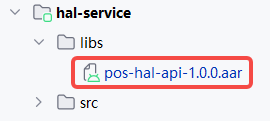
dependencies {
    implementation fileTree(include: ['*.jar','*.aar'], dir: 'libs')
}IHalService is the main entry point for the HAL service.
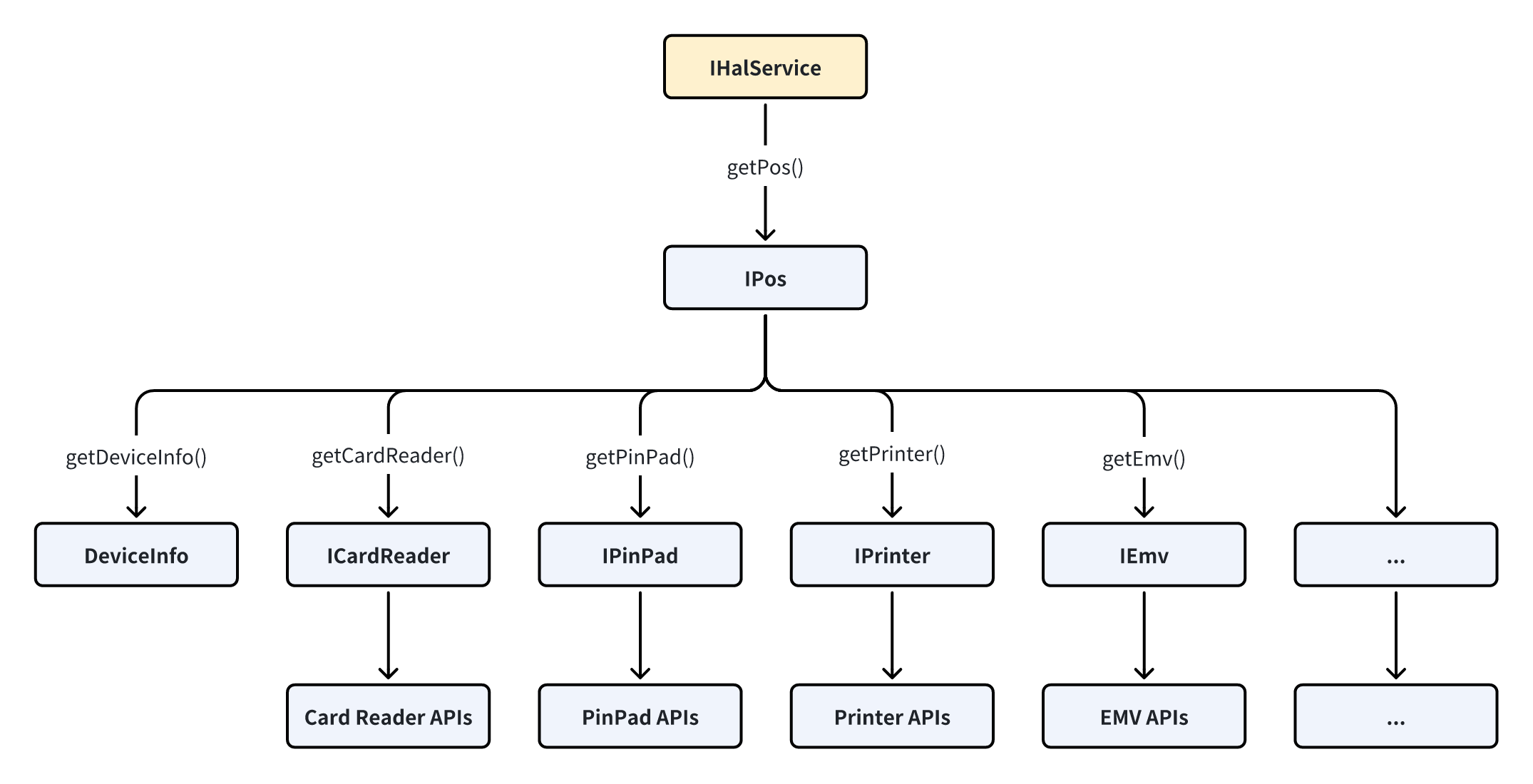
Your service is responsible for exposing a binder interface that implements the IHalService defined in the AAR.
Service.public class HalService extends Service {
@Override
public void onCreate() {
super.onCreate();
}
}IHalService.Stub interface, for example:private final IHalService.Stub binder = new IHalService.Stub() {
@Override
public IPos getPos(PosDeviceConfig posDeviceConfig) throws RemoteException {
// Return IPos instance according to the device config
}
...
};onBind() method of your service to return your binder implementation:@Override
public IBinder onBind(Intent intent) {
return binder;
}To allow clients to connect to the service using a unified configuration, configure the service as described below:
<service
    android:name=".HalService"
    android:exported="true"
    android:enabled="true">
    <intent-filter>
        <action android:name="com.pos.hal.POS_SERVICE" />
    </intent-filter>
</service>build.gradle, set the applicationId to the following fixed value:android {
...
defaultConfig {
applicationId "com.pos.hal.service"
...
}
...
}This ensures that clients can bind to the service using a known and fixed package name, regardless of the hardware vendor.
The main part of the HAL service consists of POS payment-related modules, which are provided via the IPos interface. IPos represents a POS device, providing access to its various functional modules as well as device information. You can implement IPos as needed, and then provide it to clients through the getPos method of IHalService.
IPos.Stub, for example:public class InternalPos extends IPos.Stub {
// Built-in (onboard) device
}
public class ExternalPos extends IPos.Stub {
// Peripheral POS device connected via Bluetooth, serial port, or USB.
}IPos interface, for example:public class InternalPos extends IPos.Stub {
@Override
public DeviceInfo getDeviceInfo() throws RemoteException {
// Get device info and return
...
}
@Override
public ICardReader getCardReader() throws RemoteException {
return CardReader.getInstance();
}
@Override
public IPinPad getPinPad() throws RemoteException {
return PinPad.getInstance();
}
@Override
public IEmv getEmv() throws RemoteException {
return Emv.getInstance();
}
...
}
public class ExternalPos extends IPos.Stub {
@Override
public DeviceInfo getDeviceInfo() throws RemoteException {
// Get device info and return
...
}
@Override
public ICardReader getCardReader() throws RemoteException {
return ExtCardReader.getInstance();
}
@Override
public IPinPad getPinPad() throws RemoteException {
return ExtPinPad.getInstance();
}
@Override
public IEmv getEmv() throws RemoteException {
return ExtEmv.getInstance();
}
...
}IPos instance according to the device config, for example:private final IHalService.Stub binder = new IHalService.Stub() {
@Override
public IPos getPos(PosDeviceConfig posDeviceConfig) throws RemoteException {
...
if (posDeviceConfig.getDeviceType() == PosDeviceType.INTERNAL)
return InternalPos.getInstance();
}
if (posDeviceConfig.getDeviceType() == PosDeviceType.EXTERNAL)
return ExternalPos.getInstance(posDeviceConfig);
}
...
}
};For each functional module interface (such as ICardReader, IPinPad, IEmv, etc.), provide a concrete implementation that connects to the underlying HAL logic.
For example:
public class CardReader extends ICardReader.Stub {
    // Implement this module as a singleton
    private static class Holder {
        private static final CardReader INSTANCE = new CardReader();
    }

    public static CardReader getInstance() {
        return Holder.INSTANCE;
    }

    // Implement the HAL interface methods
    @Override
    public void detectCard(CardReaderParameters parameters, ICardReaderListener listener) throws RemoteException {
        ...
    }

    @Override
    public void cancelDetect() throws RemoteException {
        ...
    }

    @Override
    public boolean isCardPresent(CardPresentParameters params) throws RemoteException {
        ...
    }

    @Override
    public ICpuCard getCpuCard(CpuCardParameters cpuCardParameters) throws RemoteException {
        ...
    }
}
Error Reporting Strategy:
For synchronous interfaces, errors are reported via exceptions.
For asynchronous interfaces, errors are primarily reported via callbacks.
However, AIDL can only throw Android predefined RuntimeExceptions and does not support custom RuntimeException types. The following are the RuntimeExceptions that can currently be thrown by AIDL interfaces on Android:
SecurityException
BadParcelableException
IllegalArgumentException
NullPointerException
IllegalStateException
NetworkOnMainThreadException
UnsupportedOperationException
ServiceSpecificException (available from API level 26 and above)
Since ServiceSpecificException is only available on Android API 26 or later, service developers should choose appropriate exceptions to throw based on the target device’s Android version and compatibility requirements.
To facilitate error reporting in services, the NHAL provides the HalException class, which allows creation of exceptions encapsulating both an error code and an error message. For example:
int errorCode = -1;
int detailedCode = -2;
String errorMessage = "Test exception.";

String exceptionMessage = HalException.createMessage(errorCode, detailedCode, errorMessage);
throw new UnsupportedOperationException(exceptionMessage);After implementing the HAL interface, you should produce the service APK deliverable for installation and deployment.
