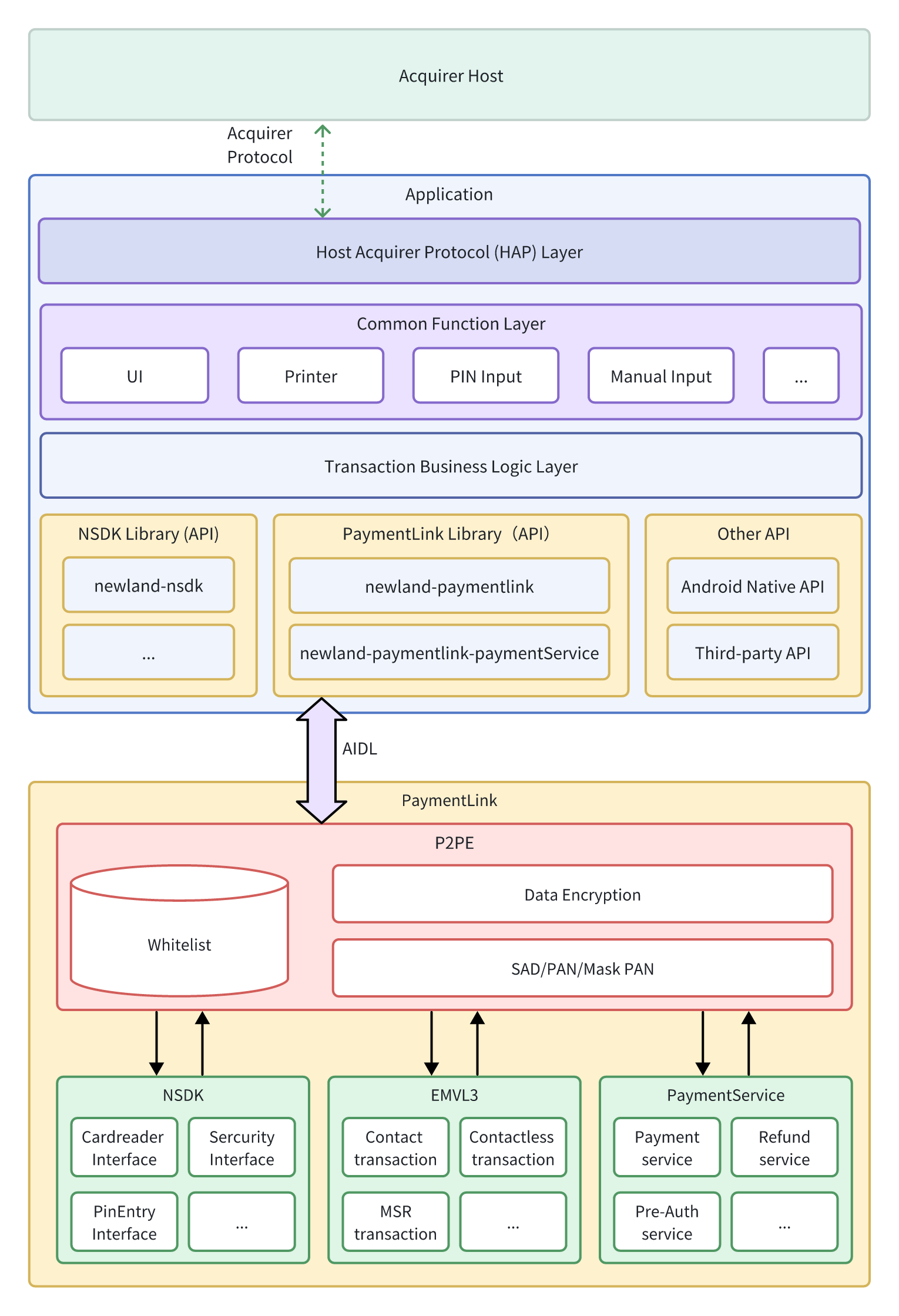
Below is the overview of the application developed based on PaymentLink.
| Abbreviations | Description |
|---|---|
| AAC | Application Authentication Code |
| ADB | Android Debug Bridge |
| AID | Applicatioin Identifier |
| API | Application Programming Interface |
| ARQC | Authorization Request Cryptogram |
| CAPK | Card Authentication Public Key |
| CDCVM | Consumer Device Cardholder Verification Method |
| CRL | Certificate Revocation List |
| CVM | Cardholder Verification Method |
| EMVL3 | EMV Level 3 |
| FW | Firmware |
| GAC | Generate Application Cryptogram |
| HAP | Host Acquirer Protocol |
| MSR | Magnetic Stripe Reader |
| NSDK | Newland Software Development Kit |
| P2PE | Point to Point Encryption |
| PAN | Payment Account Number |
| PAR | Payment Account Reference |
| PCI | Payment Card Industry |
| PIN | Personal Identification Number |
| PN | Part Number |
| POI | Point of Interaction |
| RID | Registered Application Provider Identifier |
| SAD | Secure Application Data |
| SN | Serial Number |
| TC | Transaction Certificate |
| UI | User Interface |
Learn how to install the apk in Application Install Guide
Add Dependency Libraries
Place these AARs in project /libs:

| AAR File | Description | Required |
|---|---|---|
| Newland-NSDK-x.xx.x.aar | Core NSDK interface package. | Required |
| newland-paymentlink-x.x.xx.aar | PaymentLink Core | Required |
| newland-paymentlink-paymentservice-x.x.xx.aar | PaymentService Extension | Option |
Gradle Configuration
Make the project compile with aar files in the libs folder by adding the following codes to the 'build.gradle'.
implementation fileTree(include: ['*.jar','*.aar'], dir: 'libs')Add third-party dependency.
implementation 'com.alibaba:fastjson:1.2.83'| third-party library | Description | Required |
|---|---|---|
| fastjson | PaymentLink utilizes fastjson for JSON parsing and serialization | Required |
AndroidManifest.xml
<uses-permission android:name="android.permission.MANAGE_NEWLAND_PAYCOMMON" />Add Newland Common Permissions to the configuration if your application uses NSDK's general functions (e.g., printing). The application must not include any other Newland security-related permissions.
The PaymentLink whitelist file can be used to configure encryption key settings and define specific encryption policies for designated card number ranges during transactions. By loading the whitelist, organizations can achieve centralized and consistent management of encryption policies.
Learn more about the whilelist in WhiteList Configuration.
The whitelist configuration file must be signed to ensure its integrity and authenticity.
If a whitelist file has not been signed, PaymentLink will neither load the file nor apply its configurations, instead returning an error.
Function:
public void loadWhiteList(File xmlFile) throws PaymentLinkException;Example:
File file = new File("/sdcard/paymentlink_signed.xml");
try {
    mP2PE.loadWhiteList(file);
} catch (PaymentLinkException e) {
    e.printStackTrace();
}All interface functionalities are encapsulated into separate modules based on their responsibilities. Each module can be accessed via the base class PaymentLinkProvider. This approach achieves a high-cohesion, low-coupling design, making the system easier to maintain and extend.
| Module | ModuleType | Description |
|---|---|---|
| P2PE | P2PE | Provides P2PE-specific functionalities, including whitelist loading, encryption mode configuration, get pan(Encrypted/Mask), and manual input function. |
| CardReader | CARD_READER | Provides card detection and reading capabilities, supporting both contact and contactless card recognition. |
| KeyManager | KEY_MANAGER | Provides full lifecycle key management, supporting key installation, updates, and deletion. |
| Crypto | CRYPTO | Provides encryption services based on device keys, supporting data encryption, MAC generation, digital signature, and verification. |
| PinEntry | PIN_ENTRY | Provides online/offline PIN entry functionality, supporting PIN input via hardware keypad or screen. |
| EMVL3 | EMVL3 | Integrates EMVL2 kernel APIs, encapsulates EMV transaction workflows, and provides a unified interface. |
| PaymentService | PAYMENT_SERVICE | A core payment component based on the PaymentService framework, encapsulating transaction routing and callback logic. |
Example:
PaymentLinkProvider paymentLinkProvider = PaymentLinkProviderImpl.getInstance();

P2PE mP2PE = (P2PE) paymentLinkProvider.getModule(PaymentLinkModuleType.P2PE);
CardReader mCardReader = (CardReader) paymentLinkProvider.getModule(PaymentLinkModuleType.CARD_READER);
KeyManager mKeyManager = (KeyManager) paymentLinkProvider.getModule(PaymentLinkModuleType.KEY_MANAGER);
Crypto mCrypto = (Crypto) paymentLinkProvider.getModule(PaymentLinkModuleType.CRYPTO);
PINEntry mPINEntry = (PINEntry) paymentLinkProvider.getModule(PaymentLinkModuleType.PIN_ENTRY);
EmvL3 emvl3 = (EmvL3) paymentLinkProvider.getModule(PaymentLinkModuleType.EMVL3);
PaymentServiceProvider mProvider = (PaymentServiceProvider) PaymentLinkProviderImpl.getInstance().getModule(PaymentLinkModuleType.PAYMENT_SERVICE);| Class Name | Description |
|---|---|
| ContactCard | Provides the ability to operate contact cards. Usually, concrete card instances (e.g., CPUContactCard) are created instead of ContactCard instances. |
| CPUContactCard | Provides the ability to communicate with CPU contact cards. |
| ContactlessCard | Provides the ability to operate contactless cards. Usually, concrete card instances (e.g., CPUContactlessCard) are created instead of ContactlessCard instances. |
| CPUContactlessCard | Provides the ability to communicate with CPU contactless cards. |
| AID | AID Configuration and Terminal Application Identifier Management. Used to define application identifiers used in transactions.Provides online/offline PIN entry functionality, supporting PIN input via hardware keypad or screen. |
| CAPK | Certification Authority Public Key Management. Used to load and manage CA public keys required for EMV transactions. |
| CertRevocation | Certificate Revocation List Management. Used to maintain a list of revoked certificates. |
| ExceptionFile | Exception List Management. Used to maintain a list of restricted cards or transactions. |
Example:
CPUContactCard mCPUContactCard = new CPUContactCardImp(ContactCardSlot.IC1);
CPUContactlessCard mCPUContactlessCard = new CPUContactlessCardImp();
AID aidCt = new AidImpl(EmvL3Const.CardInterface.CONTACT);
AID aidCls = new AidImpl(EmvL3Const.CardInterface.CONTACTLESS);
CAPK capk = new CapkImpl();
CertRevocation crl = new CertRevocationImpl();
ExceptionFile exceptionFile = new ExceptionFileImpl();To complete a full payment transaction using the EMVL3 interface, the following three core methods must be called in sequence:
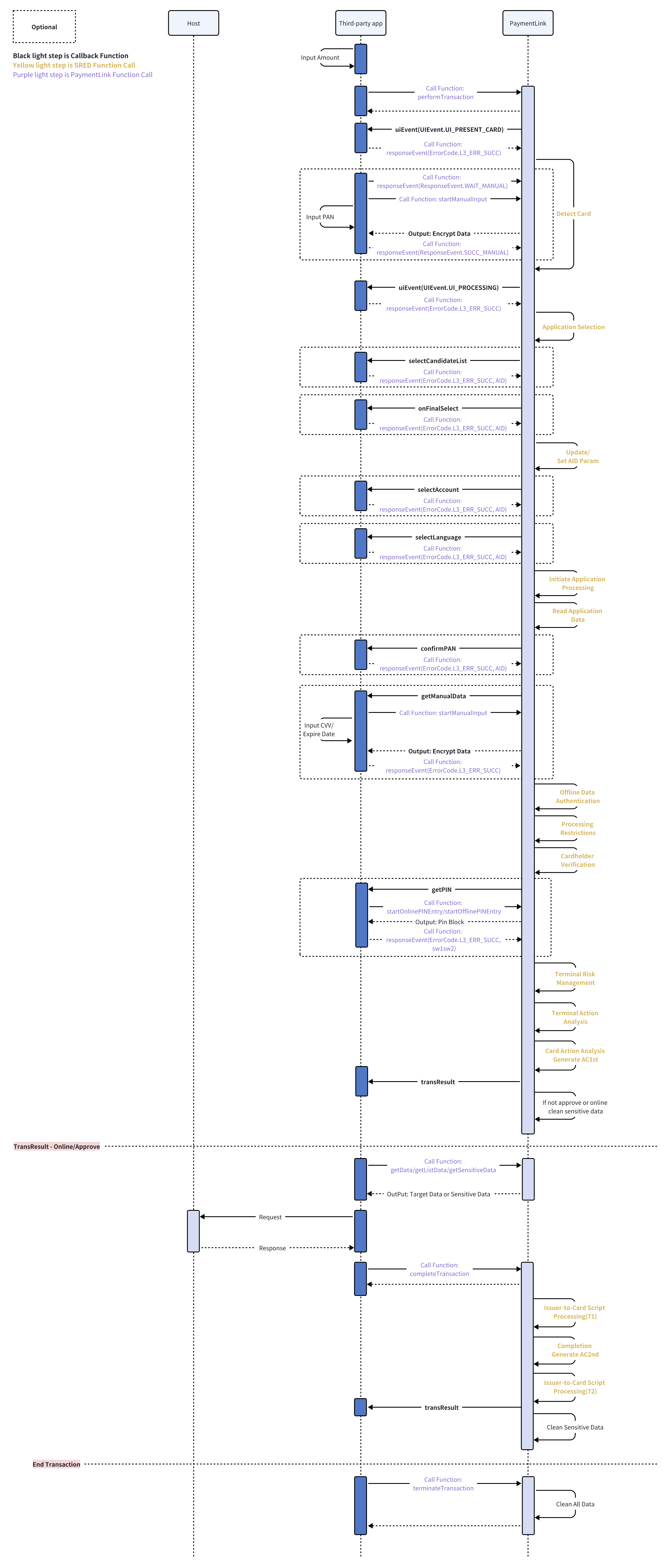
performTransaction
Initiates the transaction flow, performs card detection and key card interactions (e.g., reading card data, verifying card authenticity), and returns an initial transaction result.
completeTransaction
Called after online processing or offline transaction data collection is completed. This method processes the final transaction outcome (e.g., handling authorization results), and returns the final transaction status.
terminateTransaction
Must be called at the end of the transaction to release all related resources (such as memory, communication channels, and sessions), ensuring the system is clean and ready for the next transaction.
Depending on the card type (e.g., EMV chip card, contactless card, magnetic stripe card, or manual input), the callback logic and process between these interfaces may vary. Detailed callback mechanisms will be described in subsequent documentation.
Learn more about EMVL3 development process from EMVL3 Development Guide
The third-party app calls the interface performTransaction of newland-paymentlink (AAR library) to start the transaction
newland-paymentlink internally calls the interface of PaymentLink Service through AIDL
PaymentLink executes transactions, calling the firmware low-level interface (card reading, APDU interaction, etc.) during the process.
PaymentLink received plaintext PAN and SAD data during the transaction process.
When the application needs to enter the PIN, third-party application then calls startOnlinePINEntry/startOfflinePINEntry, PaymentLink uses the internally cached plaintext PAN (if necessary) to complete PIN entry, and return the PINBlock.
The application uses getSensitiveData to obtain encrypted PAN/SAD data, and PaymentLink combines whitelist function and encryption algorithm to encrypt PAN and SAD data by using the SRED function and return it.
The follow process is also different for different transaction results.
If this transaction needs to go online for authorization, the application sends encrypted PAN/SAD and other related data to the host and gets response from the host.Then the application calls completeTransaction to pass the auth result to PaymentLink to complete the transaction, Paymentlink will delete the PAN/SAD immediately.
If this transaction is approved offline, the third-party application should send a notification message(including the related transaction data) to the host. Then the third-party application calls completeTransaction to complete the transaction. Paymentlink will delete the PAN/SAD immediately.
If this transaction is terminated or declined offline, Paymentlink will delete the PAN/SAD immediately.
After the transaction, the application calls the terminateTransaction interface to release the relevant resources of PaymentLink, and PaymentLink will delete the PAN/SAD/Mask PAN and other data temporarily saved during the transaction process.
PaymentLink will automatically delete data such as PAN/SAD/Mask PAN after 5 minutes.
After calling the performTransaction interface, the system will automatically initiate the card detection process. Depending on the configuration parameters passed in, the following types of card detection are supported:
Contact Card
Contactless Card
Magnetic Stripe Card
For these three card types, the user only needs to insert, tap, or swipe the card on the device to trigger the card reading process. The system will automatically complete card identification and data retrieval.
If the user chooses to manually enter the card number (i.e., a "manual input transaction"), the following additional interfaces must be called during the card detection phase to control the flow:
Call responseEvent(EmvL3Const.ResponseEvent.WAIT_MANUAL, null):
This pauses the background card detection process to prevent the system from continuing to attempt reading a physical card.
Call initManualInputLayout :
Initialize the layout for manual input, such as setting the keyboard type (numeric / alphanumeric), input length limits, and whether to display masked characters.
Call startManualInput:
Start the manual input process and wait for the user to enter the card number, expiration date, CVV/CVC, and other relevant information.
Call responseEvent(EmvL3Const.ResponseEvent.SUCC_MANUAL, null):
Pass the entered data back to the system to resume the transaction flow and continue with the rest of the transaction steps.
These interfaces must be called in sequence to ensure a controlled workflow.
If responseEvent is not properly called to pause card detection, the subsequent transaction flow may fail to proceed normally.
After manual input, the standard transaction flow should still be followed, including calling completeTransaction and terminateTransaction in order to complete the transaction.
During online transaction communication with the backend service, it is often necessary to retrieve certain essential data from the card. The EMVL3 interface provides the following methods for securely obtaining this data:
getData
getListData
getSensitiveData
Basic Field 55 information can be retrieved in plaintext format using the getData and getListData interfaces, or in ciphertext format using the getSensitiveData interface.
When retrieving sensitive data, such as PAN and track data, the getSensitiveData interface must be used to ensure that the data is returned in encrypted form.
Furthermore, the getSensitiveData interface is not limited to sensitive data only — it can also be used to retrieve non-sensitive data. However, it always returns the data in encrypted format. If plaintext of non-sensitive data is needed, it is recommended to use getData or getListData for better efficiency and performance.
Sensitive Data List:
| Data | Interface | EMV Tag | L3 DATA |
|---|---|---|---|
| Track1 | MSR, Contact, Contactless | 56 | L3_DATA_TRACK1 |
| Track2 | MSR, Contact, Contactless | 57, 9F6B(MasterCard Paypass) | L3_DATA_TRACK2 |
| Track3 | MSR | - | L3_DATA_TRACK3 |
| PAN | MSR, Manual, Contact, Contactless | 5A | L3_DATA_PAN |
| CVV2/CVC | Manual | - | - |
uiEvent
Display the message according uiEventID.(Control the display effect of the device screen during various UI events.)
| EmvL3Const.UIEvent | Description |
|---|---|
| UI_PRESENT_CARD | Reader is ready to read a cardthe first byte in 'UI Event Data' indicates the specified event [L3_UI_CARD] (see EmvL3Const.UICard) |
| UI_PROCESSING | The Reader is processing the transaction |
| UI_CAPK_LOAD_FAIL | Load CAPK fails, checksum error. |
| UI_SEE_PHONE | The cardholder must interact with their mobile device to complete the transaction. |
| UI_CHIP_ERR_RETRY | Reading Chip error, Retry 3 times before Fallback |
| UI_PIN_STATUS | Used for external trasaction. You can get pinblock and ksn after entering pin. |
After completing this listener, you need to call
responseEventto notify EMVL3 to process.
selectCandidateList
Candidate selection.
Application selection process, control the behavior of devices when making card application selections.
After completing this listener, you need to call
responseEventto notify EMVL3 to process.Success :
responseEvent(ErrorCode.L3_ERR_SUCC, data);Cancel :
responseEvent(ErrorCode.L3_ERR_CANCEL, null);Failed:
responseEvent(ErrorCode.L3_ERR_FAIL, null);
onFinalSelect
Listener after Final Selection.
This function used after Final Selection but before GPO We can update the Terminal/AID Configurations according to the different AID in current Contact transaction by using setData(int, byte[ ]), For contactless trasaction you need use responseEvent(int eventResult, byte[]data).
After completing this listener, you need to call
responseEventto notify EMVL3 to process.Success:
responseEvent(ErrorCode.L3_ERR_SUCC, null);Failed:
responseEvent(ErrorCode.L3_ERR_FAIL, null);
confirmPAN
Display the card number to double check.
Used for contact, MSR and manual transaction.
After completing this listener, you need to call
responseEventto notify EMVL3 to process.Success:
responseEvent(ErrorCode.L3_ERR_SUCC, null);Failed:
responseEvent(ErrorCode.L3_ERR_FAIL, null);
getPIN
Online/Offline PIN entry. ( Online Enciphered Pin, Offline Plaintext Pin, Offline Enciphered Pin).
| EmvL3Const.PINType | Description |
|---|---|
| PIN_ONLINE | Online PIN. |
| PIN_OFFLINE | Offline PIN. |
| PIN_OFFLINE_ENCIPHERED | Offline enciphered PIN. |
After completing this listener, you need to call
responseEventto notify EMVL3 to process.Cancel:
responseEvent(ErrorCode.L3_ERR_CANCEL, null);Bypass:
responseEvent(ErrorCode.L3_ERR_BYPASS, null);Online Success:
responseEvent(ErrorCode.L3_ERR_SUCC, null);Offline Success:
responseEvent(ErrorCode.L3_ERR_SUCC, sw1sw2);Failed:
responseEvent(ErrorCode.L3_ERR_FAIL, null);
transResult
Listener for get transresult and errorcode.
This function used after for get transaction result and errorcode.
| EmvL3Const.TransResult | Description |
|---|---|
| L3_TXN_OK | Transaction is performing well. |
| L3_TXN_TERMINATE | Transaction is terminated because of unexpected errors. |
| L3_TXN_TRY_ANOTHER | Try another interface (Contactless transaction). |
| L3_TXN_DECLINE | Transaction decline (Offline /Online). |
| L3_TXN_APPROVED | Transaction approved(Offline /Online). |
| L3_TXN_ONLINE | Transaction request online, you must send the transaction online for authorization. |
This listener does not need to call responseEvent.
getManualData
Get Manual Data (Expiry date and CVV2, or other data you need).
Used for manual transaction.
After completing this listener, you need to call
responseEventto notify EMVL3 to process.
responseEvent(ErrorCode.L3_ERR_SUCC, data);
selectAccount
Account type selection.
Control the behavior of the application when selecting card accounts.
After completing this listener, you need to call
responseEventto notify EMVL3 to process.Success :
responseEvent(ErrorCode.L3_ERR_SUCC, data);Cancel :
responseEvent(ErrorCode.L3_ERR_CANCEL, null);Failed:
responseEvent(ErrorCode.L3_ERR_FAIL, null);
selectLanguage
Multi-language selection.
The application should match the language Preference and complete the language selection. The selectLanguage Listener can control the behavior of devices when selecting language.
selectAccount and selectLanguage Listener can be optionally executed at the end of application initialization stage.
After completing this listener, you need to call
responseEventto notify EMVL3 to process.Success :
responseEvent(ErrorCode.L3_ERR_SUCC, data);Cancel :
responseEvent(ErrorCode.L3_ERR_CANCEL, null);Failed:
responseEvent(ErrorCode.L3_ERR_FAIL, null);
checkCredentials
Credentials checking.
Only used for Unionpay PBOC
After completing this listener, you need to call
responseEventto notify EMVL3 to process.Success :
responseEvent(ErrorCode.L3_ERR_SUCC, data);Cancel :
responseEvent(ErrorCode.L3_ERR_CANCEL, null);Failed:
responseEvent(ErrorCode.L3_ERR_FAIL, null);
dek_det
Data Exchange.
Only used for mastercard contactless [PAYPASS]
After completing this listener, you need to call
responseEventto notify EMVL3 to process.
responseEvent(ErrorCode.L3_ERR_SUCC, data);
The third-party app calls the interface processEvent of the newland-paymentlink-paymentservice (AAR library) to start the transaction.
newland-paymentlink-paymentservice internally calls the interface of PaymentLink Service through AIDL.
PaymentLink executes transactions, calling the firmware low-level interface (card reading, APDU interaction, etc.) during the process.
PaymentLink received plaintext PAN and SAD data during the transaction process
When the application needs to enter the PIN, the third-party application then calls startOnlinePINEntry/startOfflinePINEntry, PaymentLink uses the internally cached plaintext PAN (if necessary) to complete PIN entry.
PaymentLink internally combines whitelist function and encryption algorithm, encrypts PAN and SAD data by using the SRED function, and sends it to the application through the callback interface onlineAuthorization.
The application sends encrypted PAN/SAD and other transaction data to the host for transaction authorization
After the transaction is completed, PaymentLink internally calls the terminateTransaction interface to release PaymentLink related resources, and PaymentLink will delete PAN/SAD/Mask PAN and other data temporarily saved during the transaction process.
PaymentLink will automatically delete data such as PAN/SAD/Mask PAN after 5 minutes.
Learn more about PaymentService development process from PaymentService Development Guide
| Name | Value | Description | Solutions |
|---|---|---|---|
| PAYMENTLINK_WHILELIST_VERIFY_ERROR | -20001 | Whitelist download signature verification failed | Check if the whitelist signature is valid and compatible with the terminal |
| PAYMENTLINK_REMOTE_ERROR | -20002 | Android AIDL communication error | Ensure the PaymentLink service is running and bound correctly |
| PAYMENTLINK_ENCRYPT_ERROR | -20003 | Encryption failed | Verify encryption settings and confirm that keys are properly installed |
| PAYMENTLINK_KEY_NOT_EXIST | -20004 | Failed to retrieve encryption key | Ensure encryption key is configured and default key specified in the whitelist |
| PAYMENTLINK_GET_PAN_ERROR | -20005 | Failed to retrieve card number | Confirm card supports PAN reading and ensure it's done before PIN entry |
| PAYMENTLINK_IO_ERROR | -20006 | File I/O read/write failed | Check device file access permissions and validate file path |
| PAYMENTLINK_GET_DATA_TAG_ERROR | -20007 | Illegal tag access | Use getSensitiveData for sensitive information |
| PAYMENTLINK_COMMAND_NOT_ALLOW | -20008 | Invalid APDU command | Check command validity, avoid using restricted APDU commands |
| PAYMENTLINK_MANUAL_LAYOUT_INIT_ERROR | -20009 | Manual input UI initialization failed | Verify manual input layout configuration |
| PAYMENTLINK_MANUAL_INPUT_ERROR | -20010 | Manual input failed | Check firmware interface status |
| PAYMENTLINK_MANUAL_INPUT_NOT_INIT | -20011 | Manual input UI not initialized | For devices without physical keyboards, call this method first |
| PAYMENTLINK_SERVICE_DISCONNECT | -20012 | PaymentLink service disconnected | Wait for reconnection or restart the service |
| PAYMENTLINK_SERVICE_NOT_AVAILABLE | -20013 | PaymentLink service not installed | Check if PaymentLink is installed and configured correctly |
| PAYMENTLINK_MANUAL_INPUT_BUSY | -20014 | Manual input event in progress | Wait for current manual input to complete before starting a new one |
| Name | Value | Description | Solutions |
|---|---|---|---|
| L3_ERR_FAIL | -501 | ||
| L3_ERR_CANCEL | -502 | Transaction Cancellation. | Check the application log to see if the application callback function returns a cancel message. |
| L3_ERR_TIMEOUT | -503 | The execution time of a stage exceeds the set time. | Check the log to see if a timeout occurred during AppSelect, CVM, or Card Detect. |
| L3_ERR_FORMAT | -504 | Track format error. | Check whether the data format of track 2 of the card is correct. |
| L3_ERR_OVERFLOW | -505 | Insufficient data memory causes overflow. | Check the log to find out which data is too large or the space allocated for this data is too small |
| L3_ERR_PARAM | -506 | Param error. | Check the input param. |
| L3_ERR_TAG_ABSENT | -507 | This tag has been discarded. | Check whether the passed tag value is correct. |
| L3_ERR_BYPASS | -508 | When a PIN code is required, the user or system chooses not to enter the PIN and directly skips this step. | Check the logs to see if the application returned a bypass during PIN entry. |
| L3_ERR_ONLINE_FAIL | -509 | In manual entry and card swipe transactions, an online request is made, but the 8A value is not 00, and the complete process returns L3_ERR_ONLINE_FAIL. | Check the logs to verify if the 8A value is correct. |
| L3_ERR_ONLINE_UNABLE | -510 | In manual entry and card swipe transactions, no online request is made, the onlineResult is 0, and the complete process returns L3_ERR_ONLINE_UNABLE. | Check the value of onlineResult passed to the complete process. |
| L3_ERR_UNABLE_FORCE_DECLINE | -511 | Force decline. | |
| L3_ERR_ACTIVATE | -512 | Card power-up failed, and the application does not support fallback. | Check if there is an issue with the card. |
| L3_ERR_COLLISION | -513 | The conflict was caused by using multiple cards during the transaction. | |
| L3_ERR_KERNEL_ERR | -514 | L2 kernel error code==0 | |
| L3_ERR_SWIPE_CHIP | -515 | This is a Chip Card, but swipe in magnetic swipe reader. | |
| L3_ERR_REMOVE_INTERRUPT | -516 | Transaction interrupt due to card been removed/loose. | |
| L3_ERR_FALLBACK | -517 | Fallback due to some reasons.CT: bad ATR,App Blocked, Card Blocked, Empty Aid Candidate list/Unknown AID, InitiateApplication FailedCLSS: amount exceeds the contactless transaction limit. | Check the log to find out what caused the above problem |
| L3_ERR_TRY_AGAIN | -518 | If the power-on fails or Card Confirm callback, the input pin callback returns try again. | Check the log to see if the application callback returns tryagain or if there is a problem with the card itself. |
| L3_ERR_RFID_UPED | -519 | Already activated, Repeat power on. | Make sure you only powered on once. |
| L3_ERR_NO_SUPPORT_APPLICATION | -520 | No supported application. | Check the AID configuration and make sure the configuration file contains the AID corresponding to the card. |
| L3_ERR_STEP_END | -521 | Executed to the last step of the following transaction process. | |
| L3_ERR_CASH_TRANSACTION | -522 | Cash Transaction | |
| L3_ERR_MANUAL_TRANSACTION | -523 | Manual transaction | |
| L3_ERR_SEE_PHONE | -524 | When a transaction fails, if one of the following conditions is met and 1F8141 bit 5 is 0, L3 returns L3_ERR_SEE_PHONE:tag 1F8141 bit 5: See Phone happening in a Contactless transaction, if 0 the return code would be L3_ERR_SEE_PHONE | If you want to automatically continue transaction,set 1F8141 bit5 =1 |
| L3_ERR_FALLBACK_CLSS | -525 | 1F8141 bit 6:Fallback in contactless transaction, if 0 the return code would be L3_ERR_FALLBACK_CLSS | If you want to automatically continue transaction,set 1F8141 bit 6 to 1. |
| L3_ERR_DISCOVER_CDCVM | -526 | CVR Byte7 bit2 = 0 mean not perform cdcvm | Check the value of tag 9F52 Byte7 bit2 |
| L3_ERR_DISCOVER_CDCVM_NO_ENROLLED | -527 | CDCVM_NO_ENROLLED indicates that the card has not registered a valid Cardholder Verification Method (CDCVM). This error code is returned when the system expects cardholder verification to be performed, but the necessary verification method (such as PIN or biometric authentication) is not enrolled or available on the card. | Check that the card is properly registered or the required cardholder verification method is enabled. |
| L3_ERR_NOT_SUPPORT | -528 | ||
| L3_ERR_NOT_INIT | -529 | Not initialized. | Check whether the transaction is initialized before calling the init function. |
| L3_ERR_CHANGEAPP | -530 | The pin input callback application returned L3_ERR_CHANGEAPP. | Check the log to see why the application returns L3_ERR_CHANGEAPP. |
| L3_ERR_MAG_READ_FAIL | -531 | Improper operation leads to wrong swipe of magnetic card | |
| L3_ERR_SERVICE_NOT_ALLOWED | -532 | The card does not support cashback transactions. | Check whether the card can be used for cashback or replace it with a card that supports cashback. |
| L3_ERR_NO_CARD | -533 | ||
| L3_ERR_DUPLICATE_TRANSACTION | -534 |
| Name | Value | Description | Solutions |
|---|---|---|---|
| OK | 0 | OK. | |
| ERROR | -1 | General error. | |
| OPEN_DEV_ERROR | -4 | Failed to open device. | |
| IOCTL_ERROR | -5 | Failed to call driver. | |
| PARAM_ERROR | -6 | Invalid parameter. | Validate input parameters for format and correctness |
| PATH_ERROR | -7 | Invalid file path. | Verify file path configuration, ensure it's valid and accessible |
| DECODE_IMAGE_ERROR | -8 | Failed to decode image. | Use standard image formats and check integrity |
| MACLLOC_ERROR | -9 | Out of memory. | |
| TIMEOUT | -10 | Timeout. | |
| CANCELLED | -11 | Cancelled. | |
| WRITE_ERROR | -12 | Failed to write into file. | Check write path permissions and available disk space |
| READ_ERROR | -13 | Failed to read from file. | Check if file exists and its format is correct |
| OVERFLOW | -15 | Buffer overflow. | |
| NO_DEVICES | -17 | Device not available. | |
| NOT_SUPPORTED | -18 | Not supported. | |
| TRACK_FORMAT_ERROR | -31 | Mag track data format error. | Check if the magnetic stripe data is complete and correctly formatted |
| TRACK_STATUS_ERROR | -32 | Mag track status error. | |
| NO_CARD_SWIPED | -50 | No mag card swiped. | Prompt user to re-swipe, ensure swipe completes fully |
| SWIPED_DATA_ERROR | -51 | Invalid mag card data. | Ensure swipe completes fully, avoid interruption |
| NO_SIM_CARD | -201 | No SIM card. | Insert a valid SIM card and restart the device |
| PIN_ERROR | -202 | Wrong SIM card password. | Enter correct PIN, be aware of retry limits |
| PIN_LOCKED | -203 | SIM card locked. | Unlock using PUK code or contact carrier |
| PIN_UNDEFINED | -204 | Undefined SIM card error. | Try replacing SIM card or contact support |
| ICC_WRITE_ERROR | -601 | IC card write error | |
| ICC_COPY_ERROR | -602 | IC card kernel data copy error | |
| ICC_POWER_UP_ERROR | -603 | IC card power-on failed | Ensure card is inserted properly, try reinserting |
| ICC_COMMAND_ERROR | -604 | IC card command error | Verify APDU command format and compliance with card protocol |
| ICC_CARD_PULL_ERROR | -605 | IC card is pulled out. | Prompt user to reinsert card, check card stability |
| ICC_CARD_NOT_READY | -606 | IC card not ready. | |
| SECP_TIMEOUT | -1001 | Timeout while retrieving key value. | |
| SECP_PARAM_ERROR | -1002 | Invalid parameter for security interface. | |
| SECP_DBUS_ERROR | -1003 | DBUS communication error | |
| SECP_MALLOC_ERROR | -1004 | Data overflow | |
| SECP_OPEN_SEC_ERROR | -1005 | Failed to open security library | |
| SECP_SEC_DRIVER_ERROR | -1006 | Driver call exception | |
| SECP_GET_RANDOM_ERROR | -1007 | Random number generation failed | |
| SECP_GET_KEY_ERROR | -1008 | Key value retrieval error | |
| SECP_KCV_CHECK_ERROR | -1009 | KCV verification failed | |
| SECP_GET_CALLER_ERROR | -1010 | Failed to retrieve call information | |
| SECP_OVERRUN | -1011 | Excessive calls | |
| SECP_NO_PERMISSION | -1012 | No operation permission | |
| SECP_TAMPER | -1013 | Security trigger | |
| SECP_UNSUPPORTED | -1014 | Security library does not support this function | |
| SECVP_TIMEOUT | -1101 | Timeout waiting for PIN key input | |
| SECVP_PARAM_ERROR | -1102 | PIN input interface parameter error | |
| SECVP_DBUS_ERROR | -1103 | DBUS communication error | |
| SECVP_OPEN_EVENT0_ERROR | -1104 | Event mechanism open failed | |
| SECVP_SCAN_VALUE_ERROR | -1105 | Scan value out of range | |
| SECVP_OPEN_RANDOM_ERROR | -1106 | Failed to open random number device | |
| SECVP_GET_RANDOM_ERROR | -1107 | Random number fetch failed | |
| SECVP_GET_ESC | -1108 | Application canceled flow | |
| SECVP_UNSUPPORTED | -1109 | Function not supported | |
| SECVP_VPP_NOT_ACTIVATED | -1121 | PIN entry flow ended (not started) | |
| SECVP_VPP_TIMEOUT | -1122 | PIN entry initialization timeout | |
| SECVP_VPP_ENCRYPT_ERROR | -1123 | PINBlock encryption failed | |
| SECVP_VPP_BUFFER_FULL | -1124 | PINBlock reached max length | |
| SECVP_VPP_PIN_KEY_ERROR | -1125 | Digit key pressed (“*”) | |
| SECVP_VPP_ENTER_KEY_PRESSED | -1126 | Confirm key pressed, handle PINBlock | |
| SECVP_VPP_BACKSPACE_KEY_PRESSED | -1127 | Backspace key pressed | |
| SECVP_VPP_CLEAR_KEY_PRESSED | -1128 | Clear key pressed | |
| SECVP_VPP_CANCEL_KEY_PRESSED | -1129 | Cancel key pressed | |
| SECVP_VPP_GENERAL_ERROR | -1130 | Internal error | |
| SECVP_VPP_CUSTOMER_CARD_NOT_PRESENT | -1131 | Card not present (card removed) | |
| SECVP_VPP_HTC_CARD_ERROR | -1132 | IC card operation failed | |
| SECVP_VPP_WRONG_PIN_LAST_TRY | -1133 | Last attempt | |
| SECVP_VPP_WRONG_PIN | -1134 | Password incorrect, please try again | |
| SECVP_VPP_ICC_ERROR | -1135 | Too many attempts, PIN entry failed | |
| SECVP_VPP_PIN_BYPASS | -1136 | PIN verified successfully (ByPass) | |
| SECVP_VPP_ICC_FAILURE | -1137 | Fatal error | |
| SECVP_VPP_GETCHALLENGE_BAD | -1138 | Offline PIN failed, card response not 9000 | |
| SECVP_VPP_GETCHALLENGE_NOT8 | -1139 | Response length invalid | |
| SECVP_VPP_PIN_ATTACK_TIMER | -1140 | PIN attack detection triggered | |
| SECVP_VPP_PIN_TOO_SHORT | -1141 | PIN too short | |
| SECCR_TIMEOUT | -1201 | Encryption interface: key retrieval timeout | |
| SECCR_PARAM_ERROR | -1202 | Encryption interface: parameter error | |
| SECCR_DBUS_ERROR | -1203 | Encryption interface: DBUS communication error | |
| SECCR_MALLOC_ERROR | -1204 | Encryption interface: out of memory | |
| SECCR_OPEN_RANDOM_ERROR | -1205 | Failed to open random number device | |
| SECCR_DRIVER_ERROR | -1206 | Encryption interface: driver call exception | |
| SECCR_KEY_TYPE_ERROR | -1207 | Encryption interface: key type error | |
| SECCR_KEY_LEN_ERROR | -1208 | Encryption interface: key length error | |
| SECCR_GET_KEY_ERROR | -1209 | Encryption interface: failed to retrieve key | |
| SECKM_TIMEOUT | -1301 | KeyManager interface: key retrieval timeout | |
| SECKM_PARAM_ERROR | -1302 | KeyManager interface: parameter error | |
| SECKM_DBUS_ERROR | -1303 | KeyManager interface: DBUS communication error | |
| SECKM_MALLOC_ERROR | -1304 | KeyManager interface: out of memory | |
| SECKM_OPEN_DATABASE_ERROR | -1305 | KeyManager interface: failed to open database | |
| SECKM_DELETE_DATABASE_ERROR | -1306 | KeyManager interface: failed to delete database | |
| SECKM_DELETE_RECORD_ERROR | -1307 | KeyManager interface: failed to delete key record | |
| SECKM_INSTALL_RECORD_ERROR | -1308 | KeyManager interface: failed to insert key record | |
| SECKM_READ_RECORD_ERROR | -1309 | KeyManager interface: failed to read key record | Confirm the key was install |
| SECKM_OPTION_NOT_ALLOWED | -1310 | KeyManager interface: operation not allowed | |
| SECKM_KEY_MAC_ERROR | -1311 | KeyManager interface: MAC error | |
| SECKM_KEY_TYPE_ERROR | -1312 | KeyManager interface: key type mismatch | |
| SECKM_KEY_ARCHITECTURE_ERROR | -1313 | KeyManager interface: key structure error | |
| SECKM_KEY_LEN_ERROR | -1314 | KeyManager interface: key length invalid | |
| SECKM_SYS_ERROR | -1315 | KeyManager interface: unknown system error | |
| SECKM_UNSUPPORTED | -1316 | KeyManager interface: function not supported | |
| SECKM_KEY_ALREADY_USED | -1317 | KeyManager interface: key already used | DUKPT key reused. Increase KSN before reuse |
| SECKM_CALCULATE_KCV_ERROR | -1318 | KeyManager interface: KCV calculation error | |
| SECKM_ASYM_GENERATE_BUSY | -1319 | KeyManager interface: asymmetric key gen in progress | |
| SECKM_ASYM_GENERATE_INIT | -1320 | KeyManager interface: asymmetric key handle init failed | |
| SECKM_ASYM_GENERATE_PROCESSING | -1321 | KeyManager interface: asymmetric key generation failed | |
| SECKS_TIMEOUT | -1401 | Key storage: key retrieval timeout | |
| SECKS_PARAM_ERROR | -1402 | Key storage: parameter error | |
| SECKLA_INTERNAL_ERROR | -1501 | KLA: undefined internal error | |
| SECKLA_PARAM_ERROR | -1502 | KLA: parameter error | |
| SECKLA_INVALID_CRT | -1503 | KLA: invalid certificate | |
| SECKLA_INVALID_SIG | -1504 | KLA: signature verification failed | |
| SECKLA_KEY_NOT_FOUND | -1505 | KLA: target key not found | |
| SECKLA_INVALIDKEY_USAGE | -1506 | KLA: incorrect key type | |
| SECALG_TIMEOUT | -1601 | Key retrieval error in algorithm library | |
| SECALG_PARAM_ERROR | -1602 | Parameter error in algorithm library | |
| SECALG_UPDATE_ERROR | -1603 | Cipher block update failed | |
| SECALG_FINISH_ERROR | -1604 | Cipher block calculation failed | |
| SECALG_ASYM_CALCULATE_ERROR | -1605 | Asymmetric algorithm computation error | |
| SECALG_ECC_CALCULATE_ERROR | -1606 | ECC calculation error | |
| SEC_CFG_TABLE | -1701 | Current key table invalid | |
| SEC_CFG_UNIQUE | -1702 | Key value not unique | Duplicate key found.Ensure imported keys are unique. |
| SEC_CFG_MISUSE | -1703 | Key misuse detected | Key used outside intended scope.Use keys according to purpose. |
| SEC_CFG_TRIES_LIMIT | -1704 | Interface call limit reached | |
| SEC_CFG_STRENGTH | -1705 | Target key not protected by stronger key | Weak protection scheme.Use stronger KEK (AES > DES) |
| SEC_CFG_KEYLEN_LIMIT | -1706 | Key length must be ≥ 8 bytes | |
| SEC_CFG_DPA_DEFENCE | -1707 | No DPA protection enabled | |
| SEC_CFG_CLEARKEY_LIMIT | -1708 | Plaintext key installation not supported | |
| SEC_CFG_VPP_STATIC_KEY_LAYOUT_LIMIT | -1709 | Sequential virtual keyboard layout not supported | |
| SEC_CFG_ASYM_LOADKEY_LIMIT | -1710 | Symmetric key cannot be derived from asymmetric key | |
| SEC_CSR_TIMEOUT | -1801 | CSR: key retrieval error | |
| SEC_CSR_PARAM_ERROR | -1802 | CSR: parameter error | |
| SEC_CSR_DBUS_ERROR | -1803 | CSR: DBUS communication error | |
| SEC_CSR_MALLOC_ERROR | -1804 | CSR: out of memory | |
| SEC_CSR_HANDLE_ERROR | -1805 | CSR: handle exception | |
| SEC_CSR_WRITE_ERROR | -1806 | CSR: mbedtls library error | |
| SEC_CSR_IN_PROCESS | -1807 | CSR: handle not released | |
| SEC_RKI_TIMEOUT | -1901 | RKI: timeout | |
| SEC_RKI_PARAM_ERROR | -1902 | RKI: parameter error | |
| SEC_RKI_BACKUP_ERROR | -1903 | RKI: database backup failed | |
| SEC_RKI_RESTORE_ERROR | -1904 | RKI: database restore failed | |
| SEC_RKI_VERIFY_ERROR | -1905 | RKI: certificate verification failed | |
| RFID_INITSTA | -2005 | Contactless error or not configured | |
| RFID_NO_CARD | -2008 | No Contactless card detected | |
| RFID_MULTI_CARDS | -2009 | Multiple cards conflict | |
| RFID_SEEKING | -2010 | Card activation failed | |
| RFID_PROTOCOL_ERROR | -2011 | Card incompatible with ISO14443-4 (e.g. Mifare Classic / NTAG) | |
| RFID_NOT_PICC_TYPE | -2012 | Contactless driver did not set card type | |
| RFID_NOT_DETECTED | -2013 | No card found | |
| RFID_A_ANTI | -2014 | Type A card collision | |
| RFID_RATS_ERROR | -2015 | Type A RATS handling failed | |
| RFID_B_ACTIVATE_ERROR | -2016 | Type B card activation failed | |
| RFID_A_SEEK_ERROR | -2017 | Type A card detection error (may be due to multiple cards) | |
| RFID_B_SEEK_ERROR | -2018 | Type B card detection error (may be due to multiple cards) | |
| RFID_AB_ON | -2019 | Type A/B card conflict | |
| RFID_UPED | -2020 | Card already activated | |
| RFID_NOT_ACTIVATED | -2021 | Card not activated | |
| RFID_COLLISION_A | -2022 | Type A card conflict | |
| RFID_COLLISION_B | -2023 | Type B card conflict | |
| FELICA_COLLISION | -2027 | Type F card conflict | |
| MI_NOTAGERR | -2030 | Mifare card: no card | |
| MI_CRC_ERR | -2031 | Mifare card: CRC error | |
| MI_EMPTY | -2032 | Mifare card: buffer not empty | |
| MI_AUTH_ERROR | -2033 | Mifare card: authentication failed | |
| MI_PARITY_ERROR | -2034 | Mifare card: parity error | |
| MI_CODE_ERROR | -2035 | Mifare card: failed to get response code | |
| MI_SERNR_ERROR | -2036 | Mifare card: anti-collision data check failed | |
| MI_KEY_ERROR | -2037 | Mifare 卡片: 认证密钥错误Mifare card: authentication key error | |
| MI_NOT_AUTH_ERROR | -2038 | Mifare card: not authenticated | |
| MI_BIT_COUNT_ERROR | -2039 | Mifare card: receive bit error | |
| MI_BYTE_COUNT_ERROR | -2040 | Mifare card: receive byte error | |
| MI_WRITE_FIFO_ERROR | -2041 | Mifare card: FIFO write error | |
| MI_TRANS_ERROR | -2042 | Mifare card: send data error | |
| MI_WRITE_ERROR | -2043 | Mifare card: card write error | |
| MI_INCREMENT_ERROR | -2044 | Mifare card: block increment failed | |
| MI_DECREMENT_ERROR | -2045 | Mifare card: block decrement failed | |
| MI_OVERFLOW | -2046 | Mifare card: memory overflow | |
| MI_FRAME_ERROR | -2047 | Mifare card: command structure error | |
| MI_COLLISION_ERROR | -2048 | Mifare card: collision detected | |
| MI_INTERFACE_ERROR | -2049 | Mifare card: interface reset failed | |
| MI_ACCESS_TIMEOUT | -2050 | Mifare card: receive timeout | |
| MI_PROTOCOL_ERROR | -2051 | Mifare card: protocol error | |
| MI_QUIT | -2052 | Mifare card: abnormal exit | |
| MI_PPS_ERROR | -2053 | Mifare card: PPS negotiation failed | |
| MI_SPI_REQUEST_ERROR | -2054 | Mifare card: SPI request failed | |
| MI_CARD_TYPE_ERROR | -2056 | Mifare card: wrong card type | |
| MI_IOCTL_PARAM_ERROR | -2057 | Mifare card: IOCTL parameter error | |
| MI_PARAM_ERROR | -2059 | Mifare card: parameter error | |
| RFID_BUSY | -3101 | Contactless card busy | |
| PRINTER_BUSY | -3102 | Printer busy | |
| ICCARD_BUSY | -3103 | IC card busy | |
| MAG_CARD_BUSY | -3104 | Magnetic stripe busy | |
| PIN_BUSY | -3107 | PIN entry in progress | |
| DEV_BUSY | -3109 | Device busy | |
| PERMISSION_UNDEFINED | -4021 | Newland permission not declared | |
| ACCESS_BUSY | -4022 | Driver occupied by another thread | |
| COM_FAIL | -6000 | Master-slave communication error | |
| UNSUPPORTED | -9999 | Not supported |
If there are any exceptions in the callback, you can use the error constant in ExitCode to inform PaymentService.
public class ExitCode {
    public final static String DONE = "Done";
    public final static String NOK = "Nok";
    public final static String DONE_BUT_NOT_ACCEPT = "Done_But_Not_Accept";
    public final static String CANCELLED = "Cancelled";
    public final static String ABORTED = "Aborted";
    public final static String TIMEOUT = "Timeout"
    public final static String CARD_REMOVED = "Card_Removed";
    public final static String CHANGE_APPLICATION = "Change_Application";
    public final static String PIN_BYPASS = "PIN_Bypass";
    public final static String UNABLE_GO_ONLINE = "Unable_Go_Online";

    public final static String PINPAD_NOT_WORK = "Pinpad_Not_Work";
    public final static String SEEK_CARD = "Seek_Card";
}
NOK :
When returning is unsuccessful
CANCELLED:
when the transaction is cancelled by the sale system, by the cardholder, or by the attendant.
ABORTED:
when there is a technical error or a synchronisation problem is detected by SCAP.
TIMEOUT:
when no response is returned to PaymentService。
DONE_BUT_NOT_ACCEPT:
Refuse but continue to execute the transaction, such as DCCconfirm callback.
CARD_REMOVED:
In the PIN callback, check that the card has been removed.
CHANGE_APPLICATION:
When using an EEA card, if the application is automatically selected, the application can be re-selected when entering the pin.
PIN_BYPASS :
Bypasses entering PIN.
SEEK_CARD :
Enter the manual input information switch to finding the card.
UNABLE_GO_ONLINE :
Unable to perform online operation when online callback
PINPAD_NOT_WORK :
When the password keyboard is not available.
Done and Nok can be returned.
Special circumstances :onlineAuthorization:
If you want to set specific error messages and get them in the notify callback, you can use them like this:
AuthorisationResponseBean responseBean = new AuthorisationResponseBean.Builder()
        .transactionResult(TransactionResult.DECLINED)
                .declineDisplayMessage("your message").build();

listener.response(ExitCode.DONE,responseBean);Done and Aborted and Nok can be returned.
Difference between Aborted and Nok:
Nok is the default error, and returns Aborted then an exception occurs.
PINEntry:
You can return PIN_BYPASS,PINPAD_NOT_WORK,CARD_REMOVED,CHANGE_APPLICATION in the situation mentioned above.
appendedDataEntry:
If you want to switch to finding the card, you can return SEEK_CARD.
DCCConfirm :
Refuse but continue to execute the transaction , you can return DONE_BUT_NOT_ACCEPT.
If an exception occurs, return Nok.
If an exception occurs, return Nok.
If an exception occurs, return Nok.
